Free • No signup Edit Dating app photos · Free

AI Dating Photo Editor

Describe the improvement you want and AI enhances your dating profile photos naturally.
Man at bar with harsh yellow lighting and dark shadows on face
Before
Same man with warm flattering natural lighting and corrected colors
After

AI Dating Photo Editor

Drop your photo here

or click to browse

Release to upload

Free • No signup

Advertisement
Popular use cases:
  • dating app photos
  • Tinder photo editing
  • Hinge profile photos
  • Bumble photo enhancement
  • dating profile pictures
  • online dating photos
  • dating photo improvement
  • profile photo enhancement

Cost
Free No signup required
Time
Instant results in 15-30 seconds
Works on
Any device - browser, phone, tablet, desktop
Powered by
AI-powered photo editing
Scenario Prompt Time
Quick lighting fix improve lighting to warm and flattering, keep natural 25s
Background cleanup clean up background, brighten face with warm light 35s
Full dating photo polish enhance lighting, colors, and background naturally 45s

How it works

  1. Upload your photo

    Drop your image into EditThisPic. JPG, PNG, WebP up to 7MB. Photos where your face is clearly visible work best. Full body, half body, and close-up portraits all work for dating profiles.

    Expect: Quick lighting and color fixes: 25-35 seconds. Background cleanup with enhancement: 35-50 seconds and may need refinements.
  2. Describe the enhancement you want

    Type your instruction: 'improve the lighting to be warm and flattering, enhance colors naturally' or 'clean up the messy background and brighten my face.' Be specific about what to fix while keeping things authentic. No marking needed—the AI understands portrait enhancement naturally.

    Tip: Always include 'natural' or 'authentic' in your prompt. Dating photos that look obviously edited backfire—subtle enhancement works best.

    Copy one of these to get started:

    Flattering natural lighting improve the lighting to be warm and flattering, keep my appearance natural and authentic, subtle enhancement only
    Messy background cleanup clean up the background to look simple and appealing, brighten my face with natural warm light
    Outdoor photo enhancement enhance this outdoor photo with warm golden hour lighting, vivid natural colors, and softly blurred background to draw focus to me
    Restaurant or bar photo fix fix the dim indoor lighting in this photo, brighten my face naturally and reduce the yellow color cast, keep the ambient mood
    3 more prompts
    Group photo to solo crop enhance the lighting and colors on just me, softly blur or simplify the background, make this look like a great solo portrait
    Travel photo for dating profile enhance this travel photo with vibrant natural colors and improved lighting on my face, keep the destination visible and appealing
    Activity or hobby photo polish improve the clarity and lighting of this action photo, sharpen the details and make the colors pop while keeping it looking natural
  3. Check the authenticity

    Make sure you still look like yourself. The best dating photos are enhanced versions of reality, not transformations. Check that skin tones are natural, your features are recognizable, and the edit looks like a well-taken photo rather than a filtered one.

  4. Refine with markers if needed

    If specific areas like a distracting background object or shadows on your face need extra work, tap markers on those spots and regenerate. Most dating photo edits work perfectly on the first try.

    Tip: Markers are for precision refinement only. Try without them first—you usually won't need them.
Try it free

AI Dating Photo Editor

Drop your photo here

or click to browse

Release to upload

Free • No signup

"My matches went up noticeably after I improved my photos. Nothing fake—just better lighting, cleaner backgrounds, and colors that actually show what I look like in person." @DatingWins_Jake

See it in action

Man at bar with harsh yellow lighting and dark shadows on face
Before
->
Same man with warm flattering natural lighting and corrected colors
After

Dim bar photo to warm flattering portrait

A dark photo taken in a bar with yellow lighting transformed into a warm, well-lit portrait that looks naturally attractive.

Prompt: fix the dim indoor lighting in this photo, brighten my face naturally and reduce the yellow color cast, keep the ambient mood
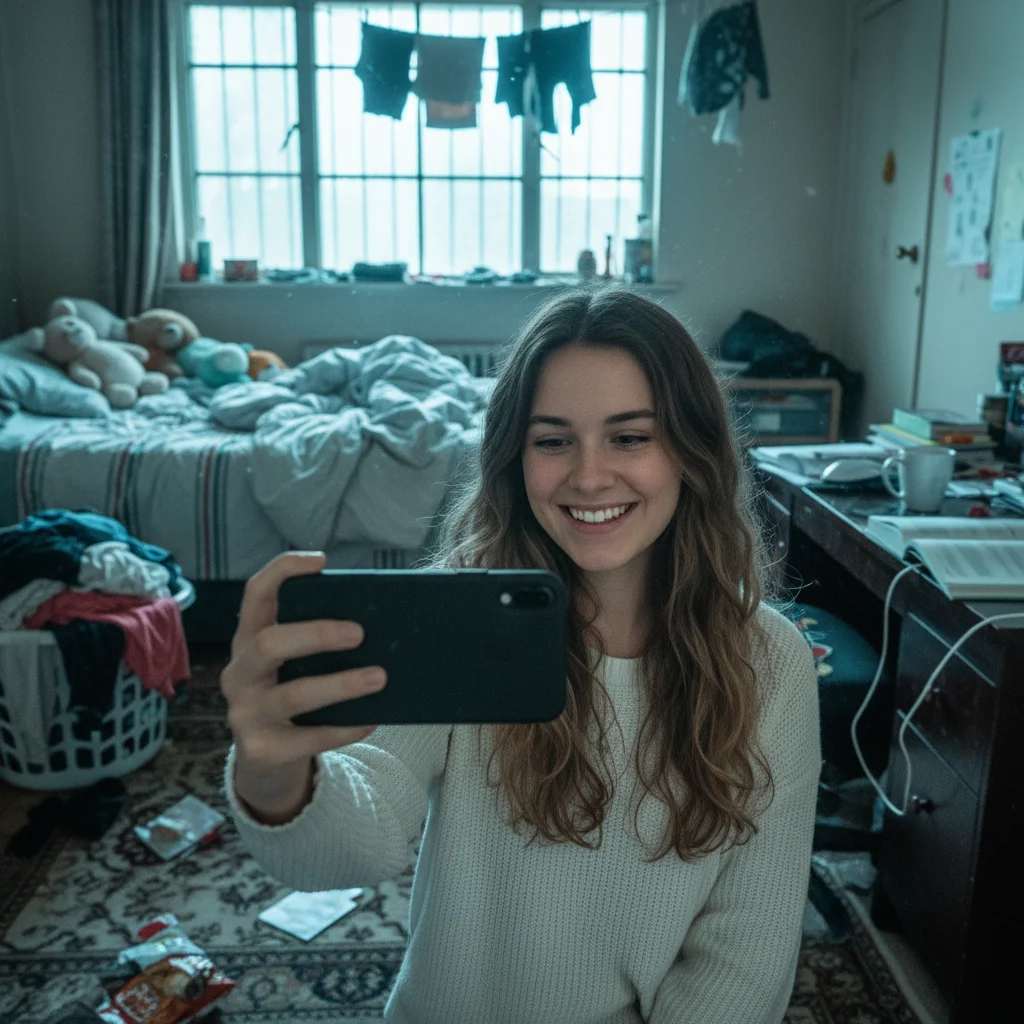
Woman taking selfie with messy bedroom visible behind her
Before
->
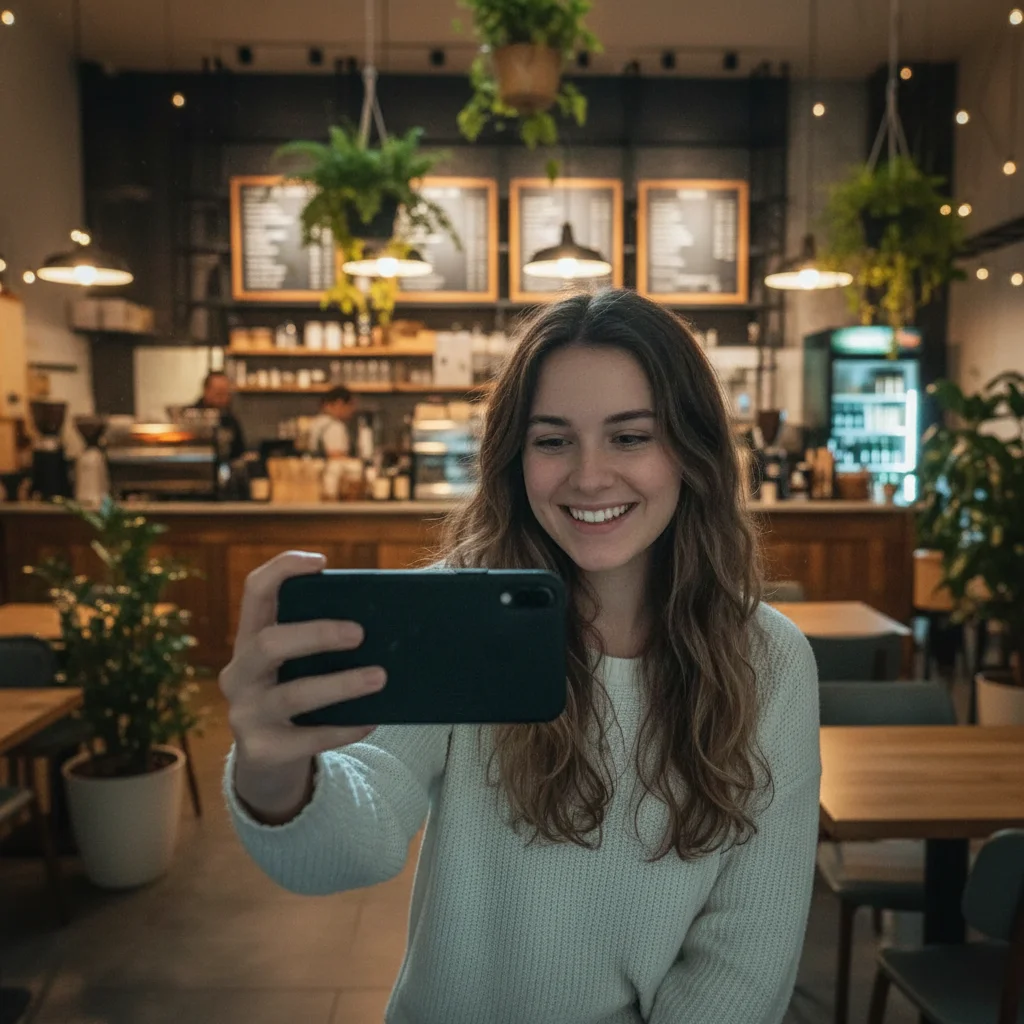
Same woman with clean simple background and warm flattering light
After

Messy room selfie to clean portrait

A selfie with a cluttered bedroom background cleaned up for a dating profile with a simple appealing backdrop.

Prompt: clean up the background to look simple and appealing, brighten my face with natural warm light
Advertisement

If something looks off

AI changed the wrong area or something I didn't want changed

Why: The AI couldn't determine exactly which area you meant from description alone. This happens when multiple things could be 'fixed' in the photo.

Try: Tap a marker on the specific area you want to change, then regenerate with the same prompt

Tip: Markers tell the AI 'I mean THIS area specifically.' Use them when description alone is ambiguous.

I don't look like myself after the enhancement

Why: The AI applied too much enhancement, altering your facial features or skin beyond what's natural.

Try: enhance only the lighting and colors in this photo, do not alter my facial features or skin texture at all, keep me looking exactly like myself

Tip: 'Do not alter my facial features' is the key phrase. The goal is better lighting, not a different face.

Photo looks obviously filtered or over-edited

Why: Strong style requests can make photos look artificial, which undermines trust on dating apps.

Try: apply very subtle natural enhancement only - slight lighting improvement and gentle color warmth, nothing that looks filtered

Tip: 'Very subtle' and 'nothing that looks filtered' keeps edits undetectable. Less is more for dating photos.

Background replacement looks fake

Why: The AI placed you in a setting where the lighting doesn't match, making it look composited.

Try: Instead of replacing, simply clean up and blur the existing background slightly, keep the original scene's lighting

Tip: Blurring or simplifying the real background usually looks more authentic than a full replacement.

Skin tones look unnatural or too orange

Why: Over-warming can push skin tones into unnatural territory, especially with multiple enhancement steps.

Try: improve the lighting with neutral warm tones, keep skin color realistic and not orange, balance the color temperature

Tip: 'Realistic skin color' and 'balanced color temperature' prevent the common over-warming problem.

Quick answers

Do I need to mark areas of my photo before describing what to fix?

No! Just describe what you want: 'improve the lighting and clean up the background' or 'make me look naturally attractive.' The AI understands these concepts automatically. Only use markers if you need to target something specific—like removing one distracting object from the background.

How do I edit dating app photos without them looking fake?

Upload your photo and use subtle prompts like 'improve the lighting naturally' and 'keep me looking authentic.' Avoid drastic changes to your face or skin. Focus on lighting, background, and color fixes. The best dating photos are enhanced versions of reality. EditThisPic works in your browser for free, no account needed.

Is there a free dating photo editor that doesn't require signup?

Yes, EditThisPic is free to try with no account needed. Upload your dating app photo, describe the improvement you want, and download the result. No watermarks on outputs. Works for Tinder, Hinge, Bumble, and any dating platform.

What's the best way to improve photos for dating apps?

Focus on three things: better lighting on your face, a cleaner background, and natural color enhancement. EditThisPic handles all three with one prompt. Describe what to fix and the AI does it while keeping you looking authentic. The key is subtle improvement, not transformation.

Ready to improve your dating photos?

Free to try. No signup required.

Try it free