Pricing Edit Heavy equipment listing photo · Free

Heavy Equipment Listing Photo Editor

← Browse all ecommerce tools

Last updated

Upload one photo of the machine and say what to clean up — the mud, the yard clutter and the flat grey sky.
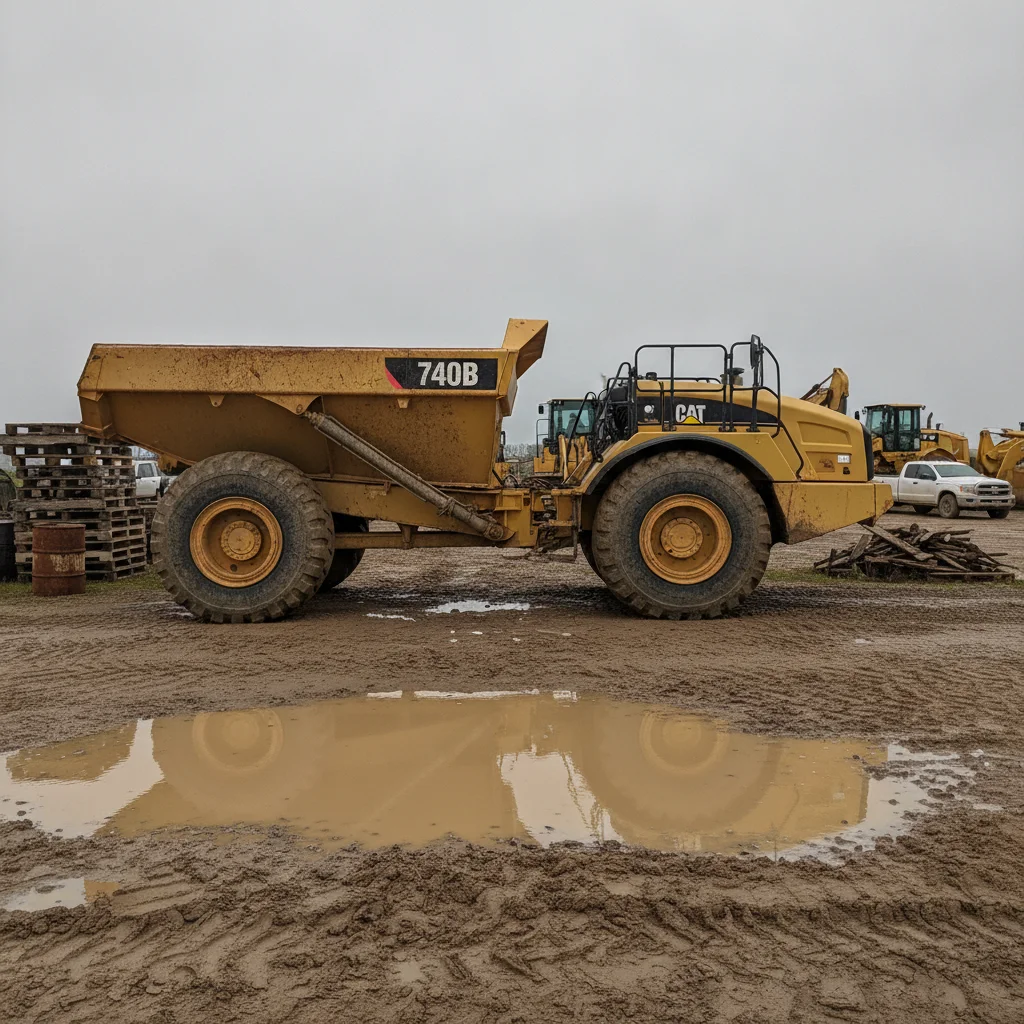
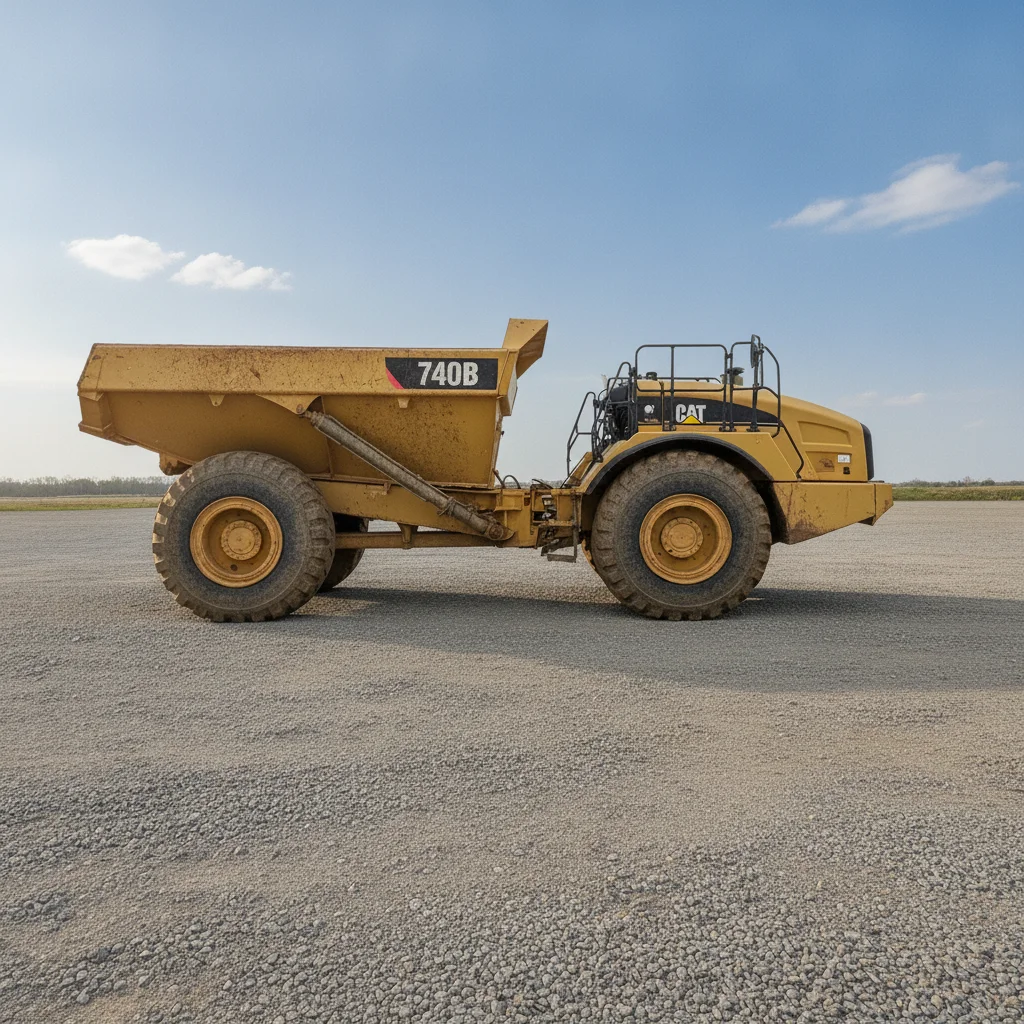
Used articulated dump truck on a deeply rutted muddy lot under a flat grey sky, with pallets, an oil drum, scrap timber, a white pickup and other machines behind it The same dump truck on a dry level gravel lot under a blue sky, with the pallets, drum, timber, pickup and background machines no longer in the frame

Upload photo to edit heavy equipment listing photo

"replace the flat grey overcast sky with a bright blue sky with a few soft white clouds, leave everything else in the photo exactly as it is"

Free to try · no sign-up · photos are never shared

Release to upload

<30stypical edit
1 freeedit weekly
Photo on your phone? Scan to open this editor there — free edit works on your phone too.

1 free edit every week·packs from $4.99

How it works

  1. Upload one machine photo

    Drop a single photo into EditThisPic. A wide shot of the machine on the lot works best. Shoot the whole machine in frame with a bit of ground and sky around it — that gives the AI room to rebuild the lot and the sky without touching the machine. JPG, PNG or WebP up to 7MB.

    Expect: About 30 seconds per photo. A busy lot with several people or machines behind the subject may take a second pass.
  2. Say what to clean up

    Type the cleanup in plain words — 'replace the grey sky with clear blue, clean the mud and puddles off the ground, and remove the people and pallets in the background'. Add 'keep the machine exactly as photographed, same paint wear, rust and dirt' so the AI cleans the scene around the machine and leaves the machine's real condition alone.

    Tip: Naming the individual items you want gone — 'the oil drum, the pallets, the person on the left' — works better than a general 'tidy this up'.

    Copy one of these to get started:

    Full lot cleanup Replace the sky with a bright blue late-morning sky with a few soft white clouds. Clean the mud, puddles, ruts and debris off the ground so the machine stands on a clean, dry, level gravel lot. Remove every person, background vehicle, other machine, trash pile and pallet. Keep the exact same camera framing and viewpoint, and keep the machine itself exactly as photographed - same paint wear, scratches, dents, rust, tyre wear and dirt on the machine.
    Grey sky only replace the flat grey overcast sky with a bright blue sky with a few soft white clouds, leave everything else in the photo exactly as it is
    Mud and standing water clean the mud, puddles, ruts and tyre tracks off the ground so the machine stands on clean dry level gravel, keep the mud and dirt on the machine itself
    People out of the shot remove every person from the photo and fill the space behind them with the same lot surface, keep the machine and its framing unchanged
    3 more prompts
    Clear the yard behind the machine remove the other machines, parked vehicles, pallets, drums and trash piles behind the subject so there is a plain open lot behind it, keep the machine and the camera angle exactly the same
    Late-afternoon shot with heavy shadows replace the hazy late-afternoon sky with a bright late-morning blue sky and even out the long shadows on the ground, keep the machine's own colour, paint wear and dirt exactly as photographed
    Snow or wet-season lot replace the grey winter sky with clear blue and clean the slush, snow melt and wet patches off the ground so the machine stands on dry gravel, leave the machine as it is
  3. Check the machine before you post it

    Compare the result against the original with the before/after slider. Look specifically at the decals and any lettering on the bodywork — small text can be redrawn. Check that the wear, rust and dents you are selling the machine with are all still there, then download it.

See it in action

Used articulated dump truck on a deeply rutted muddy lot under a flat grey sky, with pallets, an oil drum, scrap timber, a white pickup and other machines behind it
Before
->
The same dump truck on a dry level gravel lot under a blue sky, with the pallets, drum, timber, pickup and background machines no longer in the frame
After

Articulated dump truck on a churned wet lot

A pallet stack, an oil drum, scrap timber, a parked pickup and a row of background machines cleared, with the grey sky and the standing water gone.

Prompt: Replace the sky with a bright blue late-morning sky with a few soft white clouds. Clean the mud, puddles, ruts and debris off the ground so the machine stands on a clean, dry, level gravel lot. Remove every person, background vehicle, other machine, trash pile and pallet. Keep the exact same camera framing and viewpoint, and keep the machine itself exactly as photographed - same paint wear, scratches, dents, rust, tyre wear and dirt on the machine.
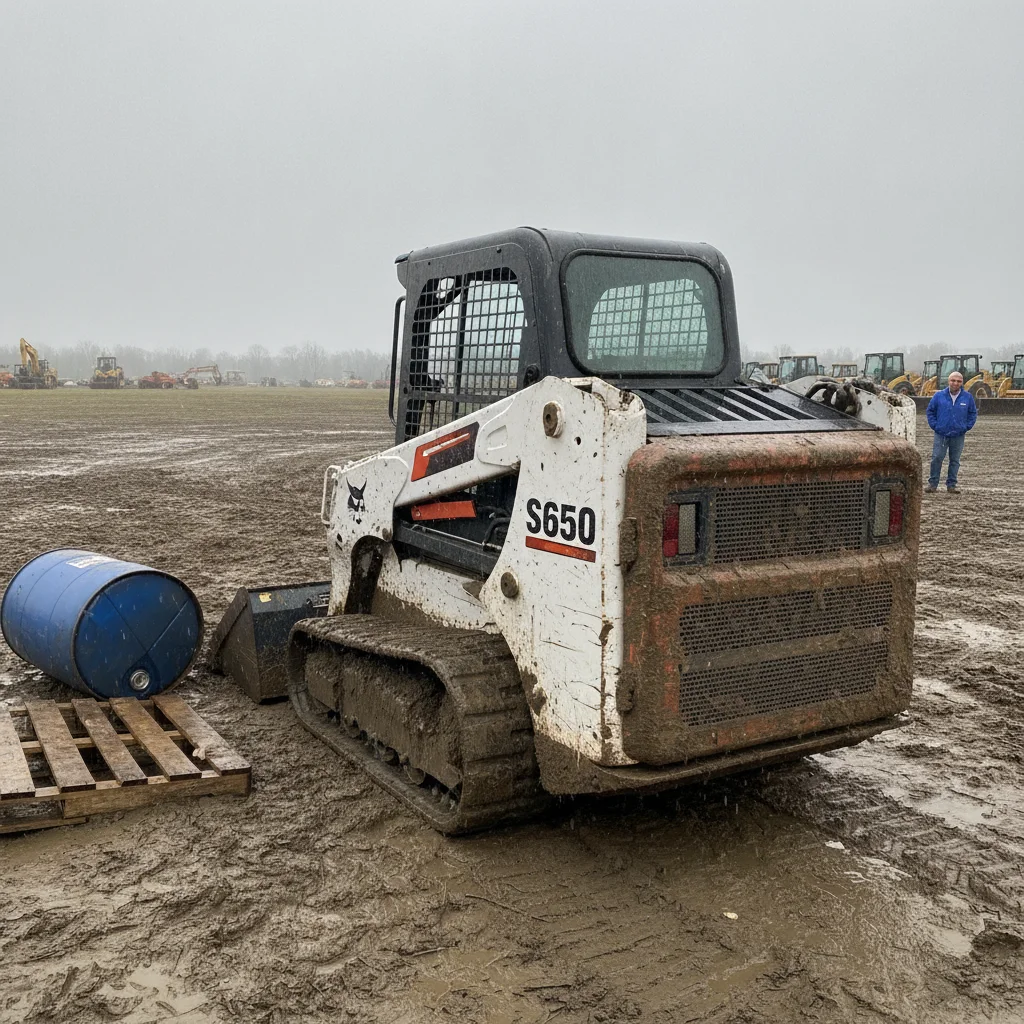
Mud-caked compact track loader on a wet churned lot with an oil drum, wooden pallets, a bystander and a row of other machines behind it
Before
->
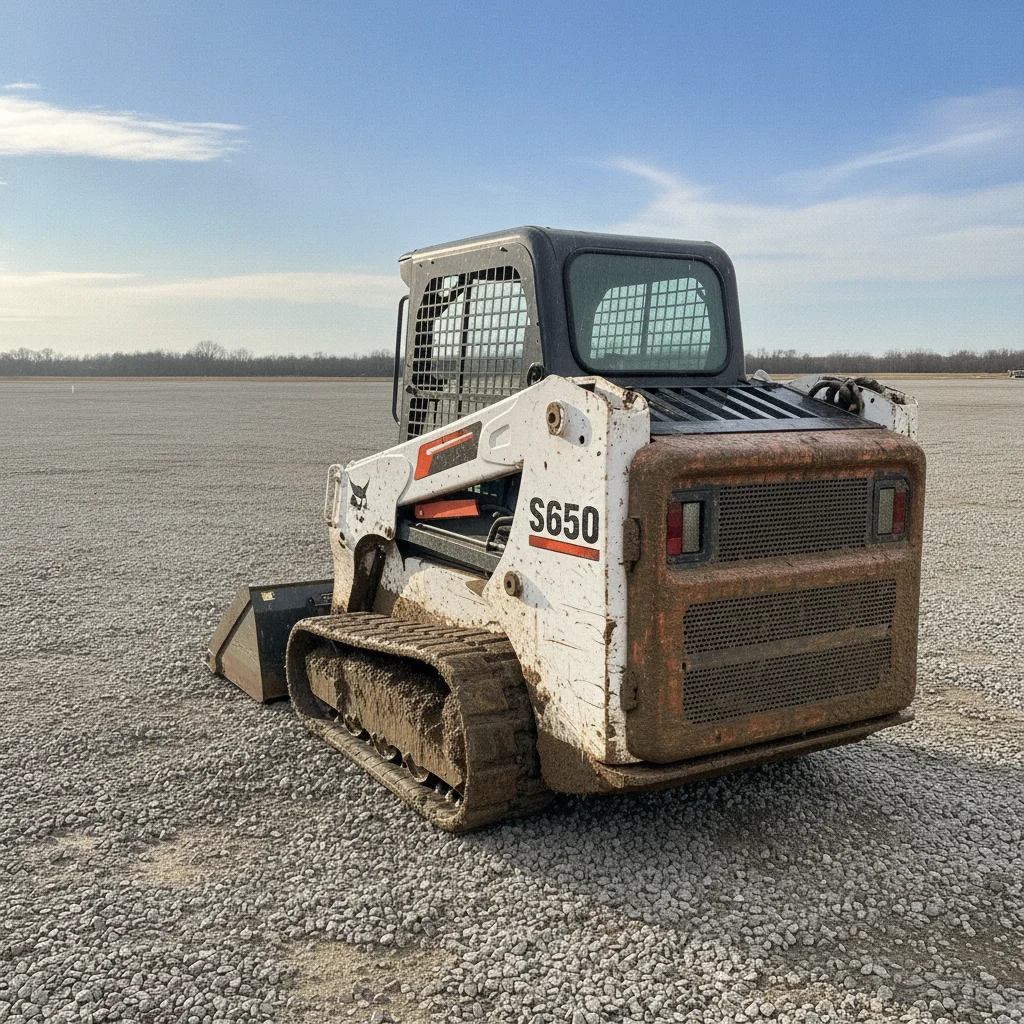
The same loader on a dry gravel lot under a blue sky, with the drum, pallets, bystander and background machine row no longer in the frame
After

Muddy skid steer with a full auction row behind it

Deep mud, a blue oil drum, a pallet stack, a bystander and an entire row of background machines taken out, leaving the machine on a dry lot.

Prompt: Replace the sky with a bright blue late-morning sky with a few soft white clouds. Clean the mud, puddles, ruts and debris off the ground so the machine stands on a clean, dry, level gravel lot. Remove every person, background vehicle, other machine, trash pile and pallet. Keep the exact same camera framing and viewpoint, and keep the machine itself exactly as photographed - same paint wear, scratches, dents, rust, tyre wear and dirt on the machine.

Quick answers

What does it actually change in the photo?

The scene around the machine. It replaces the sky, cleans mud, puddles, ruts and litter off the ground, and removes people, parked vehicles, other machines, pallets and trash from the background. The machine is not what it is there to work on — so put 'keep the machine exactly as photographed' in your instruction, and then check the result against your original before the photo goes anywhere near a listing.

Does it clean the machine up too?

It can, and for a listing that is the thing to guard against. Say 'keep the mud and dirt on the machine' in your instruction so the cleanup is aimed at the ground rather than the machine, then look at the result — a machine that photographs cleaner than it turns up creates an argument at inspection, so this is worth thirty seconds of your own eyes every time.

Can it make all 20 photos of one machine match?

No, and it is worth being straight about it. Each edit reads the light from the photo you upload, so two shots of the same machine edited separately come back with their own lighting rather than a matched set. Use it photo by photo on the frames that need it — the shot with the flat grey sky, the one with mud everywhere, the one with a guy walking through the background.

Can it clean up a photo of the serial plate or data plate?

Don't run one through it. AI editors rewrite small text — a stamped plate or a spec decal can come back with different characters, and on a machine listing that is the one thing a buyer will check against the paperwork. Shoot your plate and serial close-ups as their own photos, upload those to the listing untouched, and only use this tool on the wide shots of the machine.

Will it work on photos from an auction row where machines are packed together?

Usually, and that is one of the better uses for it — a row of other machines directly behind the one you are selling is what makes an auction photo look like an auction photo. If a neighbouring machine physically overlaps the one you are selling, expect to re-shoot instead: the AI has to invent the part it cannot see.

Do I need an account to try it?

No. Upload a photo, describe the cleanup and you get a result to look at without signing up. Downloads at full quality come from credits, and there is a free edit each week.

Can I do this from a phone in the yard?

Yes. It runs in a mobile browser on iPhone and Android with no app to install, so you can shoot a machine, clean the frame and post the listing without going back to the office.

Is it honest to edit a listing photo like this?

Cleaning the lot and the sky changes the setting, not the asset — which is the same thing a dealer does by pressure-washing the yard before a photographer arrives. What is not defensible is editing the machine's condition. Keep the wear, the rust and the hours honest, keep plate and serial shots unedited, and note that photos were digitally tidied if your marketplace asks for it.

How much does EditThisPic cost?

You get 1 free edit per week — no account needed. After that, one-time credit packs start at $4.99 for 10 edits, valid 12 months, no subscription. Power users who edit daily can pick Studio Membership, a monthly workspace at $49.99/mo for 300 edits. Purchased downloads are clean with no watermark.

Ready to clean up a listing photo?

Free to try. No signup required.

1 free edit included·Credit packs from $4.99