Pricing Change Sky in equipment photos · Free

Replace the Sky in Equipment Photos

← Browse all replace tools

Last updated

Grey, blown-out or hazy — swap the sky on a machine photo without re-shooting the lot on a better day.
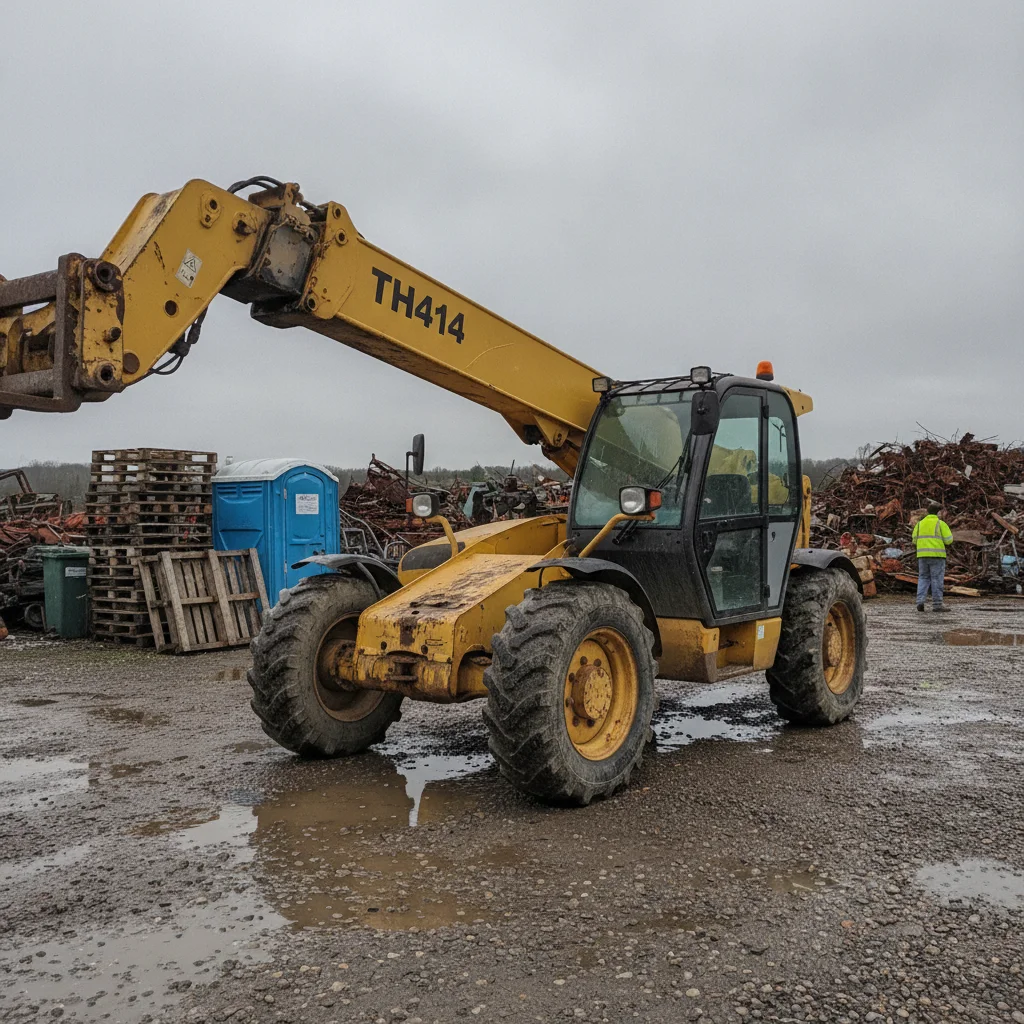
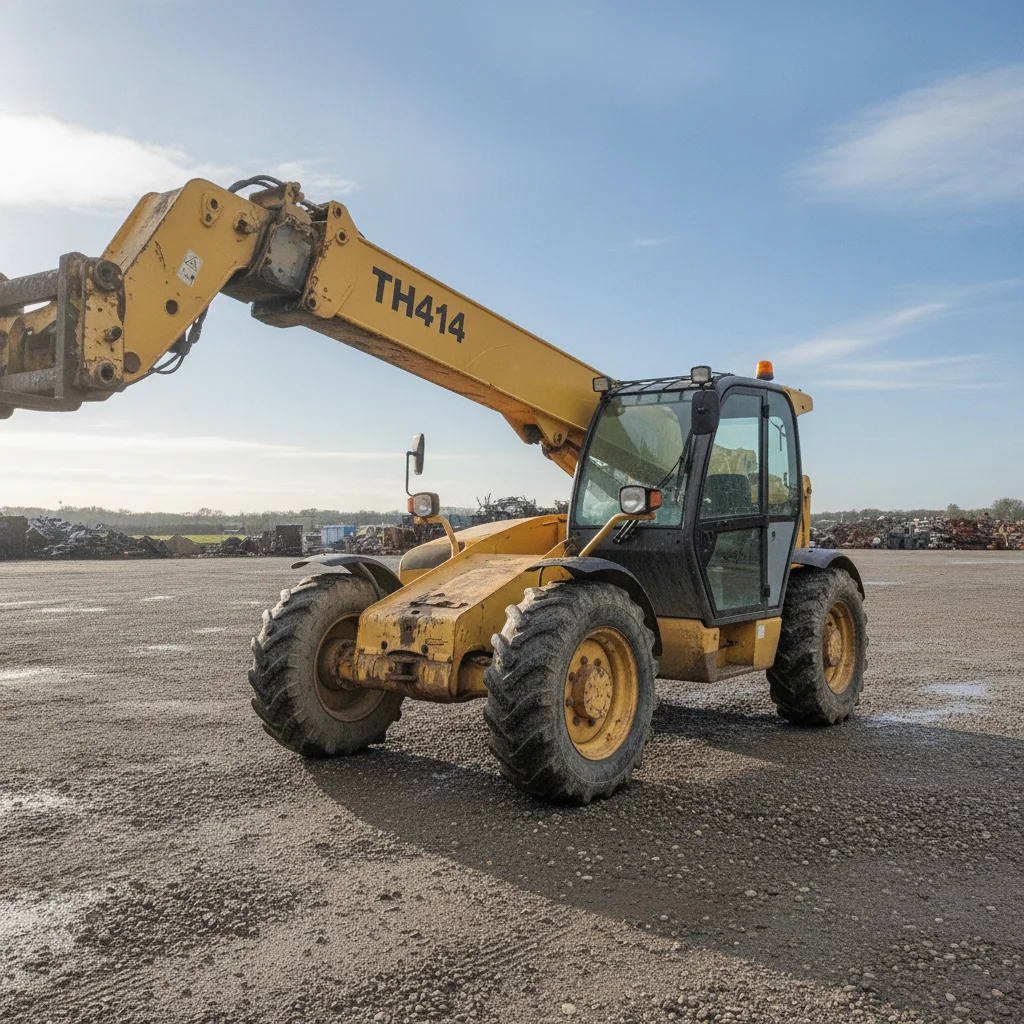
Yellow telescopic handler with the boom raised on a wet gravel lot under a flat grey overcast sky, with a blue portable toilet, stacked pallets and a worker in a hi-vis vest behind it The same telehandler on the gravel lot under a clear blue sky, with the portable toilet, pallets and worker no longer in the frame

Upload photo to replace sky in equipment photos

"replace the flat grey overcast sky with a bright blue sky with a few soft white clouds, leave everything else in the photo exactly as it is"

Free to try · no sign-up · photos are never shared

Release to upload

<30stypical edit
1 freeedit weekly
Photo on your phone? Scan to open this editor there — free edit works on your phone too.

1 free edit every week·packs from $4.99

How it works

  1. Upload one machine photo

    Drop a single photo into EditThisPic. Any shot with visible sky above the machine works. Shoot the whole machine in frame with a bit of ground and sky around it — that gives the AI room to rebuild the lot and the sky without touching the machine. JPG, PNG or WebP up to 7MB.

    Expect: About 30 seconds per photo. A busy lot with several people or machines behind the subject may take a second pass.
  2. Say what to clean up

    Type the cleanup in plain words — 'replace the grey sky with clear blue, clean the mud and puddles off the ground, and remove the people and pallets in the background'. Add 'keep the machine exactly as photographed, same paint wear, rust and dirt' so the AI cleans the scene around the machine and leaves the machine's real condition alone.

    Tip: Naming the individual items you want gone — 'the oil drum, the pallets, the person on the left' — works better than a general 'tidy this up'.

    Copy one of these to get started:

    Full lot cleanup Replace the sky with a bright blue late-morning sky with a few soft white clouds. Clean the mud, puddles, ruts and debris off the ground so the machine stands on a clean, dry, level gravel lot. Remove every person, background vehicle, other machine, trash pile and pallet. Keep the exact same camera framing and viewpoint, and keep the machine itself exactly as photographed - same paint wear, scratches, dents, rust, tyre wear and dirt on the machine.
    Grey sky only replace the flat grey overcast sky with a bright blue sky with a few soft white clouds, leave everything else in the photo exactly as it is
    Mud and standing water clean the mud, puddles, ruts and tyre tracks off the ground so the machine stands on clean dry level gravel, keep the mud and dirt on the machine itself
    People out of the shot remove every person from the photo and fill the space behind them with the same lot surface, keep the machine and its framing unchanged
    3 more prompts
    Clear the yard behind the machine remove the other machines, parked vehicles, pallets, drums and trash piles behind the subject so there is a plain open lot behind it, keep the machine and the camera angle exactly the same
    Late-afternoon shot with heavy shadows replace the hazy late-afternoon sky with a bright late-morning blue sky and even out the long shadows on the ground, keep the machine's own colour, paint wear and dirt exactly as photographed
    Snow or wet-season lot replace the grey winter sky with clear blue and clean the slush, snow melt and wet patches off the ground so the machine stands on dry gravel, leave the machine as it is
  3. Check the machine before you post it

    Compare the result against the original with the before/after slider. Look specifically at the decals and any lettering on the bodywork — small text can be redrawn. Check that the wear, rust and dents you are selling the machine with are all still there, then download it.

See it in action

Yellow telescopic handler with the boom raised on a wet gravel lot under a flat grey overcast sky, with a blue portable toilet, stacked pallets and a worker in a hi-vis vest behind it
Before
->
The same telehandler on the gravel lot under a clear blue sky, with the portable toilet, pallets and worker no longer in the frame
After

Telehandler under a flat grey sky

An overcast sky swapped for clear blue on a wet dealer lot, with the portable toilet, the pallet stack and a passing worker taken out of frame.

Prompt: Replace the sky with a bright blue late-morning sky with a few soft white clouds. Clean the mud, puddles, ruts and debris off the ground so the machine stands on a clean, dry, level gravel lot. Remove every person, background vehicle, other machine, trash pile and pallet. Keep the exact same camera framing and viewpoint, and keep the machine itself exactly as photographed - same paint wear, scratches, dents, rust, tyre wear and dirt on the machine.
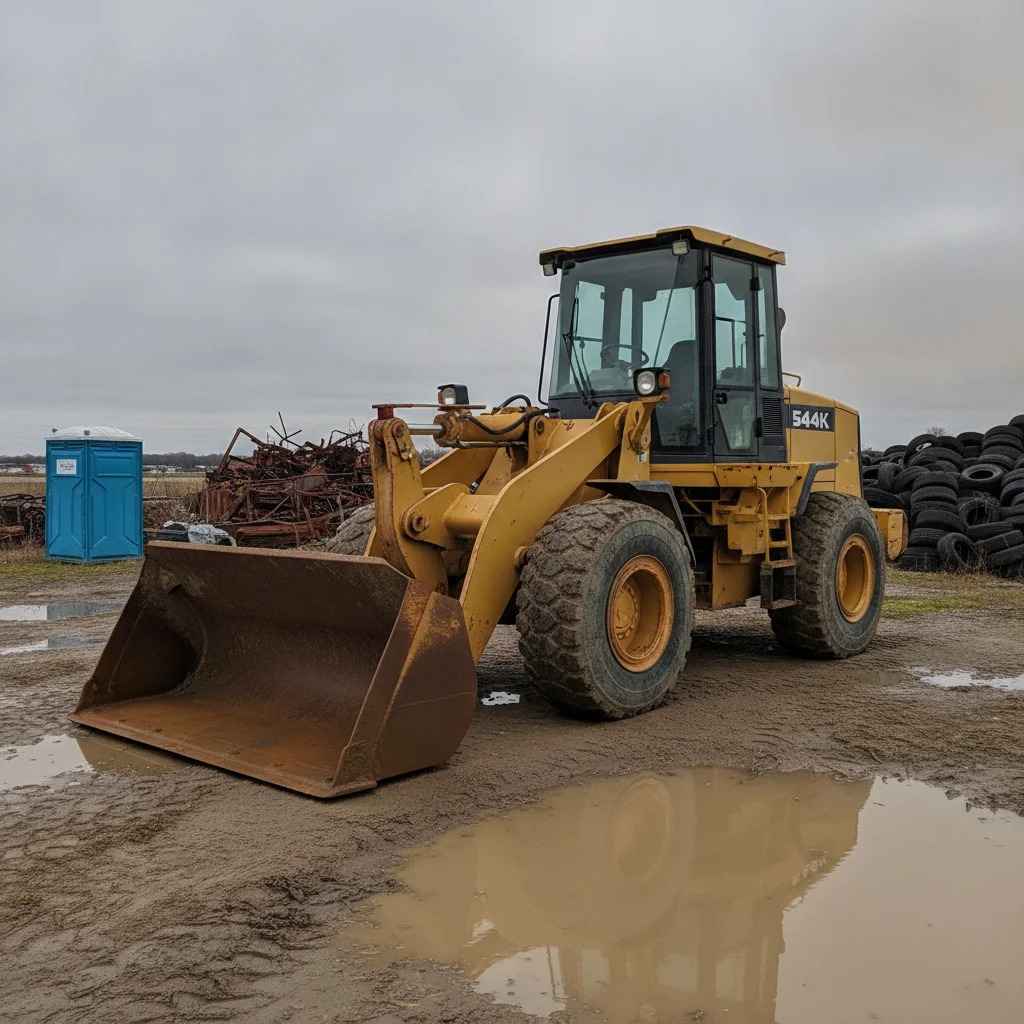
Yellow wheel loader on a muddy lot under a grey sky with a blue portable toilet, a scrap metal pile and a stack of old tyres behind it
Before
->
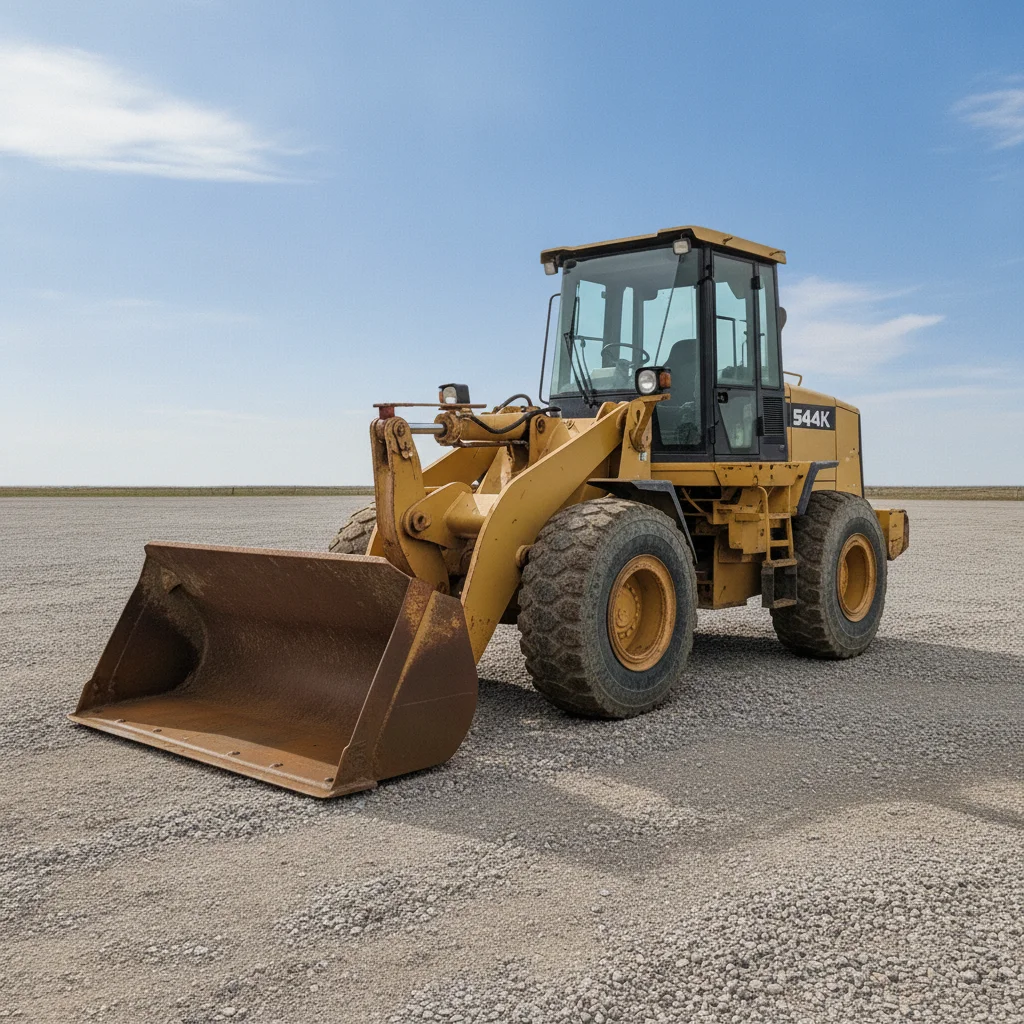
The same wheel loader on dry gravel under a blue sky, with the portable toilet, scrap pile and tyre stack no longer in the frame
After

Wheel loader parked in front of the scrap pile

A portable toilet, a scrap-metal heap and a stack of old tyres cleared from behind the machine, with the overcast sky and muddy puddles replaced.

Prompt: Replace the sky with a bright blue late-morning sky with a few soft white clouds. Clean the mud, puddles, ruts and debris off the ground so the machine stands on a clean, dry, level gravel lot. Remove every person, background vehicle, other machine, trash pile and pallet. Keep the exact same camera framing and viewpoint, and keep the machine itself exactly as photographed - same paint wear, scratches, dents, rust, tyre wear and dirt on the machine.

Quick answers

What does a sky replacement change besides the sky?

The light, and that is the part to watch. Putting a bright sky behind a machine shot under cloud changes the brightness and colour of the whole frame, which is usually what you want — a machine under a grey sky looks flat. But because the relight reaches the machine too, add 'keep the machine exactly as photographed' and compare the two frames yourself before you use the result.

Can I put the same sky on every photo in the listing?

You can replace the sky in each photo, but they will not come out identical. The AI builds the new sky and its lighting from the frame in front of it, so ten photos edited separately get ten slightly different skies. For a listing that is usually fine, but it is not the tool to reach for when the whole set has to match.

Will the shadows match the new sky?

Not automatically. If you drop a bright sunny sky onto a photo taken under flat cloud, there are no hard shadows on the ground to match it and it can read as odd. Asking for 'a soft blue sky lit from the same direction as the existing shadows' gives a more believable result than asking for brilliant sunshine.

Does swapping the sky change anything on the machine itself?

The body of the machine comes back as photographed — paint wear, rust, dents and dirt all stay. The exception worth knowing is small lettering: decals, spec plates and serial stamps can be redrawn with different characters. On a wide shot that is cosmetic, but never run this on a close-up of a plate or an hour meter. Shoot those separately and post them as-is.

The ground went white after the sky change — why?

Brightening the frame to match a sunnier sky pushes a pale gravel or concrete lot past the point where it holds detail. Ask for a soft sky and say to keep the ground at its original brightness, and the lot texture survives.

Can I use it on photos taken in rain or snow?

Yes for the sky, and it will usually dry the ground too if you ask. What it will not do is remove snow or water from the machine convincingly — that is on the machine rather than around it, and it is also condition information a buyer is entitled to.

Is this honest for a sale listing?

Changing the weather changes the setting, not the machine, which is the same thing a dealer does by waiting for a sunny day. The line to hold is the machine itself: keep the wear, keep the hours, keep plate and serial photos unedited, and disclose digital editing if the marketplace asks.

Is it free?

One free edit a week and no account needed to try it. Full-quality downloads use credits, sold in packs without a subscription.

How much does EditThisPic cost?

You get 1 free edit per week — no account needed. After that, one-time credit packs start at $4.99 for 10 edits, valid 12 months, no subscription. Power users who edit daily can pick Studio Membership, a monthly workspace at $49.99/mo for 300 edits. Purchased downloads are clean with no watermark.

Ready to clean up a listing photo?

Free to try. No signup required.

1 free edit included·Credit packs from $4.99