Pricing Remove Tattoo for job interview · Free

Remove Tattoo for Job Interview

← Browse all remove tools

Last updated

Upload your headshot or interview photo and describe which tattoo to remove. AI reconstructs natural-looking skin in 20-30 seconds — no Photoshop skills required. Works on arm, neck, hand, and collarbone tattoos visible in professional photos.

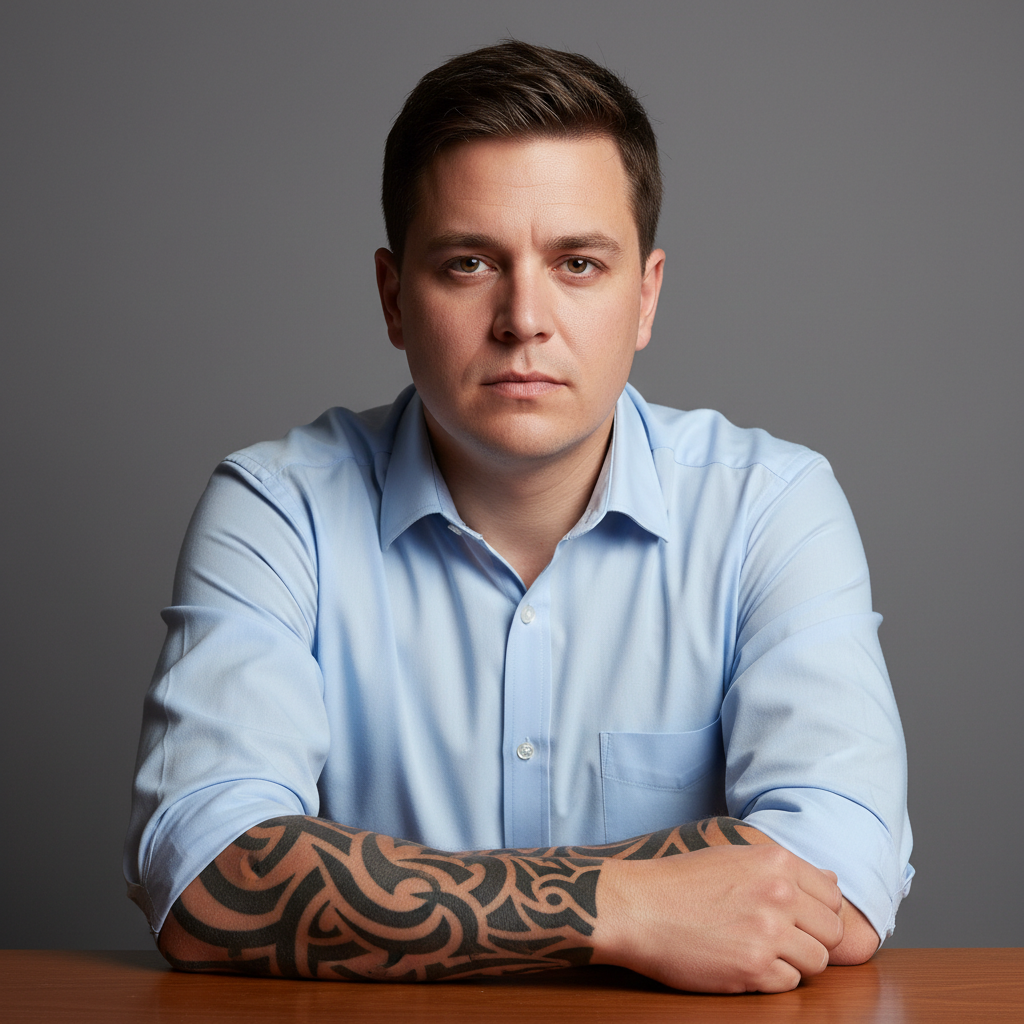
Professional headshot with visible tribal tattoo on forearm Same headshot with forearm tattoo digitally removed, natural clean skin

Upload photo to remove tattoo for job interview

"remove the neck tattoo while preserving the natural neck contour, shadows, and skin tone of the surrounding area"

Free to try · no sign-up · photos are never shared

Release to upload

<30stypical edit
1 freeedit weekly
Photo on your phone? Scan to open this editor there — free edit works on your phone too.

1 free edit every week·packs from $4.99

How it works

  1. Upload your interview headshot

    Upload the photo you plan to use for your job application, LinkedIn profile, or interview portfolio. The tattoo should be clearly visible in the photo. JPG, PNG, WebP up to 7MB.

    Expect: Small visible tattoos (forearm, wrist, hand): 20-25 seconds. Larger tattoos or multiple visible tattoos: 25-40 seconds.
  2. Describe which tattoo to remove

    Type: 'remove the tattoo from the forearm and show clean skin matching the surrounding area' or 'hide the neck tattoo and reconstruct natural skin texture.' Be specific about the body part — the AI handles multiple tattoos better when you name each location separately.

    Tip: Include skin texture guidance: 'preserve natural pores and skin tone' prevents the AI from creating an unnatural airbrushed result.

    Copy one of these to get started:

    Forearm tattoo in rolled-sleeve photo remove the tattoo from the forearm and show natural skin texture with appropriate tone, preserve any natural skin details like pores and fine hair
    Neck tattoo in headshot remove the neck tattoo while preserving the natural neck contour, shadows, and skin tone of the surrounding area
    Hand tattoo in handshake or gesture photo remove the hand tattoo and reconstruct natural skin with appropriate wrinkles, knuckle detail, and skin texture
    Wrist tattoo visible in professional photo hide the wrist tattoo and show clean natural skin matching the surrounding arm tone
    2 more prompts
    Multiple visible tattoos in full-length shot remove all visible tattoos from the arms and show clean natural skin throughout, maintain natural skin tone consistency
    Collarbone tattoo visible in business attire remove the collarbone tattoo and reconstruct smooth skin that blends naturally with the chest and neck area
  3. Review the natural skin result

    Zoom to 100% and verify the skin looks natural — realistic pores, correct skin tone, natural shadows. The reconstructed skin should be indistinguishable from the surrounding untouched area. If it looks airbrushed, regenerate with 'preserve natural skin texture.'

See it in action

Professional headshot with visible tribal tattoo on forearm
Before
->
Same headshot with forearm tattoo digitally removed, natural clean skin
After

Forearm tattoo removed from professional headshot

A tribal forearm tattoo digitally removed from a business portrait to preview what the professional photo looks like without the ink.

Prompt: remove the tattoo from the forearm and show natural skin texture with appropriate tone, preserve natural pores and skin details

Quick answers

Will a visible tattoo actually affect my job interview outcome?

It depends entirely on the industry, company culture, and interviewer. In conservative industries (finance, law, healthcare, government), visible tattoos — particularly on hands, neck, and face — can influence first impressions. In creative industries (marketing, design, media, tech), tattoos are generally accepted. This tool lets you see what your interview photo looks like without the tattoo so you can make an informed choice about whether to cover it in real life.

How do I remove a tattoo from a job interview photo for free?

Upload your interview headshot to EditThisPic, type 'remove the tattoo from the [body part] and show clean natural skin,' and the AI reconstructs realistic skin in 20-30 seconds. Free, no account required, no watermark on the result.

Will the removed tattoo area still look realistic in close-up?

Yes — the AI reconstructs skin texture, pores, and tone variation based on surrounding visible skin. Add 'preserve natural skin texture and pores' to your prompt for the most photo-realistic result. At 100% zoom, a well-prompted removal blends seamlessly.

Which tattoos cause the most concern in job interviews?

Hand, neck, and face tattoos are most frequently flagged in conservative hiring contexts because they're visible regardless of professional attire. Forearm tattoos are visible in rolled-sleeve photos but covered in long sleeves. Wrist tattoos fall in between. This tool shows exactly what each tattoo looks like removed so you can decide on a real-world coverage strategy.

Should I use the edited photo in my actual job application?

This tool is designed to help you see what you'd look like without the tattoo — useful for making coverage decisions (sleeve length, concealer, wardrobe choices) and for personal confidence. For the application itself, use a genuine professional photo. Use this preview to plan your in-person appearance, not as the submitted headshot.

Can I remove multiple tattoos from one interview photo?

Yes. Type 'remove all visible tattoos from the arms and neck and show natural clean skin throughout.' The AI handles multiple tattoos in one pass. For complex or overlapping situations, running two separate edits — one for each tattoo — gives more precise control.

Is EditThisPic's tattoo removal tool free?

Yes — you get 1 free edit per week with no account needed. Credit packs start at $4.99 for 10 edits.

What photo formats does it support?

JPG, PNG, WebP, and HEIC. Upload any standard photo format from your phone or camera.

What if the tattoo is only partially visible in the photo?

Partially visible tattoos — an arm tattoo that's half-hidden by a sleeve, or a neck tattoo partially behind a collar — work well with EditThisPic. Describe the visible portion: 'remove the visible portion of the forearm tattoo near the rolled sleeve.' The AI targets only the visible area.

How much does EditThisPic cost?

You get 1 free edit per week — no account needed. After that, one-time credit packs start at $4.99 for 10 edits, valid 12 months, no subscription. Power users who edit daily can pick Studio Membership, a monthly workspace at $49.99/mo for 300 edits. Purchased downloads are clean with no watermark.

Ready to see your professional headshot without the tattoo?

Free to try. No signup required.

1 free edit included·Credit packs from $4.99