Pricing Restore Old slide photo · Free

Restore an Old Slide Photo

← Browse all restore tools

Last updated

Clean up a scanned 35mm slide or a phone photo of one on a light box — dust, colour shift, dark exposure, mount edge — without changing who is in it.
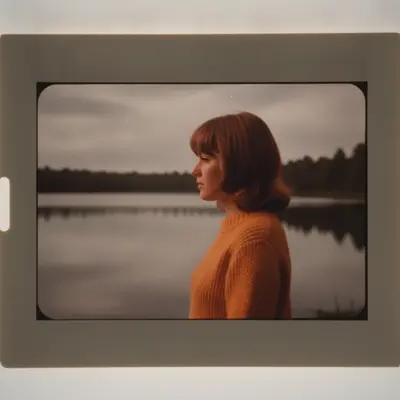
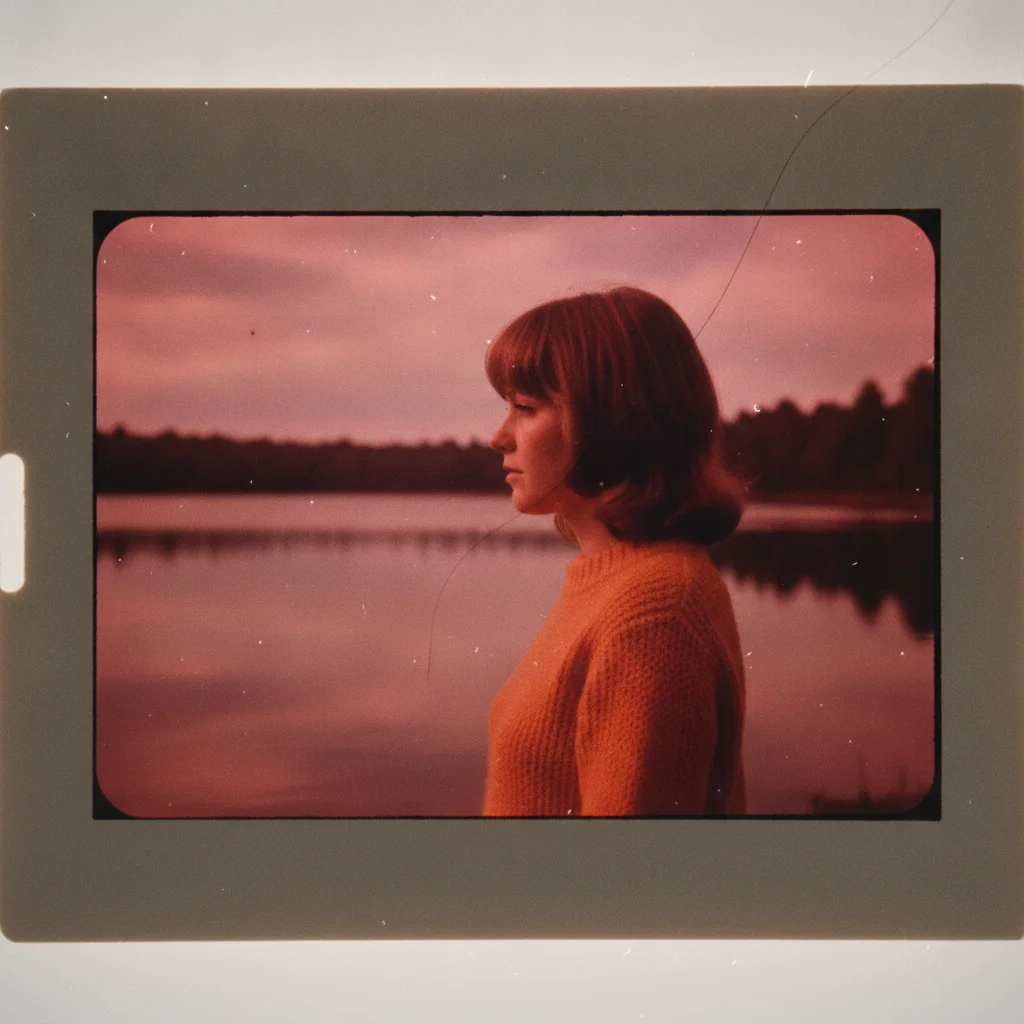
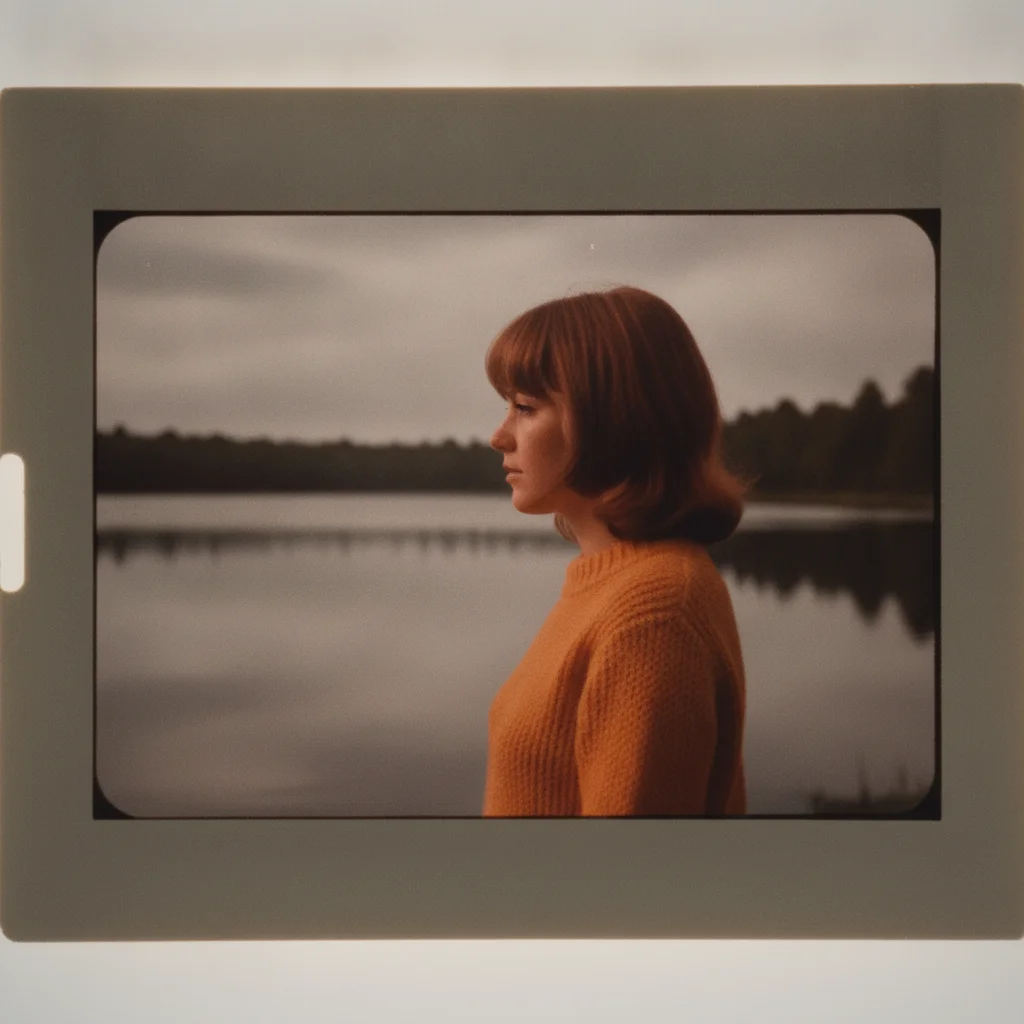
1970s slide scan of a woman in an orange sweater by a lake, red-shifted, dark, and dusty The same slide cleaned of dust, colour-corrected to natural tones, and brightened, the scene unchanged

Upload photo to restore old slide photo

"correct the strong red colour shift in this old slide scan so skin looks natural and whites are clean, keeping everything else unchanged"

Free to try · no sign-up · photos are never shared

Release to upload

<30stypical edit
1 freeedit weekly
Photo on your phone? Scan to open this editor there — free edit works on your phone too.

1 free edit every week·paid packs after

How it works

  1. Scan the slide, or photograph it on a light box

    A flatbed or dedicated slide scanner gives the most detail. No scanner? Lay the slide on a phone screen showing a plain white image, or a light box, and photograph it straight on with the room lights off — JPG, PNG, or WebP up to 7MB. Crop loosely; the mount edge can stay for now.

    Expect: Dust, a colour shift, and moderate underexposure all recover well because the image is still on the film. A slide that has gone almost entirely red or blue comes back plausible rather than exact — the AI rebuilds the lost colours from what is left. Shadows that scanned as solid black stay black: there is no detail there to bring up.
  2. Describe what is wrong with the scan

    Name each defect you can see: 'restore this old slide — remove the dust specks and hairs, correct the red colour shift so skin and whites are neutral, brighten the dark exposure, and crop out the mount edge. Keep the people and the scene exactly as they are.' Slides usually carry two or three problems at once; naming them is what stops the AI guessing.

    Tip: Big fix, then small fix: colour and exposure first, then a second pass for dust and the mount edge if the first result is busy.

    Copy one of these to get started:

    Full slide restoration restore this old slide scan — remove the dust specks and hairs, correct the colour shift so skin tones and whites are neutral, brighten the dark exposure, and keep the people and the scene exactly as they are
    Red or magenta colour shift correct the strong red colour shift in this old slide scan so skin looks natural and whites are clean, keeping everything else unchanged
    Blue or cyan colour shift correct the blue-cyan colour cast in this old slide scan and restore natural skin tones and a neutral white balance, leaving the scene as it is
    Dark, underexposed slide brighten this underexposed slide scan — open up the dark shadows and bring the faces to a natural brightness without blowing out the sky, keeping the colours and the scene unchanged
    3 more prompts
    Dust and hairs only remove all the dust specks, hairs, and small scratches from this scanned slide and leave the colours, exposure, and everything else exactly as they are
    Crop out the mount crop this photo of a slide to just the picture area, removing the cardboard mount edge and the light-box border, and straighten it so the edges are square
    Phone photo of a slide on a light box this is a phone photo of a 35mm slide on a light box — crop to the picture, remove the glare and the light-box border, correct the colour shift, and restore natural brightness while keeping the scene exactly as photographed
  3. Check the skin, the shadows, and the sky

    Old slide film loved saturated colour, so a correct result looks rich but not neon. Skin should read as skin, whites as white. Look into the shadows: they should have opened up without going grey or grainy. If the sky has gone an odd green, ask for a light second pass on the sky alone.

  4. Use a marker for a stubborn speck or a scratch

    A hair lying across a face, or a scratch in the emulsion, can survive the general cleanup. Tap a marker on it and say 'remove this hair, fill in with the surrounding detail.' Markers are optional and only for the one flaw the description did not reach.

See it in action

1970s slide scan of a woman in an orange sweater by a lake, red-shifted, dark, and dusty
Before
->
The same slide cleaned of dust, colour-corrected to natural tones, and brightened, the scene unchanged
After

Restore an Old Slide Photo — 1970s Lakeside

A 1970s 35mm slide scan with dust, a heavy red shift, and dark shadows, cleaned and corrected.

Prompt: fully remove the heavy red-magenta colour cast so this looks like a correctly exposed colour photo — neutral grey-white sky and water, natural skin tones, the sweater a clean orange — lift the dark underexposed shadows, and remove every dust speck and the hair; keep the woman, the slide frame, and the composition exactly as they are
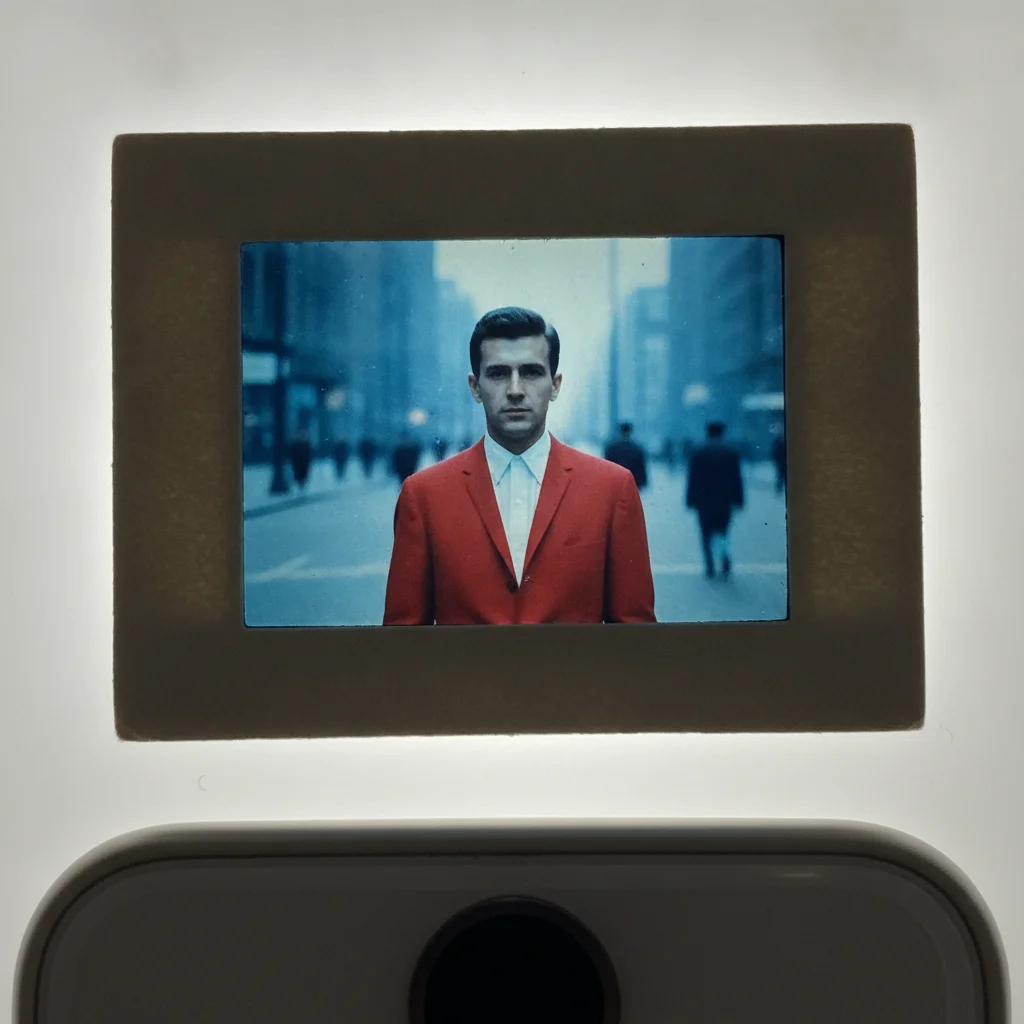
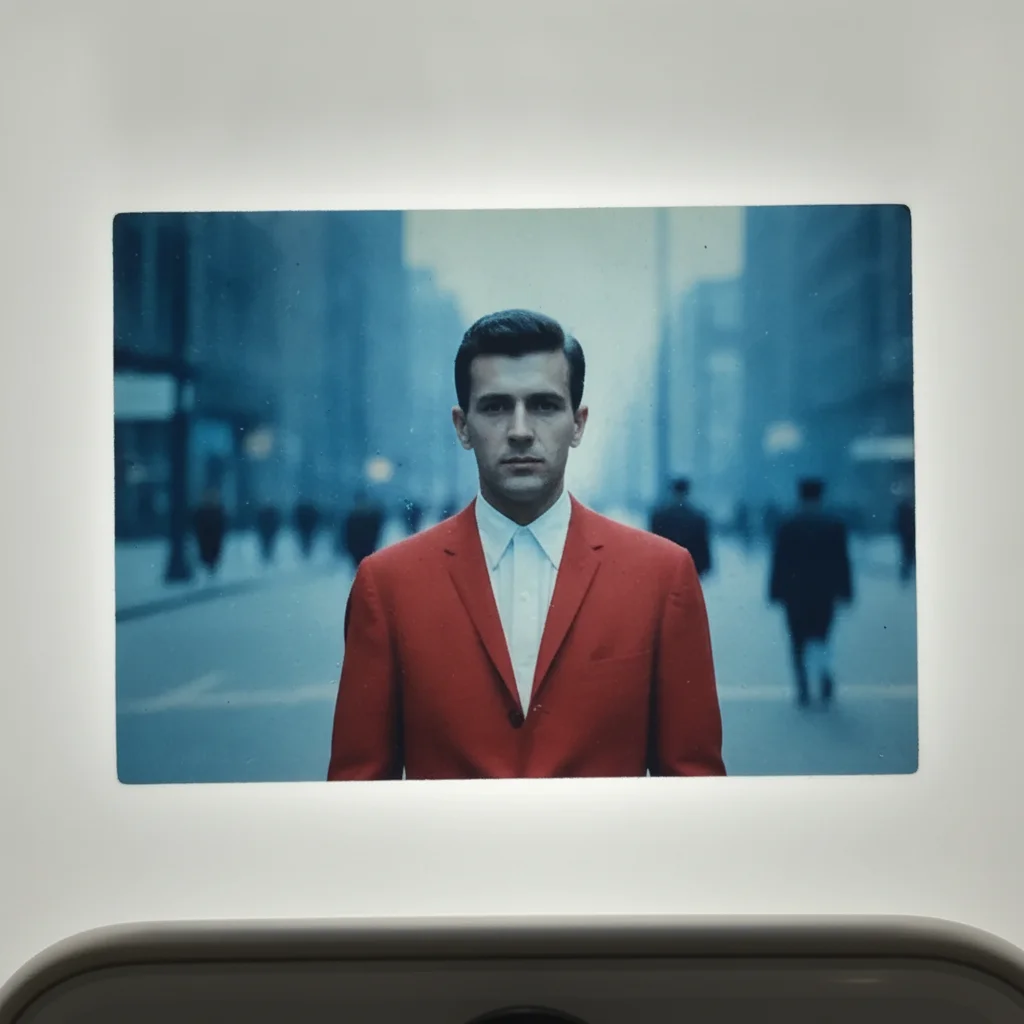
Phone photo of a 1960s slide in its mount on a light box, the picture tinted blue and slightly dark
Before
->
The picture cropped out of the mount, colour-corrected and brightened, the man and the street unchanged
After

Restore an Old Slide Photo — 1960s Slide on a Light Box

A phone photo of a 1960s Kodachrome slide on a light box, cropped out of its mount and colour-corrected.

Prompt: this is a phone photo of a 35mm slide on a light box — crop to the picture area, remove the cardboard mount edge and the glare, correct the blue colour cast so skin and the white shirt read neutral, and restore natural brightness while keeping the man and the street scene exactly as photographed

Quick answers

How do I restore an old slide photo?

Scan the slide, or photograph it on a light box, and upload the image. Then describe what is wrong: 'restore this old slide — remove the dust specks, correct the red colour shift so skin and whites are neutral, brighten the dark exposure, and keep the scene exactly as it is.' The AI repairs the scan without changing the people or the scene. If the first result is busy, do colour and exposure first and dust in a second pass.

Do I need to mark the dust or the mount edge first?

No. Describe the problems in plain language and the AI finds the specks, the cast, and the mount itself. Tap markers are optional and only useful for one stubborn flaw — a hair across a face, a scratch the cleanup missed.

Is restoring an old slide photo free?

Yes. EditThisPic gives you one Fast edit per week, no signup or credit card required. Credit packs and a subscription are available if you have a carousel of slides to get through.

Can I use a phone photo of the slide instead of a scan?

Yes. Lay the slide on a light box or a phone screen showing a blank white image, turn the room lights off, and photograph it straight on. Tell the AI that is what it is looking at, and ask it to crop to the picture and remove the glare. A scanner gives more detail, but a careful phone photo is enough for a slide you want to share.

Why did my slides turn red or blue?

Slide film carries three dye layers that fade at different speeds. On many films from the 60s to 80s the cyan layer goes first, leaving the image red or magenta; on others the yellow and magenta layers go, leaving it blue. Heat and light speed the fade, so a carousel from a warm attic shifts more than one kept in a cool cupboard.

Will it change the people or the scene in the slide?

No. Faces, clothing, and the scene stay as photographed — the repair is to the scan: dust, cast, exposure, and the mount edge. The AI does not smooth skin or alter expressions. If you want something in the picture changed as well, that is a separate edit you would ask for in its own pass.

What photo formats can I upload?

JPG, PNG, and WebP up to 7MB. The restored slide image downloads in the same format you uploaded.

How much does EditThisPic cost?

You get 1 free edit per week — no account needed. After that, one-time credit packs start at $4.99 for 10 edits, valid 12 months, no subscription. Power users who edit daily can pick Studio Membership, a monthly workspace at $49.99/mo for 300 edits. Purchased downloads are clean with no watermark.

Ready to bring your old slides back to life?

Free to try. No signup required.

1 free edit included·paid credit packs after