Pricing Fix Scan line · Free

AI Scan Line Fixer

← Browse all creative effects

Last updated

Describe the lines and EditThisPic removes them — no cloning or manual retouching needed.
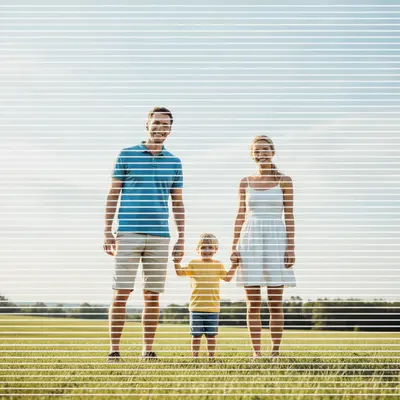
Scanned family photo with regular horizontal white scan lines across entire image Same family photo with all scan lines removed and clean natural image restored

Upload photo to fix scan line

"remove the thin white horizontal lines across this scanned photo — they repeat at regular intervals, restore the natural image content where each line is"

Free to try · no sign-up · photos are never shared

Release to upload

<30stypical edit
1 freeedit weekly
Photo on your phone? Scan to open this editor there — free edit works on your phone too.

1 free edit every week·packs from $4.99

How it works

  1. Upload the photo with scan lines

    Drop your image into EditThisPic. JPG, PNG, or WebP up to 7MB. Works on photos with regular horizontal scanner artifact lines from a dirty or misaligned flatbed scanner, interlaced video frame captures with alternating-field lines, and photos printed then re-scanned through a printer that introduced banding.

    Expect: Regular repeating scan lines (same spacing, same direction) are removed cleanly in one pass in about 15-20 seconds. Irregular or variable-spacing lines may need a more descriptive prompt about the line pattern.
  2. Describe the scan lines and what they're covering

    Type what you see: 'remove the horizontal scan lines across this scanned photo — restore the original image detail under each line' or 'fix the scanner artifact lines — thin horizontal white lines repeat every few pixels across the whole image.' Describing the direction (horizontal, diagonal), regularity (evenly spaced, irregular), and color (white, dark, grey) helps the AI target the correct pattern.

    Tip: If the lines have a specific color or are only in one part of the image, say so: 'remove the thin white horizontal lines in the upper half of the image' or 'fix the dark grey scan lines — they appear every 3-4 pixels across the full width.' Specificity helps the AI distinguish scan lines from intentional fine-line patterns in the image content.

    Copy one of these to get started:

    General horizontal scan line removal — most common remove the horizontal scan lines from this scanned photo — restore the original image content under each line, result should look like a clean scan with no line artifacts
    Thin white lines from flatbed scanner remove the thin white horizontal lines across this scanned photo — they repeat at regular intervals, restore the natural image content where each line is
    Interlaced video frame with alternating lines remove the interlaced scan lines from this video frame — fix the alternating line pattern from the video interlacing, restore smooth image content throughout
    Dark scan lines on portrait face remove the dark horizontal scan lines that cross the person's face — restore natural skin texture under each line, face should look clean and uninterrupted
    2 more prompts
    Scan lines in partial area of image remove the scan lines in the upper portion of this image — the bottom half looks fine, only the top has the horizontal line artifacts
    Heavy scan line damage covering most of image this photo has heavy scan line damage — remove all the horizontal scan lines throughout the image and reconstruct the image content as best as possible, the lines cover most of the photo
  3. Check that the lines are fully removed and content is intact

    Zoom to 100% and scan vertically through the image to verify all scan lines are gone. Check that the content underneath where the lines were looks natural — skin, fabric, and background should show continuous texture without any visible repair seams. Compare the treated area to a nearby untouched area to verify tonal consistency.

  4. Refine any remaining lines with markers

    If most scan lines are removed but a few remain in a specific area — often near high-contrast edges or in very dark/bright zones — tap a marker on that area and add: 'remove the remaining scan lines in this specific area, restore the content underneath.' One targeted pass usually finishes what the global fix started.

    Tip: Residual scan lines near high-contrast edges (like hair against sky) are the most common miss. A quick marker on the edge zone with a focused prompt resolves them.

See it in action

Scanned family photo with regular horizontal white scan lines across entire image
Before
->
Same family photo with all scan lines removed and clean natural image restored
After

Old family photo — flatbed scanner lines removed

A print photograph scanned on a flatbed scanner that left regular horizontal white lines across the entire image. One prompt removed all lines and restored continuous image content.

Prompt: remove the horizontal scan lines from this scanned photo — restore natural image content under each line, result should look like a clean scan

Interlaced video still with alternating horizontal scan line pattern throughout
Before
->
Same frame with interlacing removed and smooth continuous image restored
After

Interlaced video still — alternating line pattern removed

A still frame captured from a VHS or interlaced broadcast video. The alternating even/odd field pattern produced visible horizontal lines throughout. Deinterlacing prompt removed the alternating pattern and restored smooth content.

Prompt: remove the interlaced scan lines from this video frame — fix the alternating horizontal line pattern, restore smooth continuous image content

Portrait scan with dark horizontal scanner artifact lines crossing the face
Before
->
Same portrait with all scan lines removed and natural skin texture restored
After

Portrait photo — scanner lines removed from face

Close-up portrait scan with dark horizontal scanner artifact lines running across the face. Targeted removal restored natural skin texture under each line.

Prompt: remove the dark horizontal scan lines crossing the face — restore natural skin texture under each line, the face should look clean and continuous

Quick answers

Do I need to mark the scan lines before removing them?

No. Just describe the lines: 'remove the horizontal scan lines from this scanned photo — restore the image content under each line.' The AI identifies the repeating artifact pattern automatically. Only use markers if the scan lines are confined to one area and you want to protect the rest of the image from changes.

How do I remove scan lines from a photo for free online?

Upload your photo to EditThisPic, type 'remove the horizontal scan lines — restore the original image content under each line' and click Generate. The AI removes the lines in about 20 seconds. Free, no account. Works in any browser. The free edit is a preview — purchased downloads are clean, full quality.

Why does my scanned photo have horizontal lines?

Horizontal scan lines in flatbed scans usually come from dust or debris on the scanner glass, a misaligned or dirty scan head, or an old fluorescent scan lamp with uneven output. They can also appear when scanning printed material that has its own halftone dot pattern that creates a moiré interference pattern with the scanner's sampling resolution.

Is there a free tool to remove scanner artifact lines without Photoshop?

Yes. EditThisPic removes scan lines for free with no account. Unlike Photoshop's manual Clone Stamp approach (which requires painting over each line individually), EditThisPic's AI identifies and removes the entire repeating line pattern in one pass. Works on desktop and mobile browsers. The free edit is a preview — purchased downloads are clean, full quality.

Can I remove scan lines from an old family photo?

Yes. Upload the scan and type: 'remove the horizontal scan lines from this scanned photo — restore the original image content under each line.' Works on portraits, group photos, and landscape scans. The AI fills each line position with synthesized content that matches the surrounding image.

Can I fix interlaced scan lines from a video capture?

Yes. Interlaced video frames have alternating horizontal line patterns from the field structure of analog TV signals. Type: 'remove the interlaced scan lines from this video frame — fix the alternating line pattern, restore smooth continuous image content.' The AI deinterlaces the frame and restores smooth detail.

How much does EditThisPic cost?

You get 1 free edit per week — no account needed. After that, one-time credit packs start at $4.99 for 10 edits, valid 12 months, no subscription. Power users who edit daily can pick Studio Membership, a monthly workspace at $49.99/mo for 300 edits. Purchased downloads are clean with no watermark.

Ready to remove the scan lines from your photo?

Free to try. No signup required.

1 free edit included·Credit packs from $4.99