AI Photo Editor for Speaker Headshots
Last updated
Get speaker bureau-ready headshots without scheduling a professional photo session.
Drop your photo here
"replace background with blurred conference stage setting, warm stage lighting, professional speaker environment"
Release to upload
Built for Speakers and Presenters
Your speaker headshot appears in conference programs, event websites, podcast show notes, and speaker bureau listings. It's your professional calling card in the speaking industry. Professional speaker photography is expensive and requires scheduling. EditThisPic lets you transform any quality photo into a polished, stage-ready speaker headshot in seconds. Get the credibility without the photographer price tag.
Tools for Professional Speaker Headshots
Replace Background
Swap casual backgrounds for conference stage or speaking environment
Enhance Lighting
Create dramatic stage-quality lighting for speaker photos
Blur Background
Professional depth with stage-like bokeh effect
Enhance Face
Polished speaker look without appearing artificial
Remove Background
Clean cutout for event organizer graphics and composites
How to AI Photo Editor for Speaker Headshots
-
Choose a confident photo
Pick a photo where you look engaged and authoritative - the way you want audiences to see you. Look for confident expression, good eye contact with camera, and even lighting. Photos from previous speaking events work great, even if the background isn't ideal. Avoid extreme close-ups or overly casual poses.
Background replacement with stage setting: 25-35 seconds. Lighting enhancement for stage effect: 20-25 seconds.Photos where you're mid-gesture or mid-speech can convey energy and authenticity - perfect for speaker headshots. -
Upload and describe your speaker look
Drop your photo into EditThisPic and describe the professional speaker environment you want: 'replace background with conference stage setting, dramatic lighting' or 'create professional speaker photo with stage lighting effect, blur background like on-stage photography.'
Combine edits in one prompt: 'replace background with blurred conference stage, enhance lighting for keynote speaker effect, reduce shadows, keep natural expression' -
Review for speaker credibility
Check that you still look approachable and authentic. Verify the stage backdrop or lighting doesn't look artificial. Ensure your expression conveys confidence and expertise. Your speaker headshot should project authority while remaining genuine - event organizers and audiences value authenticity.
-
Fine-tune and download high-res
If hair edges need cleanup or lighting needs adjustment, use markers on specific areas and regenerate. Download your speaker-ready headshot. Event organizers often need high-resolution versions - EditThisPic outputs are suitable for print programs and large-format event graphics. Consider creating variations with different backgrounds for different event types.
Create 2-3 versions: one with stage backdrop for conferences, one with neutral background for podcasts, and one with removed background for event organizer flexibility.
Copy-Paste Prompts for Speaker Headshots
replace background with blurred conference stage setting, warm stage lighting, professional speaker environment
Stage backdrops immediately signal 'professional speaker' to event organizers and audiences
enhance lighting for keynote speaker effect, create dramatic stage lighting on face, professional but warm
Dramatic lighting (not harsh) creates visual authority and speaker credibility
replace background with blurred red TEDx-style backdrop, professional stage lighting, keep confident expression
Red backdrops work for TEDx events and create bold, memorable speaker photos
enhance lighting for speaker bureau submission, blur background professionally, reduce shadows, polished but authentic look
Speaker bureaus need polished headshots that still look like you'll show up in person
Show 4 more prompts
replace background with modern podcast studio setting, warm professional lighting, approachable expression
Podcast photos need warmth and approachability - audiences listen for connection
replace background with blurred professional training room, bright even lighting, confident and approachable
Training photos balance authority (confident) with accessibility (approachable)
blur background with stage bokeh effect, enhance face lighting for print quality, high-resolution professional look
Event programs are often printed - request high resolution and print-appropriate lighting
remove background completely, clean edges for event graphics, professional lighting
Background-free versions give event organizers flexibility for their promotional materials
| Edit Type | Prompt | Time | |
|---|---|---|---|
| Conference stage | replace with blurred conference stage, dramatic lighting |
30s | Try This → |
| TEDx backdrop | red TEDx-style stage backdrop, professional lighting |
25s | Try This → |
| Podcast studio | modern podcast studio setting, warm lighting |
25s | Try This → |
| Speaker bureau | clean backdrop, enhance lighting, polished natural |
35s | Try This → |
Real Examples
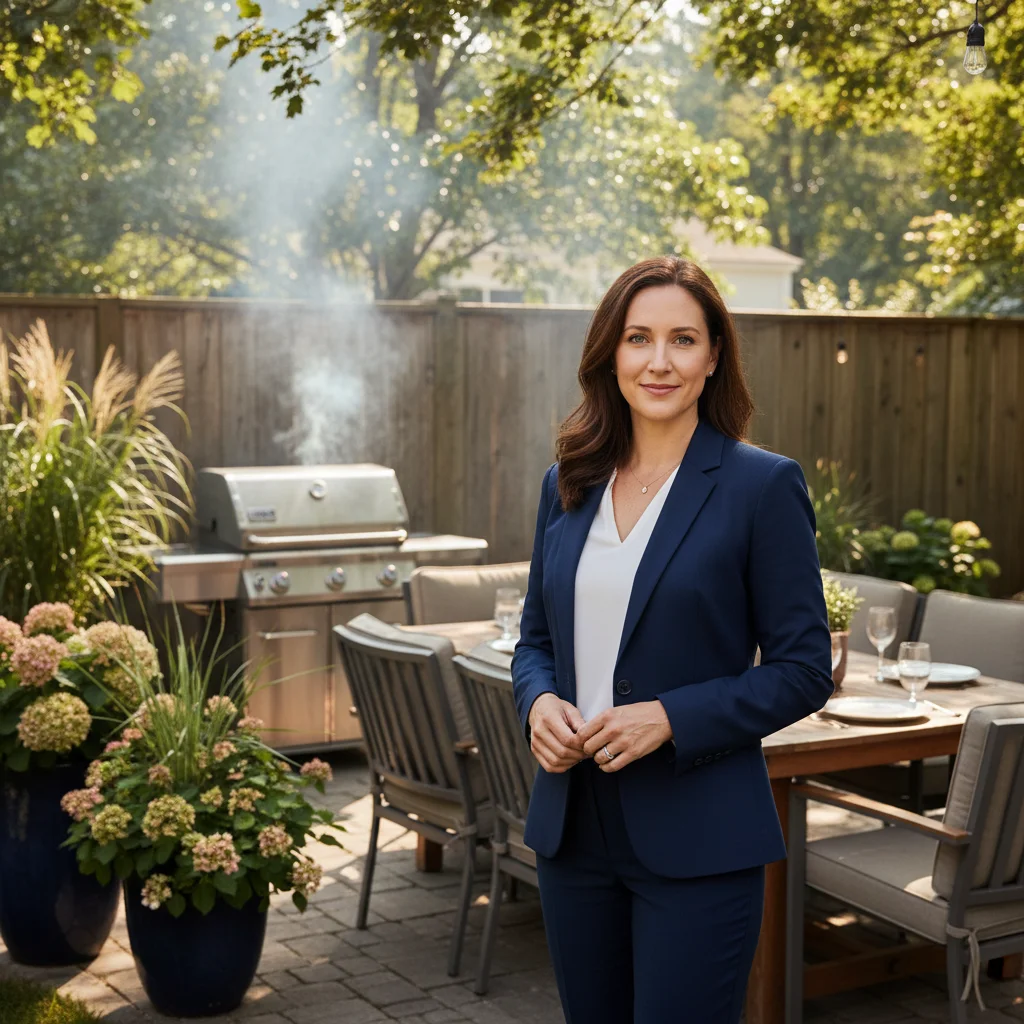
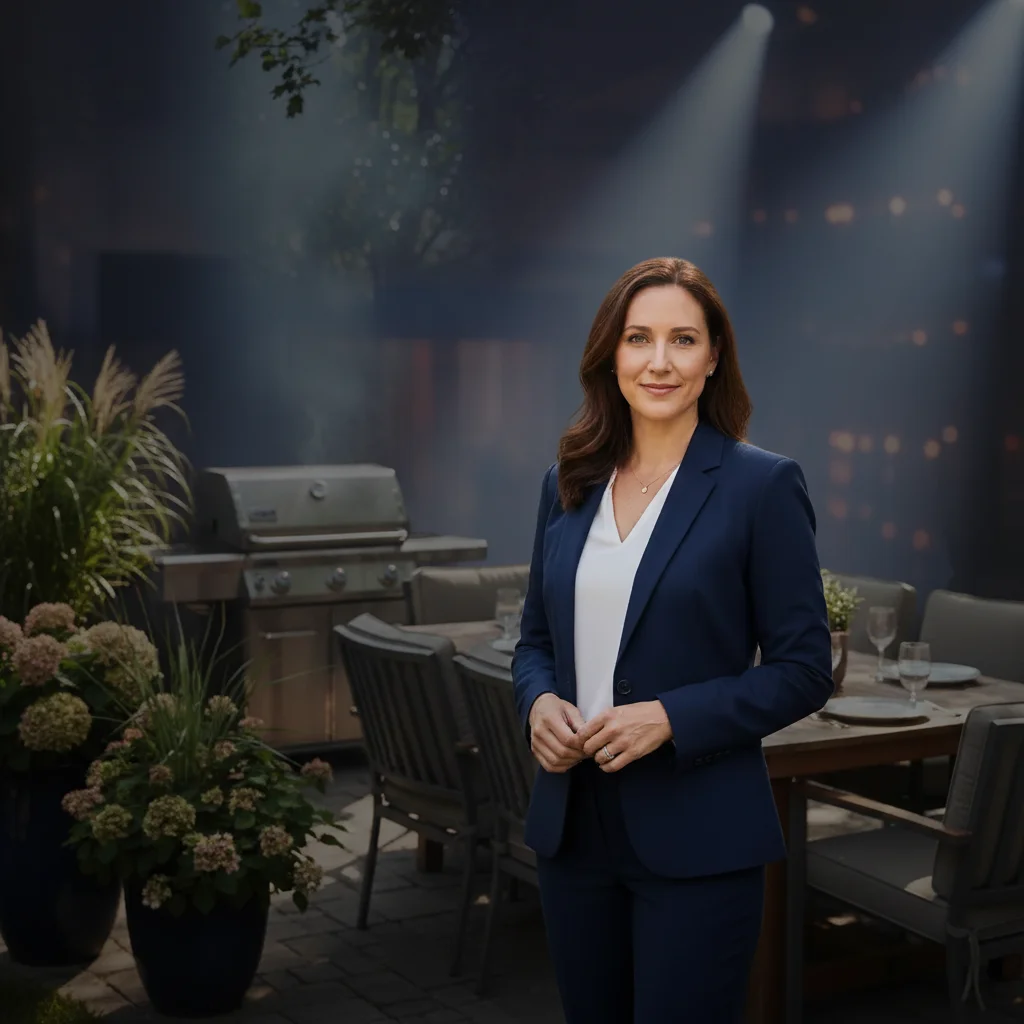
Backyard photo to conference keynote
Your best confident expression is from a backyard BBQ. Keep the authoritative look, swap the grill for a stage.
replace the backyard and grill with blurred conference stage setting, add dramatic keynote lighting on face, keep my confident expression exactly as is
Living room Zoom to TEDx stage
That video call where your energy was perfect but your bookshelf was in the background. Now it looks like you're backstage at TEDx.
replace living room bookshelf background with blurred red TEDx-style stage backdrop, add warm professional stage lighting, enhance image quality
Office desk to podcast studio
Great expression from a quick office selfie, but desk clutter and fluorescent lighting aren't podcast-worthy.
replace office desk and clutter with modern podcast studio setting, fix harsh fluorescent lighting to warm professional glow, blur background professionally
Event candid to speaker bureau photo
A candid shot from a networking event captured your professional presence perfectly. Clean it up for speaker bureau submission.
remove the other people and event clutter from background, replace with clean gradient studio backdrop, enhance lighting for professional speaker bureau quality, keep my authentic expression
When Things Go Wrong
Stage backdrop looks artificial or overly dramatic
Why: Too much contrast between your original lighting and the requested stage effect.
Tap markers on the background, then: create subtle blurred stage setting, professional but natural looking, blend lighting smoothly
Request 'subtle' or 'professional but natural' to avoid over-the-top theatrical effects.
Lighting makes face look too shiny or plastic
Why: Strong stage lighting enhancement on already well-lit photos can create artificial gloss.
enhance lighting subtly for speaker photo, maintain natural skin texture, reduce highlights, keep dimensionality
'Maintain natural skin texture' prevents the overly smooth plastic look.
Lost my confident expression or energy
Why: Multiple edits or face enhancements may have softened your authentic speaker presence.
Start fresh with just: replace background with conference stage, keep my face and expression completely unchanged
Speaker headshots need authenticity - do background first, decide later if face needs any changes.
Hair edges have halos against stage backdrop
Why: Fine hair strands don't blend smoothly with new dramatic backgrounds.
Tap markers on the hair edges, then: blend hair edges naturally with stage background, smooth transition no halos
Photos where your hair color contrasts with the original background work best for clean replacement.
Background doesn't look like real stage photography
Why: Generic 'stage' prompts may create incorrect depth or blur patterns.
replace background with professional conference stage setting as seen from audience perspective, shallow depth blur like stage photography, warm professional lighting
Specify 'as seen from audience perspective' for more realistic stage backdrop angles.
Frequently Asked Questions
What kind of photo works best for speaker headshots?
Look for: confident, engaged expression (slight smile or mid-speech), looking at camera, good eye contact, even lighting. Your expression matters more than the background - that's what we're replacing. Photos from previous speaking events, professional settings, or even confident selfies work well. Avoid extreme angles, too-casual poses, or photos where you look uncertain. Event organizers and speaker bureaus want to see your professional presence and authority.
Will it look authentic for speaker bureau submissions?
Yes, if you keep edits professional and subtle. Background replacement to stage settings doesn't change your face or expression - it places your authentic self in a professional speaker environment. Lighting enhancement should make you look like yourself under stage lights, not like a different person. Speaker bureaus and event organizers will meet you in person or see you on stage - your headshot should be recognizably you with professional polish.
What background works best for conference speakers?
For most conferences: blurred stage setting with warm lighting, gradient backdrop similar to professional speaker photography, or subtle auditorium blur. TEDx/TED-style events: bold red backdrops. Podcast appearances: modern studio settings with warm tones. Corporate training: bright, accessible environments. Avoid: pure black (too dramatic), overly busy patterns, or fantastical settings that undermine credibility.
Can I use this for podcast guest photos?
Absolutely. Podcast photos need warmth and approachability since audiences connect through listening. Use prompts like 'modern podcast studio setting, warm professional lighting' or 'blur background professionally, enhance for podcast show notes quality.' Podcast hosts often request photos for episode artwork and show notes - speaker-quality headshots work perfectly.
How is this different from generic headshot tools?
EditThisPic specializes in speaker-specific transformations: conference stage backdrops, keynote-style lighting, TEDx settings. Generic headshot tools create corporate office looks. For speakers, your headshot needs to convey authority, confidence, and stage presence - not just 'professional employee.' We preserve your authentic speaking energy while creating the polished speaker environment event organizers expect.
What resolution do event organizers need?
Event programs are often printed - they typically request high-resolution headshots (300 DPI minimum for print). EditThisPic outputs high-quality images suitable for both digital use (websites, show notes) and print materials (conference programs, banners, promotional posters). Download your full-resolution version for maximum flexibility with event organizers.
Should I create different versions for different events?
Yes, consider creating variations: conference stage backdrop for keynote speaking, neutral backdrop for speaker bureau listings, modern studio for podcast appearances, and background-removed version for event organizer graphics. Event organizers appreciate flexibility - having multiple professional versions ready shows you're prepared and professional.
Is EditThisPic's AI photo editor for speaker headshots really free?
Yes — you get 1 free edit per week, no account needed. Plans start at $4.99/month for 15 edits.
Popular use cases
Ready to create your professional speaker headshot?
Free to try. No signup required. No watermarks.
Create Your Speaker HeadshotTrusted by 15,000+ users