Pricing Prepare Amazon listing photo · Free

Turn a Creator Photo Into an Amazon Listing Image

← Browse all ecommerce tools

Last updated

A creator photo is a secondary-slot asset, not a main image. Amazon expects the main image on pure white with no people and no props — which is exactly what a creator photo is not.
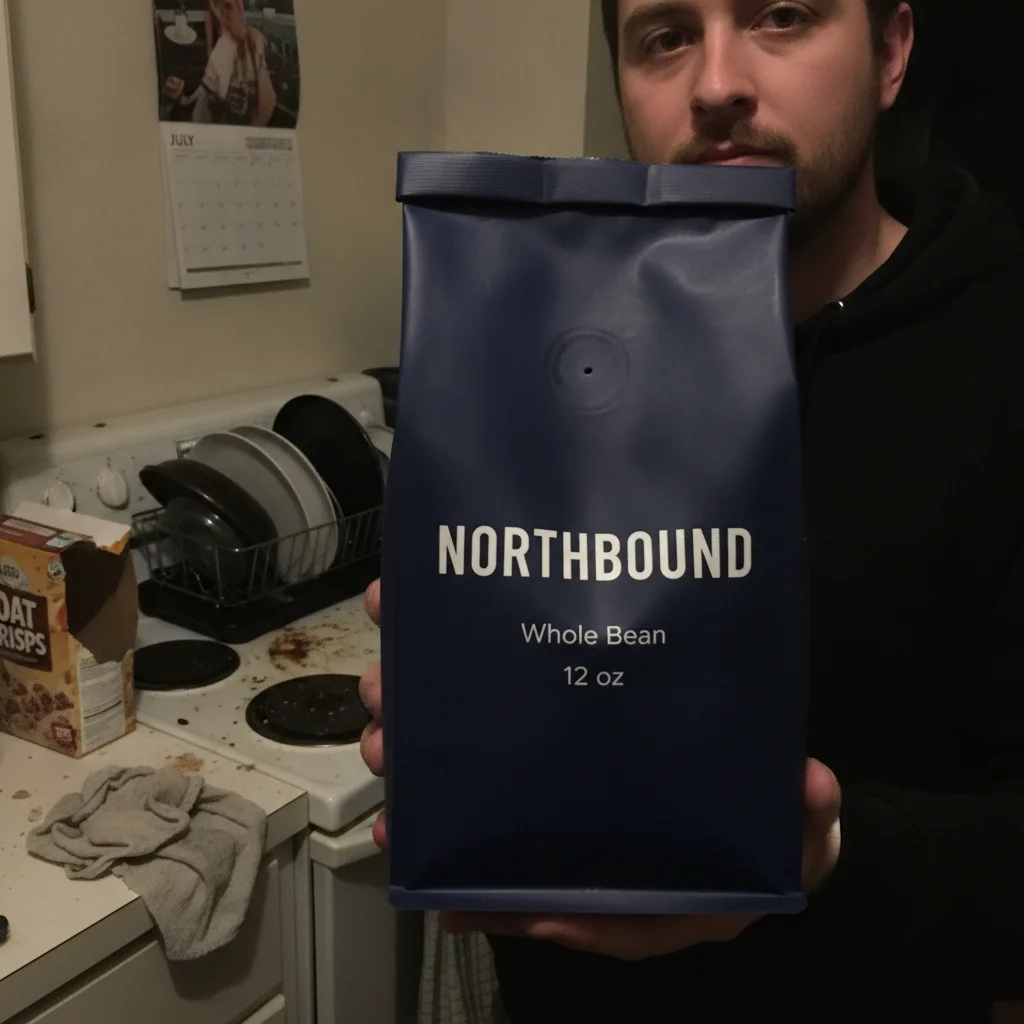
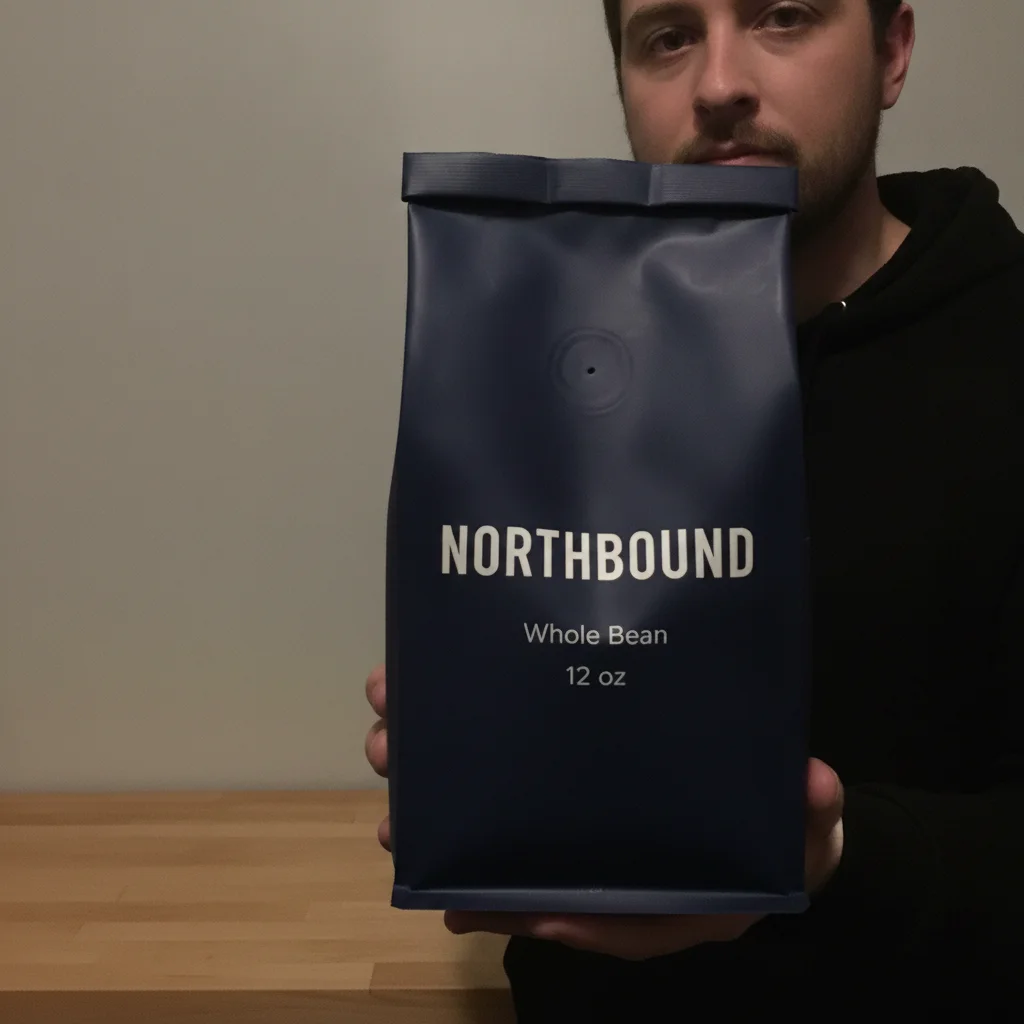
Man holding a coffee bag in a messy kitchen with an overflowing dish rack under dull yellow light The same man and coffee bag in a tidy setting under even neutral light, the bag wording legible

Upload photo to prepare Amazon listing photo

"Brighten the packaging and raise its clarity so the brand name and size are easy to read, without altering any wording, numbers, typeface or layout."

Free to try · no sign-up · photos are never shared

Release to upload

<30stypical edit
1 freeedit weekly
Photo on your phone? Scan to open this editor there — free edit works on your phone too.

1 free edit every week·packs from $4.99

How it works

  1. Decide which slot the photo is for

    This decides everything downstream. Amazon expects a main image to be the product alone on a pure white background, with no people, props or added text, so a creator photo belongs in the secondary lifestyle slots.

    Expect: Cleanup runs 20-30 seconds.
  2. Tidy the setting without flattering the product

    For a lifestyle slot, ask for the clutter to go while the scene stays a believable home setting, and name the packaging as something to leave alone. A listing image has to match what actually arrives in the box.

    Tip: Be conservative here. An image that flatters the product into looking like something else is a returns and policy problem, not a matter of taste.

    Copy one of these to get started:

    Lifestyle slot, tidy but real Tidy the background clutter and even out the lighting so this works as a lifestyle listing image, keeping it a believable real home setting. Leave the person and the product as photographed, including the wording on the packaging.
    Packaging clearly legible Brighten the packaging and raise its clarity so the brand name and size are easy to read, without altering any wording, numbers, typeface or layout.
    Main image, product alone on white Place the product alone on a pure white background with no people, props or text, keeping the product and its printed wording as photographed.
    Neutral colour for accuracy Correct the lighting to neutral daylight and keep the product’s colour true to the original. Do not change the packaging design or any of its wording.
    1 more prompts
    In-use context Clean up the setting so the product is clearly in use in a tidy home environment. Leave the person, the product and the packaging wording as photographed.
  3. Check against the physical product, not the photo

    Read the packaging in the preview against the item on your desk. Colour, size wording and claims all have to match what ships — and the original photo is not the standard, the product is.

See it in action

Man holding a coffee bag in a messy kitchen with an overflowing dish rack under dull yellow light
Before
->
The same man and coffee bag in a tidy setting under even neutral light, the bag wording legible
After

Kitchen coffee-bag photo prepared as a lifestyle image

A creator holding a coffee bag in a messy kitchen — overflowing dish rack, torn cereal box, crooked calendar — under dull yellow ceiling light. The cleanup gives a tidy setting and even, neutral light. At full resolution the bag still reads NORTHBOUND / Whole Bean / 12 oz across its three lines, which is the part that matters for a listing: the size on the packaging has to be the size in the box.

Prompt: Turn this into a clean, ad-ready product still. Declutter the background completely — remove every stray object and mess behind and around the subject and replace it with a simple, uncluttered backdrop. Fix the lighting to bright, soft and flattering, with clean colour. Keep the person exactly as photographed: their face, features, hair, skin and pose must not change at all. Keep the product exactly as photographed: its shape, proportions, colours, logo, and every single word, letter and number printed on its label must stay identical, character for character. Do not restyle, redesign, replace, reword or re-typeset anything on the product. Do not remove the product or the hand holding it.

Quick answers

Can I use a creator photo as my Amazon main image?

No. Amazon expects the main image to show the product alone on a pure white background, without people, props or added text. A creator photo with someone holding the product belongs in the secondary lifestyle slots, where people and settings are the point.

What are the secondary slots actually for?

Showing the product in use, at a sense of scale, and in a real setting — the questions a white-background main image cannot answer. A tidied creator photo does that better than a studio render, because it looks like someone actually owns the thing.

Will the packaging text stay accurate?

Readable wording is what the prompt is written to hold and it came back matching in our demo, but a listing deserves more caution than an ad. Small print is re-drawn rather than carried over, so read the size line and any claims at full resolution against the physical product.

How careful do I need to be with colour?

More careful than on social. If your listing image shows a shade the buyer does not receive, that drives returns and can become a listing problem. Ask for neutral daylight correction with the product colour kept true, and verify against the physical item.

Does the image need a minimum size?

Amazon wants listing images large enough to support zoom, which in practice means well over a thousand pixels on the longest side. Start from a full-resolution creator file rather than one compressed by a messaging app, or you lose the zoom before you begin.

Can I add text or badges to a lifestyle image?

Secondary slots allow more than the main image does, but the rules vary by category and change over time. Check the current requirements in Seller Central rather than copying a competitor — their listing may simply not have been caught yet.

How much does EditThisPic cost?

You get 1 free edit per week — no account needed. After that, one-time credit packs start at $4.99 for 10 edits, valid 12 months, no subscription. Power users who edit daily can pick Studio Membership, a monthly workspace at $49.99/mo for 300 edits. Purchased downloads are clean with no watermark.

Prepare a listing image

Free to try. No signup required.

1 free edit included·Credit packs from $4.99