Pricing Convert Creator photo · Free

Creator Photo to Ad Creative

Last updated

Creator photos earn their place in paid social because they look real. They also arrive with someone’s living room in the back of the frame and a window blowing out one side of their face.
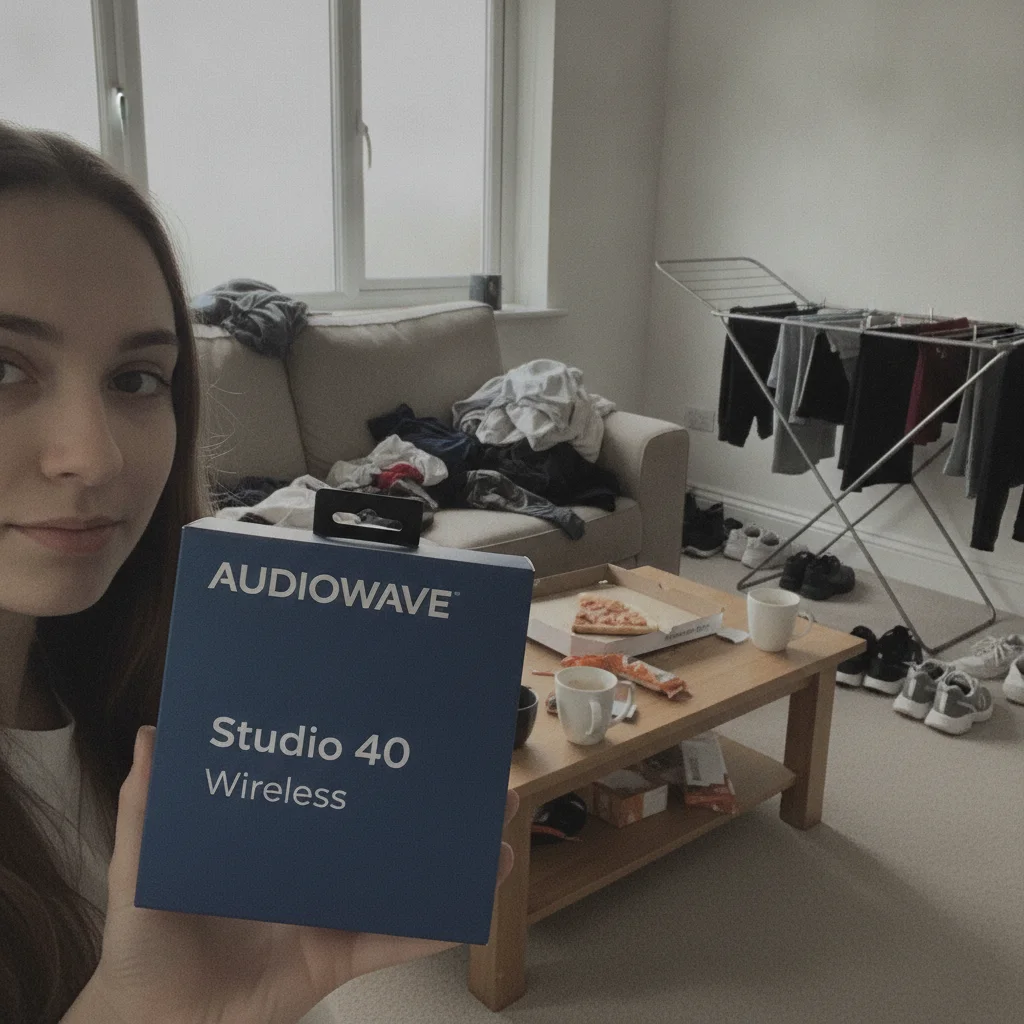
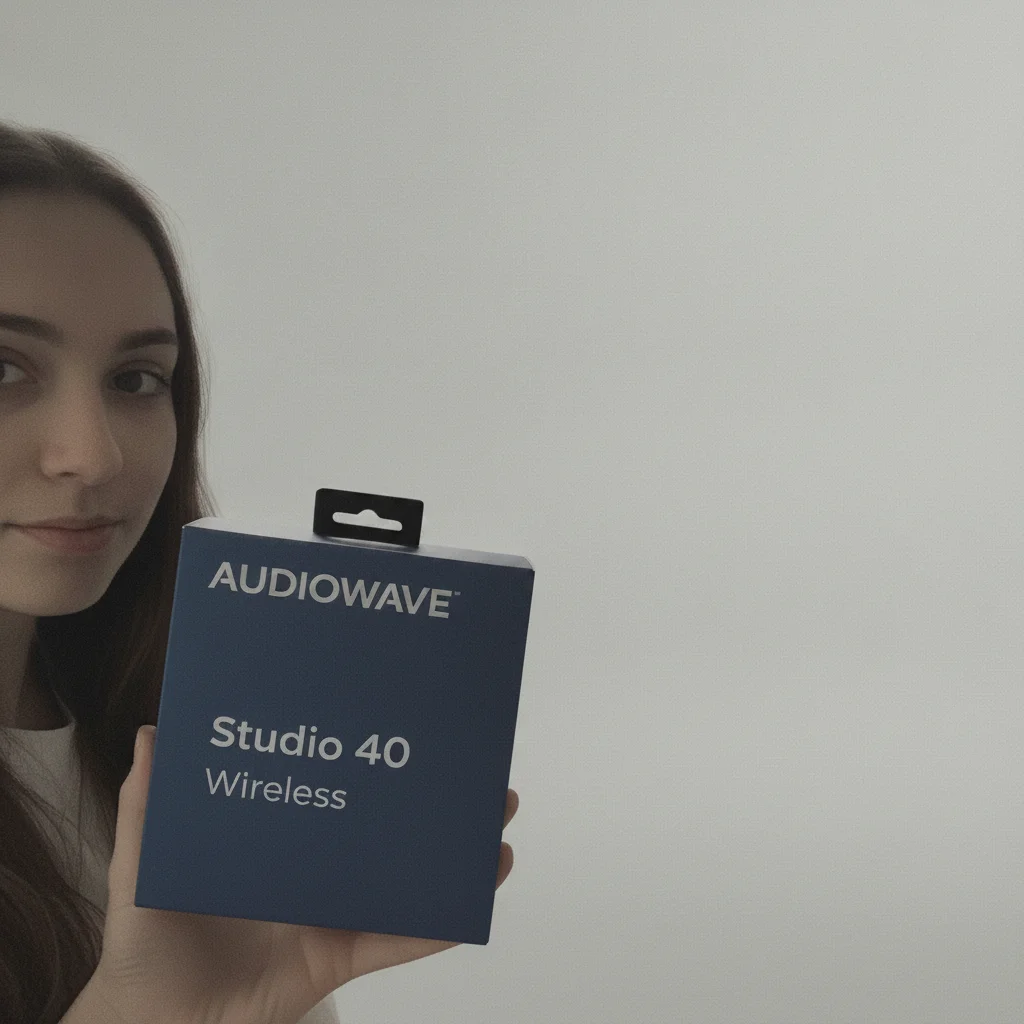
Creator holding a headphones box in a living room buried in laundry and takeaway boxes under flat grey light The same creator and headphones box on a plain backdrop in even light

Upload photo to convert creator photo

"Tidy the background and even out the lighting, but keep this looking like a genuine phone photo taken at home rather than a studio shot. Leave the person and the product as photographed."

Free to try · no sign-up · photos are never shared

Release to upload

<30stypical edit
1 freeedit weekly
Photo on your phone? Scan to open this editor there — free edit works on your phone too.

1 free edit every week·packs from $4.99

How it works

  1. Start from the creator’s original file

    Use the file the creator sent rather than a screenshot of it or a copy that has been through a messaging app. Frame the whole person in the shot — subjects cut off at the frame edge can confuse the cleanup, because the edit has to guess what continues past the crop.

    Expect: A cleanup pass runs about 20-30 seconds.
  2. Ask for the room and the light, and name what to leave alone

    Two changes are usually the whole job: declutter the background, and make the light even with clean colour. Then add the sentence that does the real work: "Keep the person exactly as photographed — face, features, hair and pose. Keep the product exactly as photographed, including the words, letters and numbers printed on its label. Do not restyle, redesign, reword or re-typeset anything on the product."

    Tip: The second half matters more than the first. Without it the edit treats your packaging as decoration it is free to redesign.

    Copy one of these to get started:

    Room and light, subjects left alone Declutter the background and replace it with a simple, uncluttered backdrop, and make the lighting bright, soft and even with clean colour. Keep the person exactly as photographed — face, features, hair and pose. Keep the product exactly as photographed, including the words, letters and numbers printed on its label. Do not restyle, redesign, reword or re-typeset anything on the product.
    Keep it looking like a real photo Tidy the background and even out the lighting, but keep this looking like a genuine phone photo taken at home rather than a studio shot. Leave the person and the product as photographed.
    The room is beyond tidying Remove everything in the background and replace it with a plain, softly lit backdrop with a soft natural shadow. Keep the person, their hand and the product as photographed.
    One image, several placements Clean the background and lighting while keeping the subject centred with clear space on all four edges, so the image can be cropped square, 4:5 and vertical.
    1 more prompts
    Product sitting in shadow Lift the product out of shadow so its packaging reads clearly, matching the light already on the person. Leave the wording on the packaging and the person’s face as photographed.
  3. Read the label at full size before you buy the download

    The preview is there so you can check. Open it large and read the packaging against the original line by line — a label that has changed is close to invisible at full-frame size and obvious the moment you zoom in.

See it in action

Creator holding a headphones box in a living room buried in laundry and takeaway boxes under flat grey light
Before
->
The same creator and headphones box on a plain backdrop in even light
After

Living-room headphones shot turned into ad creative

A creator holding a headphones box in a living room buried in laundry, takeaway boxes and a drying rack, under flat grey window light. The result puts her on a plain backdrop in even light. Checked at full resolution, the box still reads AUDIOWAVE / Studio 40 / Wireless, down to the small trademark mark after the brand name.

Prompt: Turn this into a clean, ad-ready product still. Declutter the background completely — remove every stray object and mess behind and around the subject and replace it with a simple, uncluttered backdrop. Fix the lighting to bright, soft and flattering, with clean colour. Keep the person exactly as photographed: their face, features, hair, skin and pose must not change at all. Keep the product exactly as photographed: its shape, proportions, colours, logo, and every single word, letter and number printed on its label must stay identical, character for character. Do not restyle, redesign, replace, reword or re-typeset anything on the product. Do not remove the product or the hand holding it.
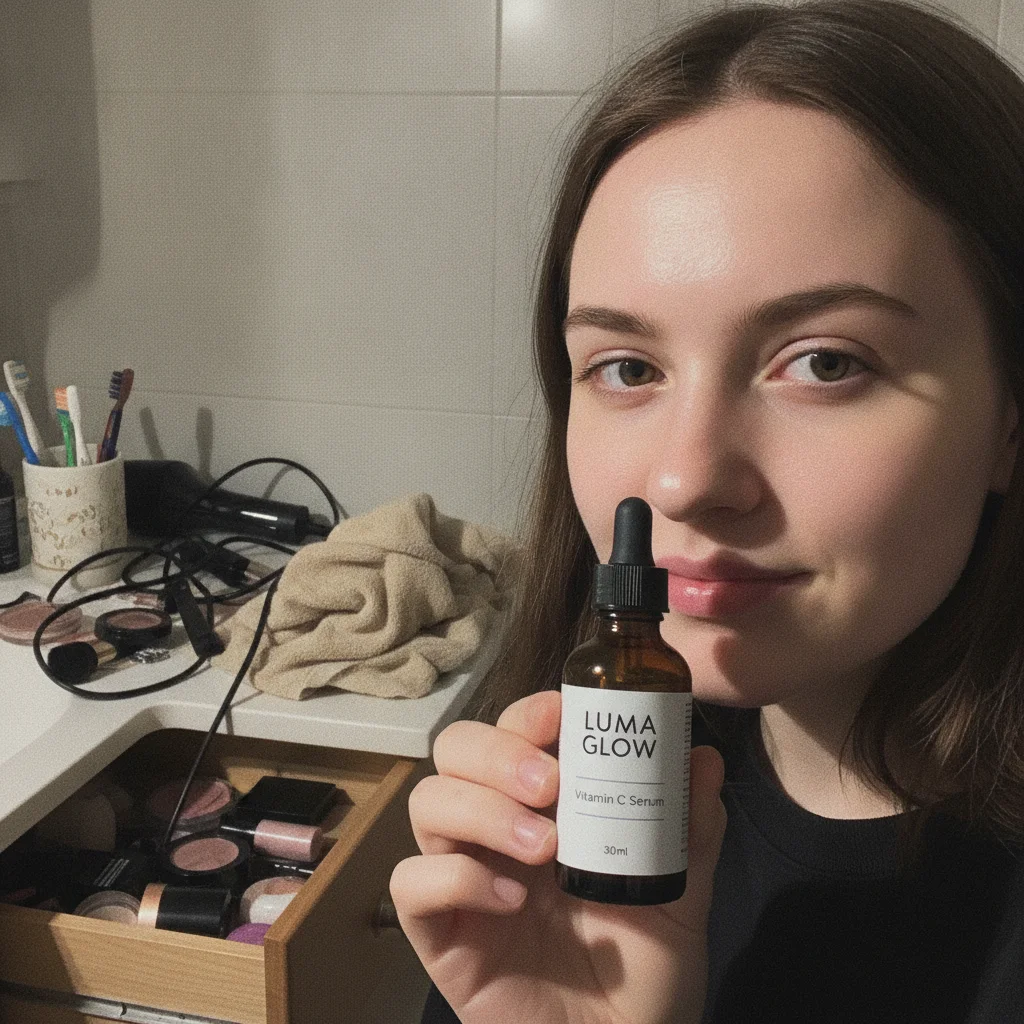
Creator holding a serum bottle in front of a cluttered bathroom counter under harsh phone flash
Before
->
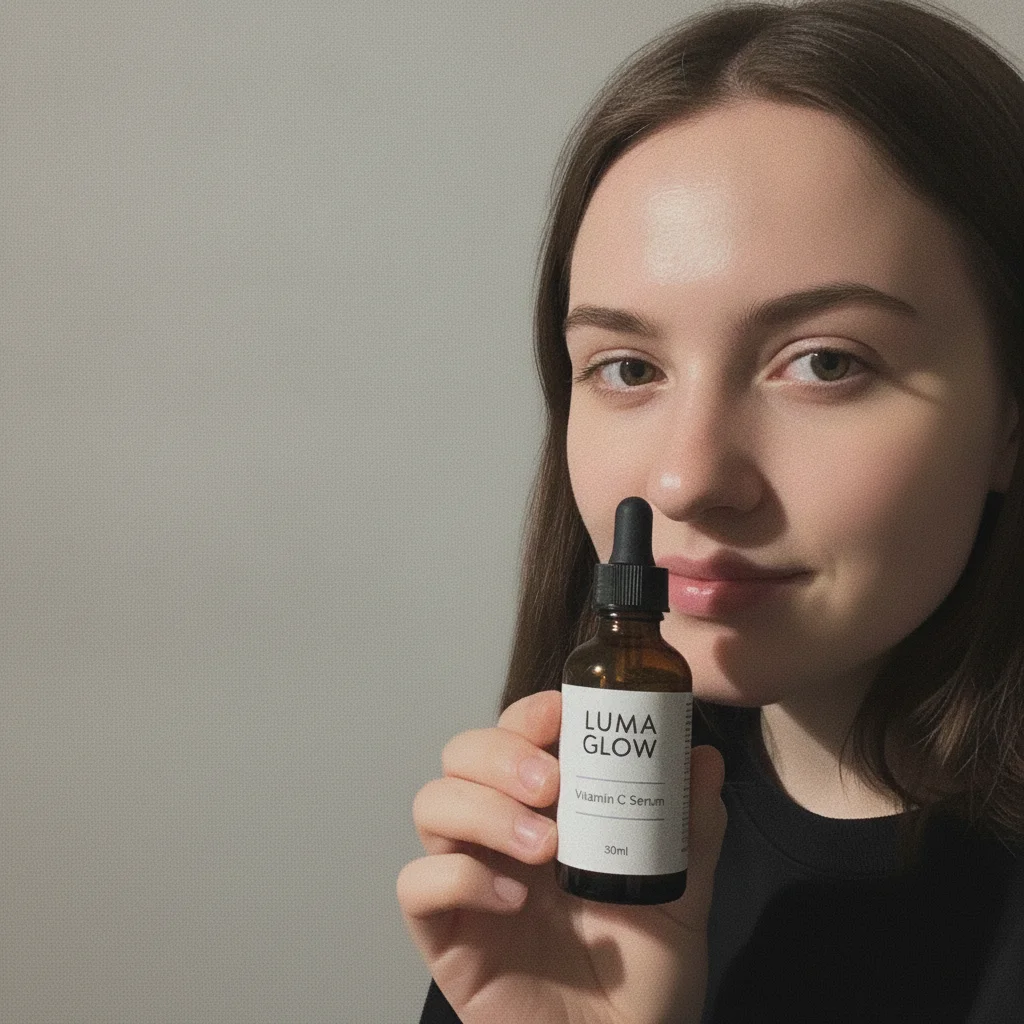
The same creator and serum bottle on a plain backdrop in soft light
After

Bathroom-counter serum shot, same pass

A creator holding a serum bottle in front of a cluttered bathroom counter, lit by direct phone flash. The counter goes, the flash becomes soft light. At full resolution the three label lines still read LUMA GLOW / Vitamin C Serum / 30ml. Both demos used one fixed prompt, applied unmodified — that is why they are comparable.

Prompt: Turn this into a clean, ad-ready product still. Declutter the background completely — remove every stray object and mess behind and around the subject and replace it with a simple, uncluttered backdrop. Fix the lighting to bright, soft and flattering, with clean colour. Keep the person exactly as photographed: their face, features, hair, skin and pose must not change at all. Keep the product exactly as photographed: its shape, proportions, colours, logo, and every single word, letter and number printed on its label must stay identical, character for character. Do not restyle, redesign, replace, reword or re-typeset anything on the product. Do not remove the product or the hand holding it.

Quick answers

How do I turn a creator photo into ad creative?

Upload it and describe two changes — declutter the background, even out the lighting — then add a sentence naming the person and the product as things to leave as photographed. A preview comes back in about 15 to 30 seconds, free to look at, and a clean download costs credits.

Is it actually free?

Looking is. You get a free preview without an account, which is enough to judge the result and read the label. The clean, full-resolution download is what credits pay for. There is no free finished asset, and it would be dishonest to imply otherwise.

Will my product’s label come back the same?

It comes down to how large the wording sits in the frame. Lines big enough to read comfortably — brand name, product name, size — are what the pinning clause is designed to hold, and on our demo set those came back matching. Wording that sits small gets re-drawn instead. Angle and lighting matter much less than size: labels at 45 degrees and curved around a bottle held fine. Ask creators to fill more of the frame with the product, and check the packaging in the preview before you download.

Is an invented brand name riskier than an ordinary word?

Yes, and it is the one trap worth planning around. Small wording that sits close to a familiar phrase gets pulled toward the familiar version — a test string reading "Earl Crey" was normalised toward "Grey" on every attempt, while a neutral string of the same size held. Most real brand names are coined words, so if yours is, shoot it larger in frame and read it letter by letter in the preview.

Can I upload a whole folder at once?

No. It works one photo at a time. For a set, reuse the same prompt on each image so the results land in a similar place, and look at each one — creator photos vary far more between shots than a studio set does.

Does the creator still look like themselves?

That is what naming them in the prompt is for, and in our demos faces came back recognisably the same person. Two things to watch: skin can come back smoother than it started, and someone cut off at the edge of the frame gives the edit less to work with.

Do I need the creator’s permission to edit their photo?

That sits in your agreement with them rather than in the tool. Paid usage and altered versions are often licensed separately from an organic repost, and replacing a background is a bigger change than a crop. Worth confirming before edited photos run as paid creative.

What files can I upload?

JPG, PNG, WebP and HEIC up to 7MB — HEIC included, since that is how most photos arrive straight off an iPhone.

How much does EditThisPic cost?

You get 1 free edit per week — no account needed. After that, one-time credit packs start at $4.99 for 10 edits, valid 12 months, no subscription. Power users who edit daily can pick Studio Membership, a monthly workspace at $49.99/mo for 300 edits. Purchased downloads are clean with no watermark.

Turn a creator photo into ad creative

Free to try. No signup required.

1 free edit included·Credit packs from $4.99