Pricing Fix UGC photo lighting · Free

Fix the Lighting in a UGC Photo

← Browse all fix & repair tools

Last updated

Creator photos fail on light in three ways: direct flash that blows out a forehead, indoor bulbs that turn everything yellow-green, and rooms that are simply too dark. The first two fix well. The third often does not, and this page says so.
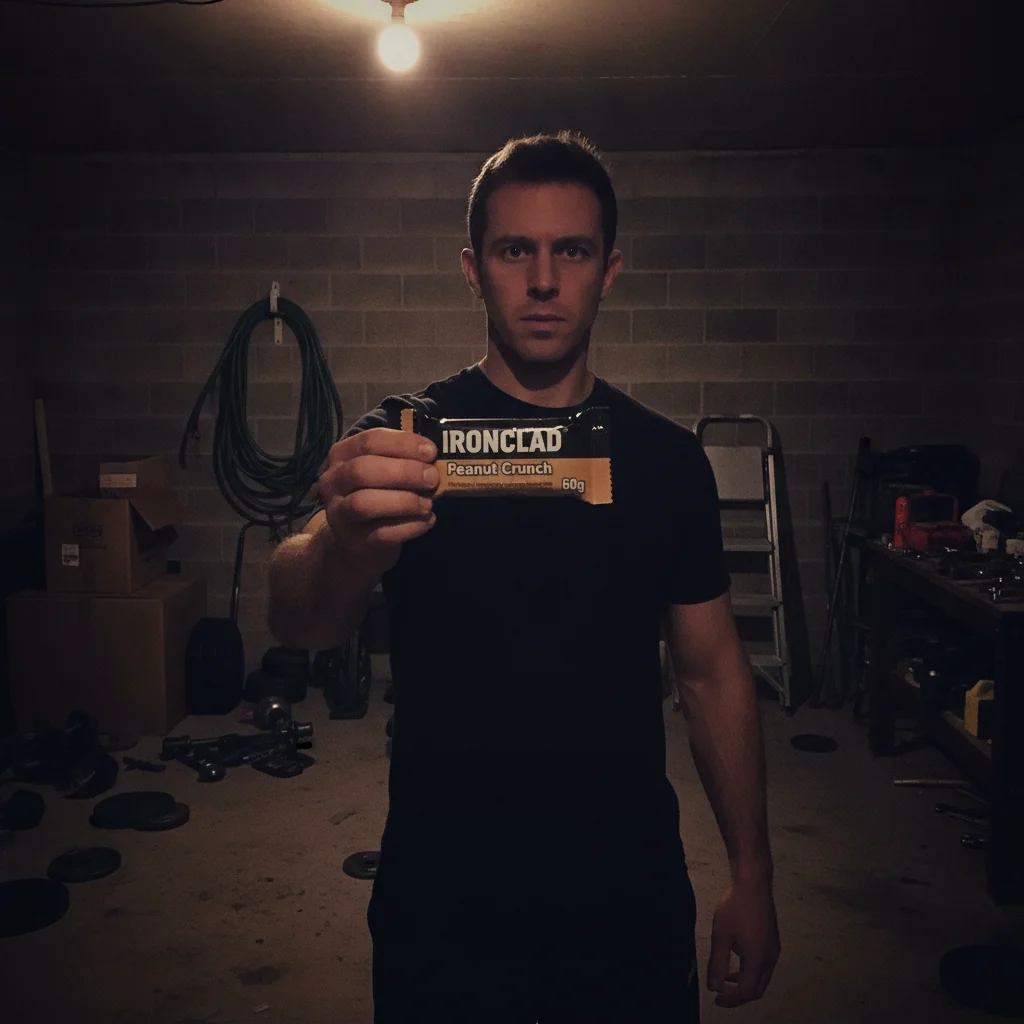
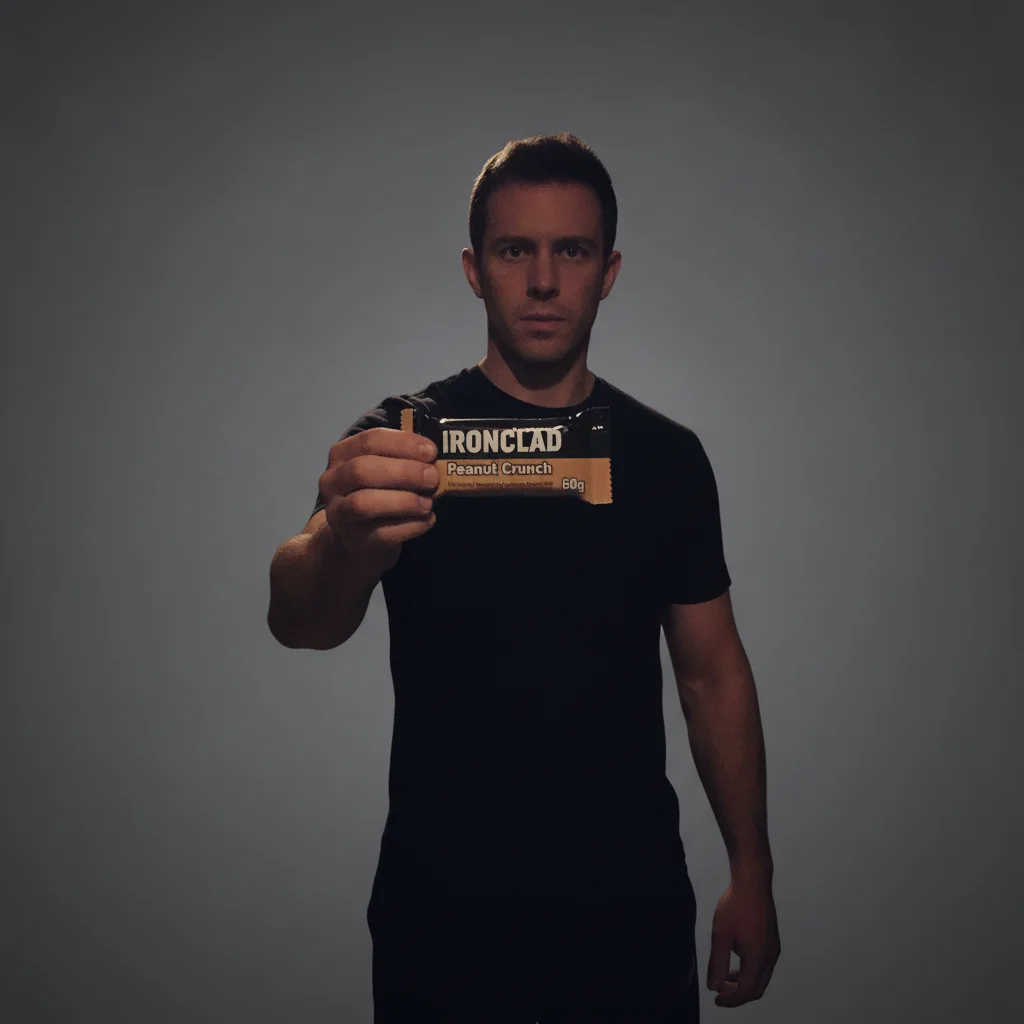
Man in a dim garage holding a protein bar, forehead and wrapper blown out by direct flash The same man and bar in softer, more even light with the garage clutter gone

Upload photo to fix UGC photo lighting

"Brighten this underexposed photo to clean, even lighting while keeping shadows natural and noise under control. Leave the person and the product label as photographed."

Free to try · no sign-up · photos are never shared

Release to upload

<30stypical edit
1 freeedit weekly
Photo on your phone? Scan to open this editor there — free edit works on your phone too.

1 free edit every week·packs from $4.99

How it works

  1. Identify which of the three problems you have

    Flash, darkness and colour cast need different asks, and a photo often has two at once. Look before you prompt. Frame the whole person when you shoot — a subject cut off at the frame edge can confuse the cleanup.

    Expect: Lighting passes finish in about 20 seconds.
  2. Describe the light, then protect both subjects

    Ask for soft, even, flattering light with clean colour. Then add the two protections this job specifically needs: keep skin texture natural rather than smoothed, and leave the wording on the product label alone.

    Tip: The label clause matters more here than anywhere else, because nobody expects a brightness change to touch packaging — so nobody checks it afterwards.

    Copy one of these to get started:

    Harsh on-camera flash Replace the harsh direct flash with soft, even, flattering light. Recover the blown highlights on the face, keep skin texture natural with no smoothing, and leave the wording on the product label alone.
    Dim, underexposed room Brighten this underexposed photo to clean, even lighting while keeping shadows natural and noise under control. Leave the person and the product label as photographed.
    Indoor colour cast Remove the yellow-green colour cast from this indoor photo and restore natural skin tone and true product colour under neutral light. Do not change the label wording.
    Mixed light sources This photo mixes warm lamp light and cool window light. Unify it into a single soft, neutral light across the frame, keeping skin natural and the label alone.
    1 more prompts
    Product in shadow, person lit Lift the product out of shadow so its label reads clearly, matching the light already on the person. Leave the label wording and the person’s face as photographed.
  3. Check the two places light breaks things

    The face, for waxy or over-smoothed skin, and the product, for a label that got brighter and also different. Both at full size, against the original, in the free preview.

See it in action

Man in a dim garage holding a protein bar, forehead and wrapper blown out by direct flash
Before
->
The same man and bar in softer, more even light with the garage clutter gone
After

Dim garage gym with blown flash, relit

A very dim garage lit by one bare bulb, with direct camera flash blowing out the man’s forehead and the wrapper while everything else falls to black. The result recovers the face and clears the garage. Worth noting honestly: it keeps a fairly moody feel rather than becoming a bright studio shot. At full resolution the wrapper still reads IRONCLAD / Peanut Crunch / 60g — and the tiny unreadable line beneath it stays unreadable rather than being invented.

Prompt: Turn this into a clean, ad-ready product still. Declutter the background completely — remove every stray object and mess behind and around the subject and replace it with a simple, uncluttered backdrop. Fix the lighting to bright, soft and flattering, with clean colour. Keep the person exactly as photographed: their face, features, hair, skin and pose must not change at all. Keep the product exactly as photographed: its shape, proportions, colours, logo, and every single word, letter and number printed on its label must stay identical, character for character. Do not restyle, redesign, replace, reword or re-typeset anything on the product. Do not remove the product or the hand holding it.

Quick answers

Can it fix a photo ruined by direct phone flash?

Usually. Ask for the flash to be replaced with soft even light and for blown highlights to be recovered, and say explicitly that skin texture should stay natural. The exception is a highlight burned to pure white, where nothing is left to recover and a different frame is the honest answer.

Will fixing the lighting change my product label?

It can, which is why the label belongs in the prompt even for a lighting job. Readable wording is what the clause is written to hold; small print gets re-drawn either way. A lighting pass is the sneakiest place for this, because nobody thinks to check packaging after a brightness change.

How do I fix the yellow-green cast in indoor photos?

Name the cast and what you want instead: remove the yellow-green cast and restore natural skin tone and true product colour under neutral light. Kitchen, gym and garage lighting all produce it, and it matters commercially because it misrepresents your product’s actual colour.

Does the face stay recognisable?

In our demos, yes. The risk in a lighting fix is not that the face changes shape but that it comes back smoothed — technically brighter, visibly retouched, and no longer reading as a real person’s photo. Saying "no smoothing" is what prevents it.

Can it rescue a photo that is simply too dark?

Often not, and that is worth knowing before you rely on it. In a run of deliberately dark test photos the background cleanup fired every time while the exposure lift did not — the results came back tidier and still dark. Treat flash and colour cast as the reliable jobs here, and a dark original as a reshoot.

Can I fix the lighting without changing the background?

Yes. Say "keep the background as it is" and the pass stays on exposure and colour. That is often what you want when the room is genuinely part of the story and only the light is wrong.

How much does EditThisPic cost?

You get 1 free edit per week — no account needed. After that, one-time credit packs start at $4.99 for 10 edits, valid 12 months, no subscription. Power users who edit daily can pick Studio Membership, a monthly workspace at $49.99/mo for 300 edits. Purchased downloads are clean with no watermark.

Fix your creator photo lighting

Free to try. No signup required.

1 free edit included·Credit packs from $4.99