Pricing Protect Product label · Free

Keeping the Product Label Readable Through an Edit

Last updated

AI editors redraw what they touch. Harmless on a wall, expensive on packaging — unless the prompt names the label as off limits, and you check the result rather than assuming.
Hand holding a boxed phone case over a cluttered desk with tangled cables under harsh light The same package on a clean backdrop in even light, its printed model name legible

Upload photo to protect product label

"Replace the background with a plain, softly lit backdrop. Do not change the product in any way, including the wording printed on its label."

Free to try · no sign-up · photos are never shared

Release to upload

<30stypical edit
1 freeedit weekly
Photo on your phone? Scan to open this editor there — free edit works on your phone too.

1 free edit every week·packs from $4.99

How it works

  1. Shoot the label large in the frame

    The single thing that decides this, and it is about size rather than conditions. Wording that sits large enough in frame to read comfortably tends to carry over; wording that is small gets re-drawn. Angle and lighting matter far less than people expect — labels at 45 degrees, curved around a bottle, and shot through glare all held in our testing. Step closer rather than prompting harder.

    Expect: Label-critical edits run 20-30 seconds.
  2. Name the label as off limits

    Add the clause to whatever else you are asking for: leave the shape, proportions, colours, logo and every word, letter and number printed on the label alone, and do not restyle, redesign, reword or re-typeset anything on the product.

    Tip: Both halves earn their place. The first blocks rewording; the second blocks a redesign that keeps the words and changes the type.

    Copy one of these to get started:

    The clause on its own Keep the product as photographed: its shape, proportions, colours, logo, and every word, letter and number printed on its label. Do not restyle, redesign, replace, reword or re-typeset anything on the product.
    Background change, label named Replace the background with a plain, softly lit backdrop. Do not change the product in any way, including the wording printed on its label.
    Lighting change, label named Improve the lighting to bright and even with clean colour, and leave the product and all of its printed text as photographed.
    More legible without rewording Increase the clarity and contrast of the label so it reads more easily, without altering any of the words, letters, numbers, typeface or layout.
    1 more prompts
    Codes and barcodes in frame Keep the barcode and any printed codes on the packaging as photographed, along with all label wording.
  3. Verify at 100%, because nothing does it for you

    Open the preview at full resolution and read the label line by line against the original. Nothing here inspects the label on your behalf — and a changed label is close to invisible at full-frame size, which is exactly how one reaches a finished ad.

See it in action

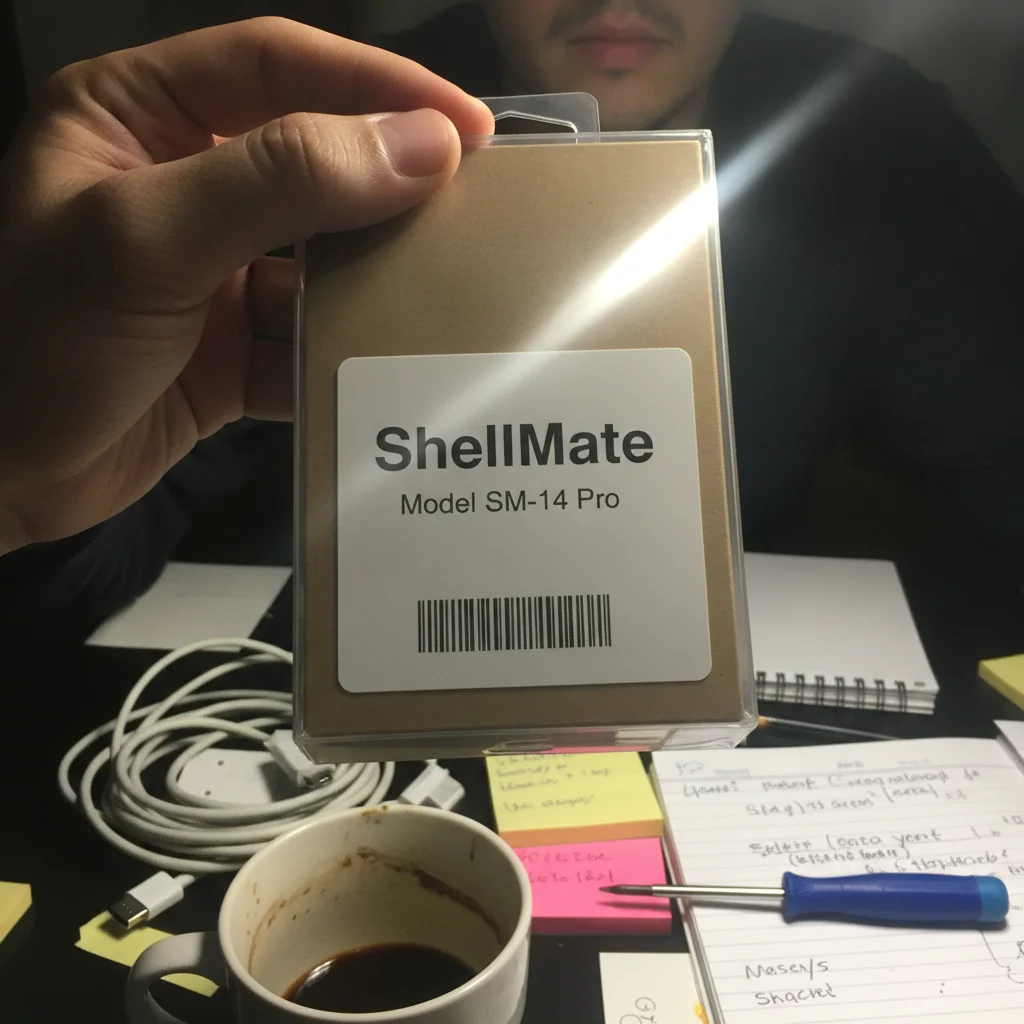
Hand holding a boxed phone case over a cluttered desk with tangled cables under harsh light
Before
->
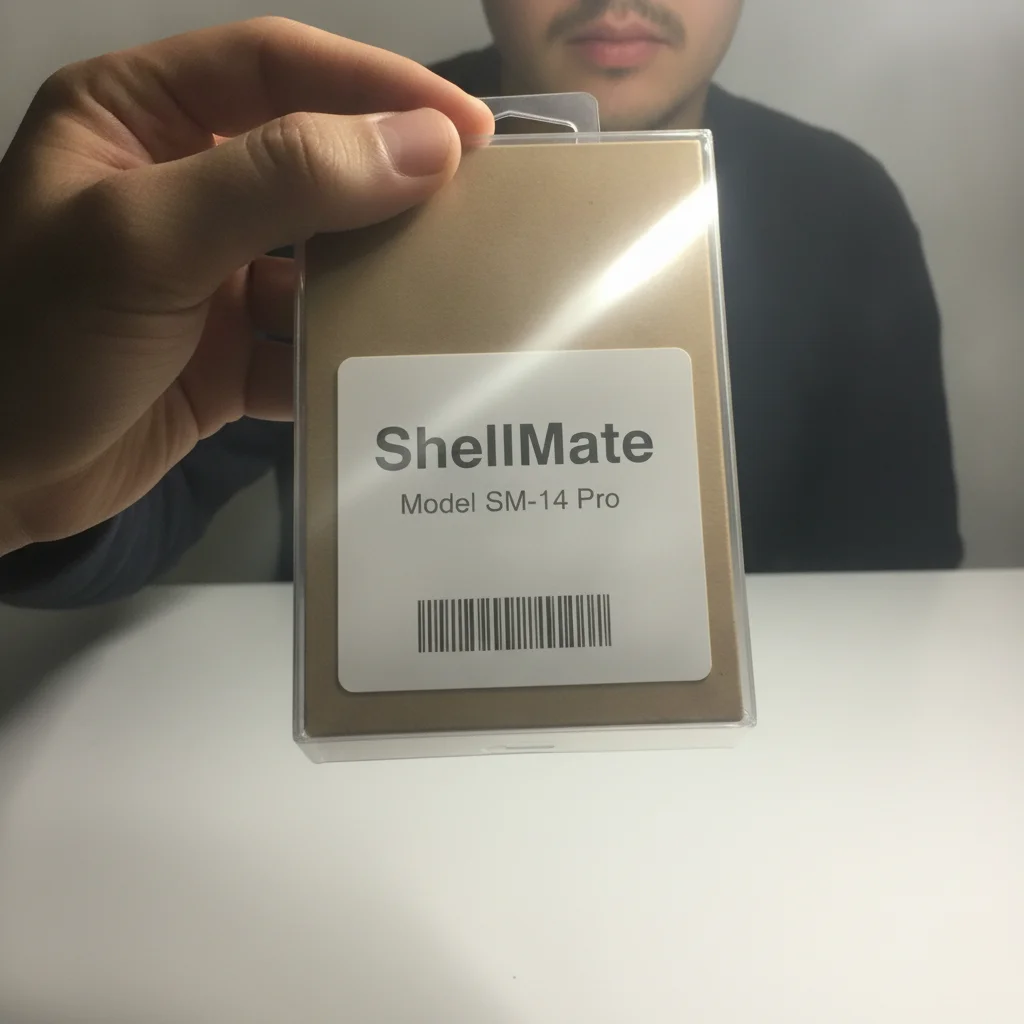
The same package on a clean backdrop in even light, its printed model name legible
After

Retail packaging cleaned up, text and barcode inspected

A phone case in its retail package over a cluttered desk in harsh mixed light. The desk goes and the light evens out. At full resolution the package still reads ShellMate / Model SM-14 Pro. The barcode block keeps its pattern, but it has been re-rendered rather than copied — the bars are drawn again, so treat a barcode in any edited image as artwork, not as something to scan.

Prompt: Turn this into a clean, ad-ready product still. Declutter the background completely — remove every stray object and mess behind and around the subject and replace it with a simple, uncluttered backdrop. Fix the lighting to bright, soft and flattering, with clean colour. Keep the person exactly as photographed: their face, features, hair, skin and pose must not change at all. Keep the product exactly as photographed: its shape, proportions, colours, logo, and every single word, letter and number printed on its label must stay identical, character for character. Do not restyle, redesign, replace, reword or re-typeset anything on the product. Do not remove the product or the hand holding it.
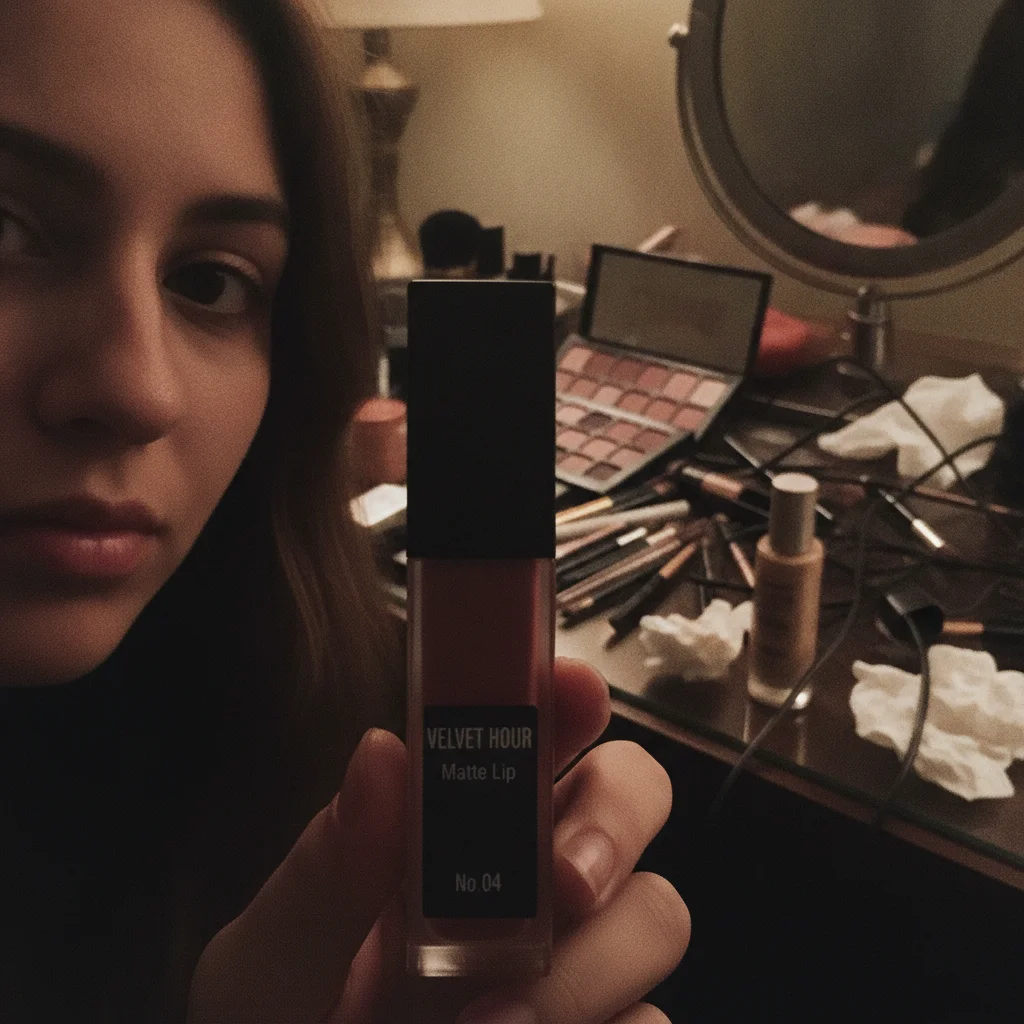
Creator holding a lipstick tube in front of a chaotic bedroom vanity in dim lamp light
Before
->
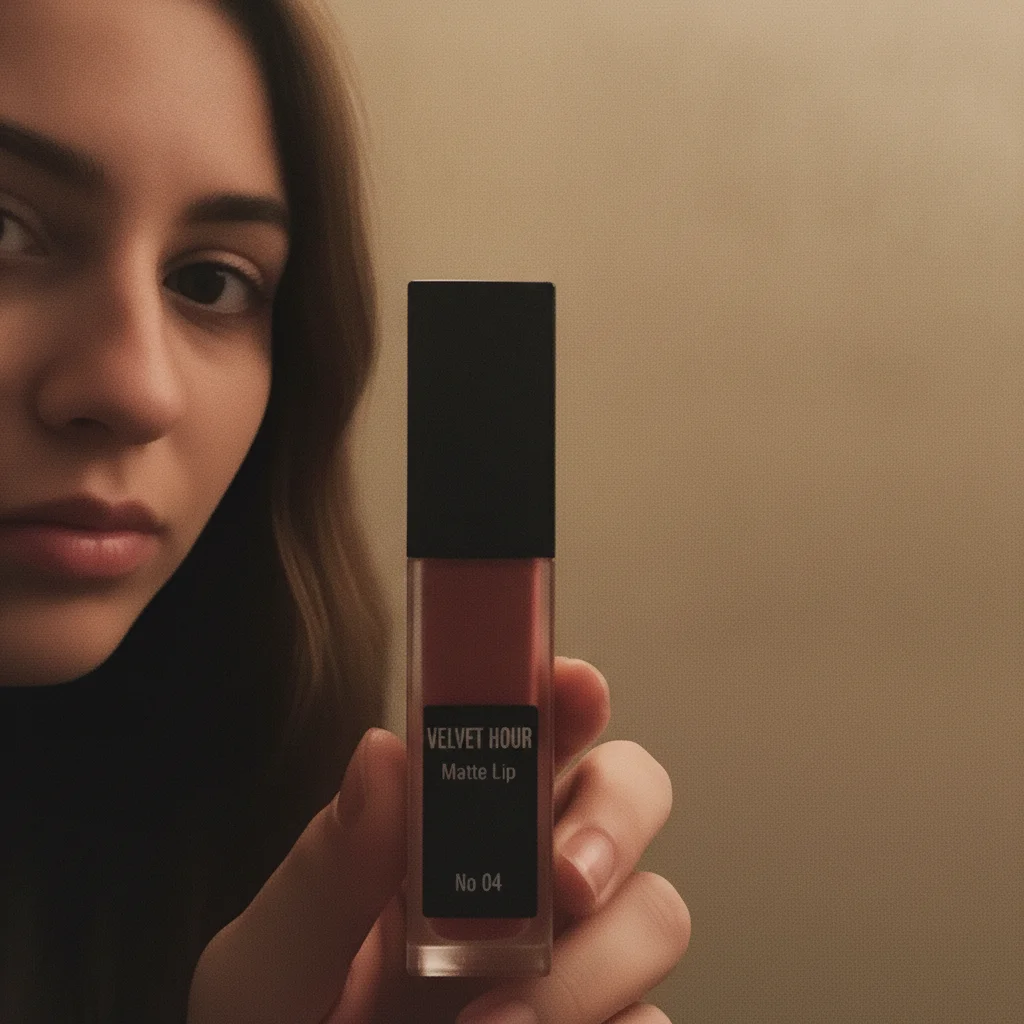
The same lipstick on a plain backdrop, its smallest label line returning as No 04 without the full stop
After

Where it stops: the smallest line on a lipstick tube

The honest counter-example, and the reason this page exists. The vanity behind the creator clears and the light evens out. VELVET HOUR and Matte Lip come back matching. The smallest line does not: "No.04" in the original returns as "No 04" — the full stop is gone. That happened on all three candidates we generated, so it is the boundary rather than bad luck. Large lines held; the smallest line did not.

Prompt: Turn this into a clean, ad-ready product still. Declutter the background completely — remove every stray object and mess behind and around the subject and replace it with a simple, uncluttered backdrop. Fix the lighting to bright, soft and flattering, with clean colour. Keep the person exactly as photographed: their face, features, hair, skin and pose must not change at all. Keep the product exactly as photographed: its shape, proportions, colours, logo, and every single word, letter and number printed on its label must stay identical, character for character. Do not restyle, redesign, replace, reword or re-typeset anything on the product. Do not remove the product or the hand holding it.

Quick answers

Why do AI photo editors change product labels?

Because they regenerate the pixels they touch instead of moving them. Text is just texture to that process, so a label is redrawn from what the model believes it says. That is why it comes back looking confidently typeset while occasionally saying something else.

What holds up, and what does not?

On our demo set the readable lines — brand name, product name, size — came back matching on eight of nine published images. The exception was the smallest line on a lipstick tube, where "No.04" returned as "No 04" every time. Treat comfortably readable wording as likely to hold and small print as re-drawn.

Why would a brand name get quietly "corrected"?

Because the model is completing text as much as copying it. Small wording that sits close to a familiar phrase gets pulled toward the familiar version: a test string reading "Earl Crey" was normalised toward "Grey" on every attempt, while a neutral string of the same size held. Coined brand names rendered small are the class most at risk, and the result looks like clean typography rather than an error.

What is the most useful thing to put in the prompt?

Name the label and then block a redesign: leave every word, letter and number printed on the label alone, and do not restyle, reword or re-typeset anything on the product. The first half stops rewording; the second stops a redesign that keeps the words but changes the type.

Does anything check the label for me?

No, and it would be wrong to let you believe otherwise. Nothing here inspects the output or vouches for a label. Reading it is a step you do: open the preview at full resolution and compare it with your original before you spend credits on the download.

Can I trust a barcode in an edited photo?

Treat it as artwork. In our test the barcode kept its pattern through the edit, but the bars were re-rendered rather than copied across — the pixels are drawn again. That is fine for a picture of a package and not something to rely on for scanning.

What if the label is small, angled, or catching glare?

Size is the one that matters. In testing, labels at 45 degrees, curved around a bottle, and shot through a glare stripe all came back character-exact — what failed was wording that sat small in the frame. So step closer rather than worrying about the angle. One thing worth knowing about glare: the text under it survives, but the glare stripe itself stays put, because the edit reads it as part of the label artwork rather than as something to clean off.

How much does EditThisPic cost?

You get 1 free edit per week — no account needed. After that, one-time credit packs start at $4.99 for 10 edits, valid 12 months, no subscription. Power users who edit daily can pick Studio Membership, a monthly workspace at $49.99/mo for 300 edits. Purchased downloads are clean with no watermark.

Edit without losing your label

Free to try. No signup required.

1 free edit included·Credit packs from $4.99