Pricing Edit Product photo with a person · Free

Ad-Ready Product Photos With a Person In Them

← Browse all ecommerce tools

Last updated

Two subjects in one frame, and both have to come back right: a real person’s face and a real product’s label. Most instructions protect one of them and quietly redraw the other.
Person at a gym holding a steel water bottle under harsh fluorescent light with kit scattered behind them The same person and bottle on a plain backdrop in neutral light

Upload photo to edit product photo with a person

"Replace the background behind the subject with a plain backdrop. Keep the person, their hand and their grip on the product as photographed, and leave the printed wording on the label alone."

Free to try · no sign-up · photos are never shared

Release to upload

<30stypical edit
1 freeedit weekly
Photo on your phone? Scan to open this editor there — free edit works on your phone too.

1 free edit every week·packs from $4.99

How it works

  1. Pick a frame where both subjects are readable

    The product should be turned toward the camera and the person should be fully in shot. Frame the whole person — someone cut off at the frame edge can confuse the cleanup, because the background replacement has to invent what continues past the crop.

    Expect: A two-subject cleanup runs 20-30 seconds.
  2. Name both subjects, not one

    This is the step that decides the result. Name the person and the product in the same sentence: "Keep the person exactly as photographed — face, features, hair and pose. Keep the product exactly as photographed, including the words, letters and numbers printed on its label. Do not restyle, redesign, reword or re-typeset anything on the product." Naming only the face tends to let the packaging drift; naming only the product tends to let the face soften.

    Tip: Mention the hand as well. Hands holding objects are where a background replacement most often goes wrong, because the new background is being drawn right up against the fingers.

    Copy one of these to get started:

    Both subjects named Replace the cluttered background with a plain, softly lit backdrop and even out the lighting. Keep the person exactly as photographed — face, features, hair and pose. Keep the product exactly as photographed, including the words, letters and numbers printed on its label. Do not restyle, redesign, reword or re-typeset anything on the product.
    Protect the hand and grip Replace the background behind the subject with a plain backdrop. Keep the person, their hand and their grip on the product as photographed, and leave the printed wording on the label alone.
    Natural skin, no retouching Even out the lighting on the face with soft natural light. Keep skin texture, freckles and features as they are — no smoothing or retouching. Leave the product and its label alone.
    Two people in frame Tidy the background and even the lighting. Keep both people as photographed, and leave the product and its printed wording alone.
    1 more prompts
    Person stays, room goes Remove everything in the background and replace it with a plain, softly lit backdrop, keeping the person and the product they are holding as photographed.
  3. Check the face, the hand and the label

    Three checks in that order: does the person still look like themselves, is the hand still holding the product plausibly, and does the packaging read as it did. Do the last one at full size in the preview.

See it in action

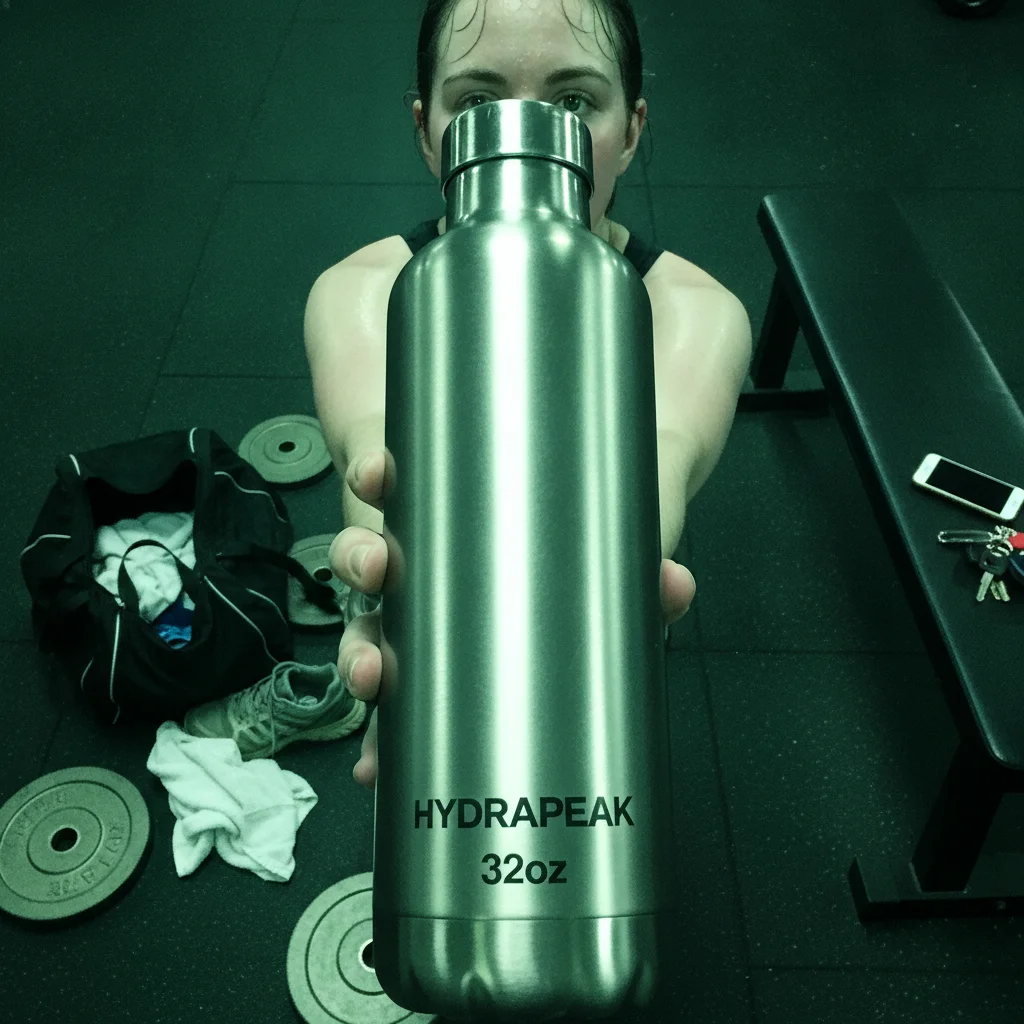
Person at a gym holding a steel water bottle under harsh fluorescent light with kit scattered behind them
Before
->
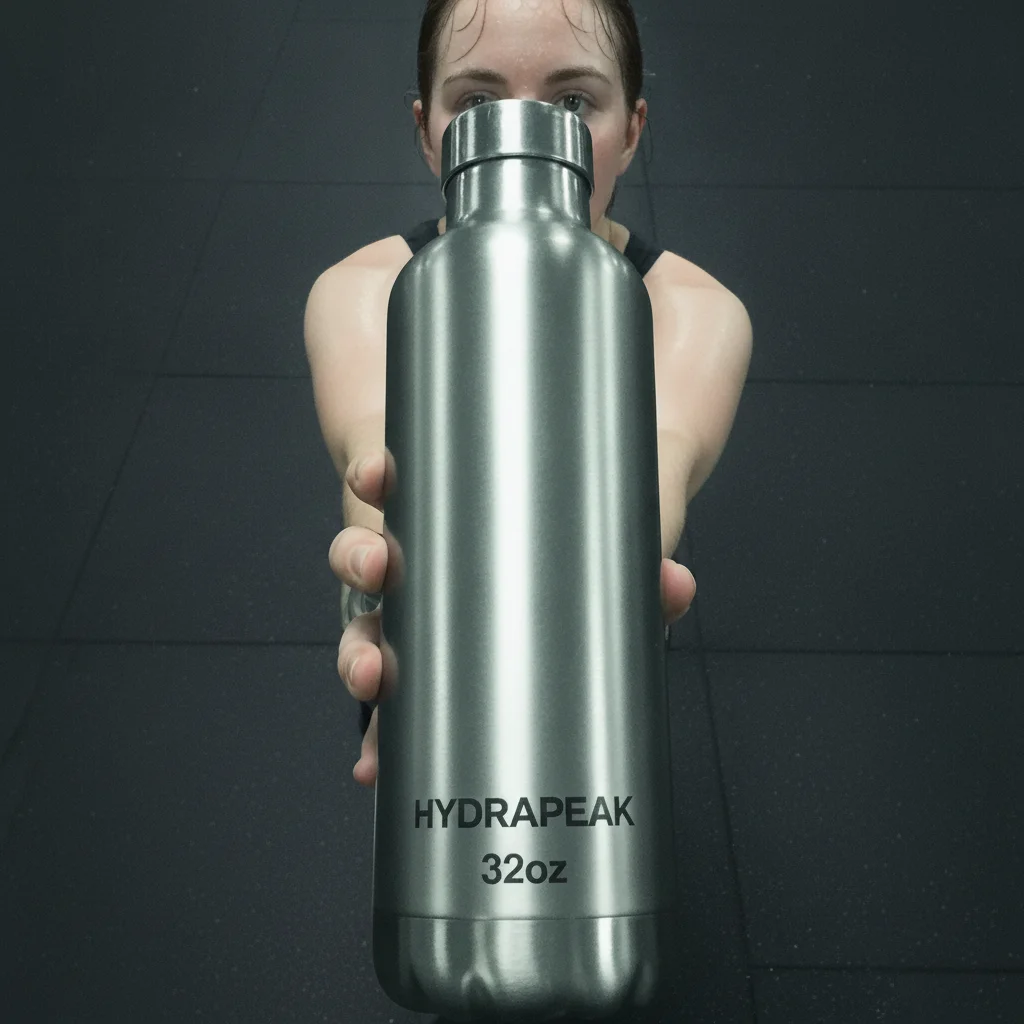
The same person and bottle on a plain backdrop in neutral light
After

Gym water bottle shot with the face and the label both checked

A person at a gym holding a steel bottle under fluorescent light with a strong green-cyan cast, kit scattered behind them. The cleanup replaces the gym floor with a plain backdrop and neutralises the cast. At full resolution the bottle still reads HYDRAPEAK / 32oz, and the face reads as the same person.

Prompt: Turn this into a clean, ad-ready product still. Declutter the background completely — remove every stray object and mess behind and around the subject and replace it with a simple, uncluttered backdrop. Fix the lighting to bright, soft and flattering, with clean colour. Keep the person exactly as photographed: their face, features, hair, skin and pose must not change at all. Keep the product exactly as photographed: its shape, proportions, colours, logo, and every single word, letter and number printed on its label must stay identical, character for character. Do not restyle, redesign, replace, reword or re-typeset anything on the product. Do not remove the product or the hand holding it.

Quick answers

Can it hold both the face and the product label?

That is what naming both in one sentence is for, and it is worth doing explicitly rather than hoping. In our demos the person came back recognisable and the large label lines matched. Naming only one of the two is the reliable way to let the other drift.

What happens to the hand holding the product?

Hands are the most fragile part of this edit, because the new background is drawn right up against them. Naming the hand and its grip helps. So does starting from a photo where the whole person is in frame rather than cropped at the edge.

How much of the label holds up?

It tracks how large the wording sits in frame. Lines you can read comfortably — brand, product, size — are the ones the prompt is written to hold. Anything sitting small is re-drawn instead, so ingredient panels and legal type come back plausible rather than correct. If your brand name is a coined word, get the creator to fill more of the frame with the product: small invented wording is the case most likely to be quietly normalised toward a real one.

Does it retouch the person’s skin?

It can, as a side effect of a general request to improve the photo. Adding "keep skin texture as photographed, no smoothing" keeps the person looking like a person — which is usually the whole point of using their photo instead of a stock model.

Can it remove other people from the background?

Yes, and it will do so by default when you ask for the background cleared, since bystanders read as clutter. If someone should stay, say how many people belong in the frame.

Is this the same as an AI on-model generator?

No. On-model tools synthesise a person to hold or wear your product. This keeps the real person who was photographed with it, which is what makes the image work as social proof rather than as an illustration.

How much does EditThisPic cost?

You get 1 free edit per week — no account needed. After that, one-time credit packs start at $4.99 for 10 edits, valid 12 months, no subscription. Power users who edit daily can pick Studio Membership, a monthly workspace at $49.99/mo for 300 edits. Purchased downloads are clean with no watermark.

Clean up a person-and-product shot

Free to try. No signup required.

1 free edit included·Credit packs from $4.99