Pricing Declutter Product photo · Free

Declutter a Product Photo for Ads

← Browse all ecommerce tools

Last updated

In a paid feed the eye lands on whatever is busiest. If that is a stack of dishes behind your product, the ad is working hard for the dishes.

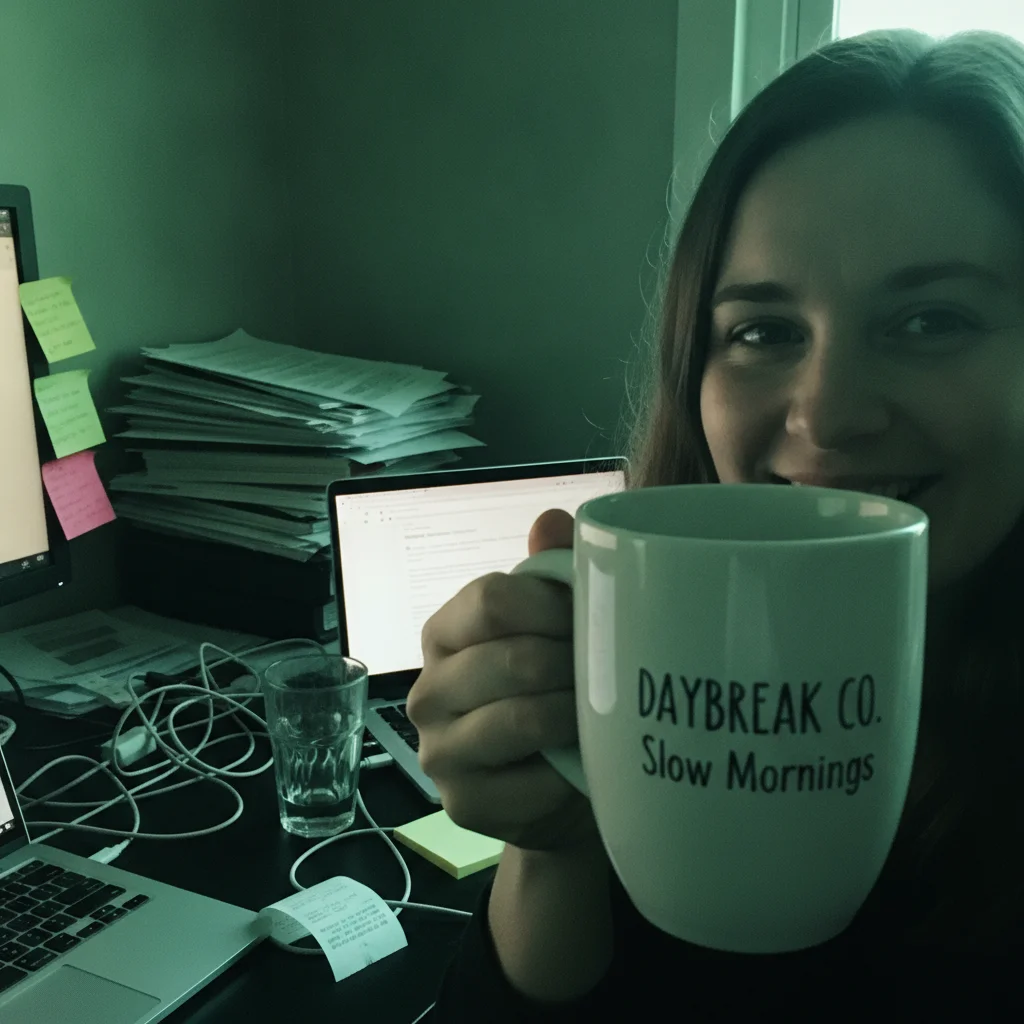
Woman holding a ceramic mug in front of a cluttered desk piled with paper, cables and sticky notes under a green cast The same woman and mug on a plain backdrop in neutral light with the desk cleared

Upload photo to declutter product photo

"Remove the dishes, the cables and the papers from the background, leaving the room otherwise as it is. Do not change the product or the person."

Free to try · no sign-up · photos are never shared

Release to upload

<30stypical edit
1 freeedit weekly
Photo on your phone? Scan to open this editor there — free edit works on your phone too.

1 free edit every week·packs from $4.99

How it works

  1. Upload the cluttered shot

    Desks, counters, sofas, gym floors and shelves all work. The product should read as the subject rather than as one object among many. Frame the whole person if someone is holding it — a subject cut off at the frame edge can confuse the cleanup.

    Expect: Declutter passes run about 20 seconds.
  2. Choose: clear everything, or name the offenders

    Broad — remove all the clutter and replace it with a plain backdrop — is faster and more consistent. Specific — remove the mugs, cables and papers — keeps more of the room. Either way, name the product and the hand holding it.

    Tip: Naming objects is the safer choice when part of the setting is doing useful work in the ad.

    Copy one of these to get started:

    Clear everything, plain backdrop Remove every stray object and all the mess behind and around the subject and replace it with a simple, uncluttered backdrop with a soft natural shadow. Keep the product, the hand holding it, and the wording on the label as photographed.
    Name the specific offenders Remove the dishes, the cables and the papers from the background, leaving the room otherwise as it is. Do not change the product or the person.
    Tidy but stay in a real room Tidy the background so it reads as a clean, simple home setting rather than a studio backdrop. Leave the product and its label alone.
    Ground it with a shadow Replace the cluttered background with a plain backdrop and add a soft, natural contact shadow beneath the product so it sits in the scene.
    1 more prompts
    Clear the colour cast too Remove the background clutter and neutralise the colour cast so whites read as white, keeping the product’s own colour true and the label wording alone.
  3. Check the edges and the ground

    Look where the product meets the new background, and at the shadow under it. A halo at the edge and a missing contact shadow are the two tells that make a declutter look pasted.

See it in action

Woman holding a ceramic mug in front of a cluttered desk piled with paper, cables and sticky notes under a green cast
Before
->
The same woman and mug on a plain backdrop in neutral light with the desk cleared
After

Cluttered home-office desk cleared behind a mug

A creator holding a ceramic mug in front of a badly cluttered desk — leaning paper, a snarl of cables, sticky notes — under mixed light with a heavy green-cyan cast. The desk goes and the cast lifts. Worth knowing what you are looking at: the mug appears to change from green to white, but the cast was global — white paper in the original measures green too — so the white mug is the cast being removed, not the product being recoloured. The lettering still reads DAYBREAK CO. / Slow Mornings.

Prompt: Turn this into a clean, ad-ready product still. Declutter the background completely — remove every stray object and mess behind and around the subject and replace it with a simple, uncluttered backdrop. Fix the lighting to bright, soft and flattering, with clean colour. Keep the person exactly as photographed: their face, features, hair, skin and pose must not change at all. Keep the product exactly as photographed: its shape, proportions, colours, logo, and every single word, letter and number printed on its label must stay identical, character for character. Do not restyle, redesign, replace, reword or re-typeset anything on the product. Do not remove the product or the hand holding it.

Quick answers

How do I remove clutter from a product photo?

Ask for the background mess to be removed and replaced with a plain, uncluttered backdrop, and name the product and any hand holding it as things to leave alone. It takes about 20 seconds, and the preview is free to look at before you spend credits on a download.

Is this the same as removing the background?

No, and the difference matters for ads. Background removal leaves a cutout on transparency, which still needs a backdrop and a shadow before it can run anywhere. Decluttering replaces the mess with a usable background in one pass, so the result is already an image.

Will the product itself change?

The readable wording on the packaging is what the prompt is written to hold, and on our demos it came back matching. Small print is a different story — it is re-drawn rather than carried over. Colour can also move if the room was casting, so check the preview at full size.

Can I keep the room and remove only specific things?

Yes — name them. "Remove the mugs, cables and papers, leaving the room otherwise as it is" keeps the lifestyle setting while clearing what competes with the product. For social placements that often beats a plain backdrop.

Why does my decluttered product look like it is floating?

Because it lost its contact shadow. Ask for the plain backdrop and a soft natural contact shadow beneath the product in the same prompt, and it sits in the scene instead of hovering above it.

Will other people in the background be removed?

A general instruction to clear the background usually takes bystanders with it, since it treats anyone who is not the subject as clutter. If someone should stay, say how many people belong in the frame.

How much does EditThisPic cost?

You get 1 free edit per week — no account needed. After that, one-time credit packs start at $4.99 for 10 edits, valid 12 months, no subscription. Power users who edit daily can pick Studio Membership, a monthly workspace at $49.99/mo for 300 edits. Purchased downloads are clean with no watermark.

Clear the clutter behind your product

Free to try. No signup required.

1 free edit included·Credit packs from $4.99