Free • No signup Apply Ghibli filter · Free

Apply Ghibli Filter to Photo

Type what you want. Turn any photo into dreamy Ghibli art in seconds.

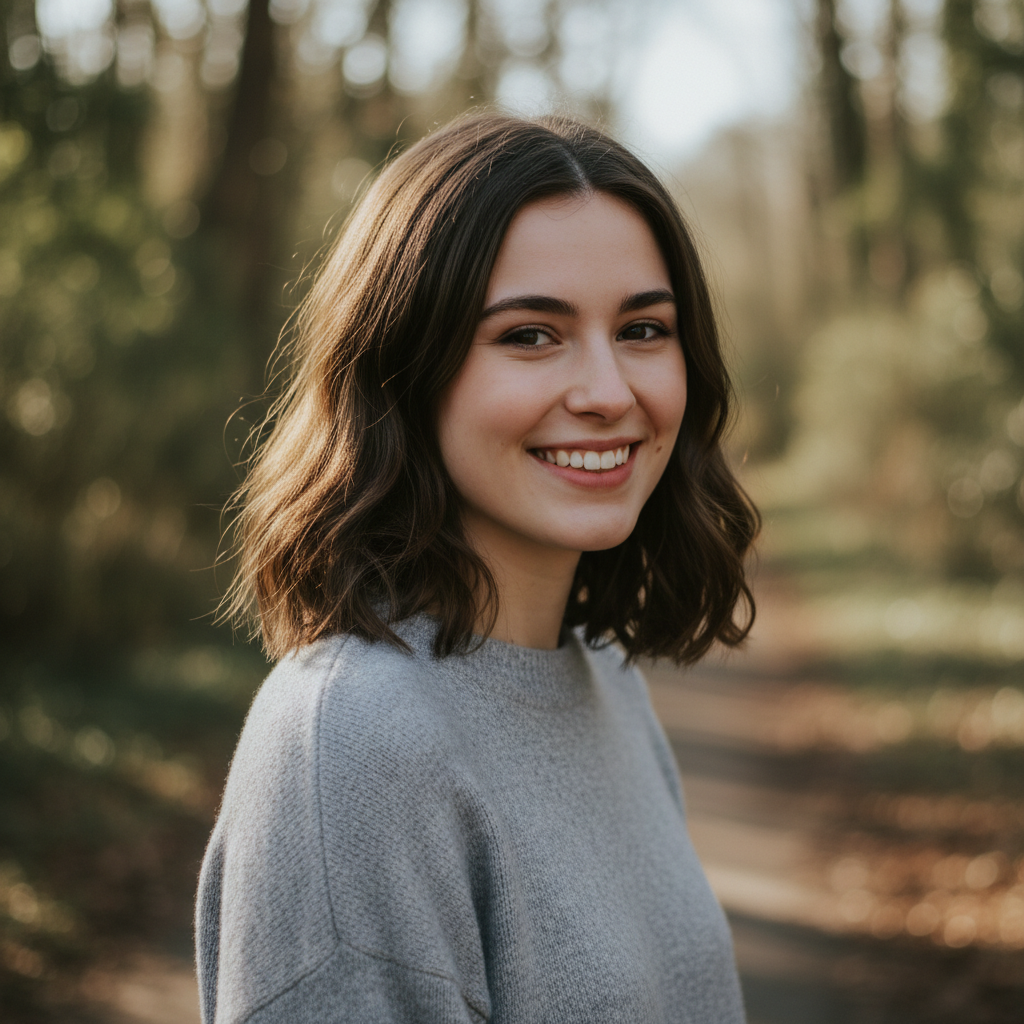
Casual portrait photo of a young woman smiling
Before
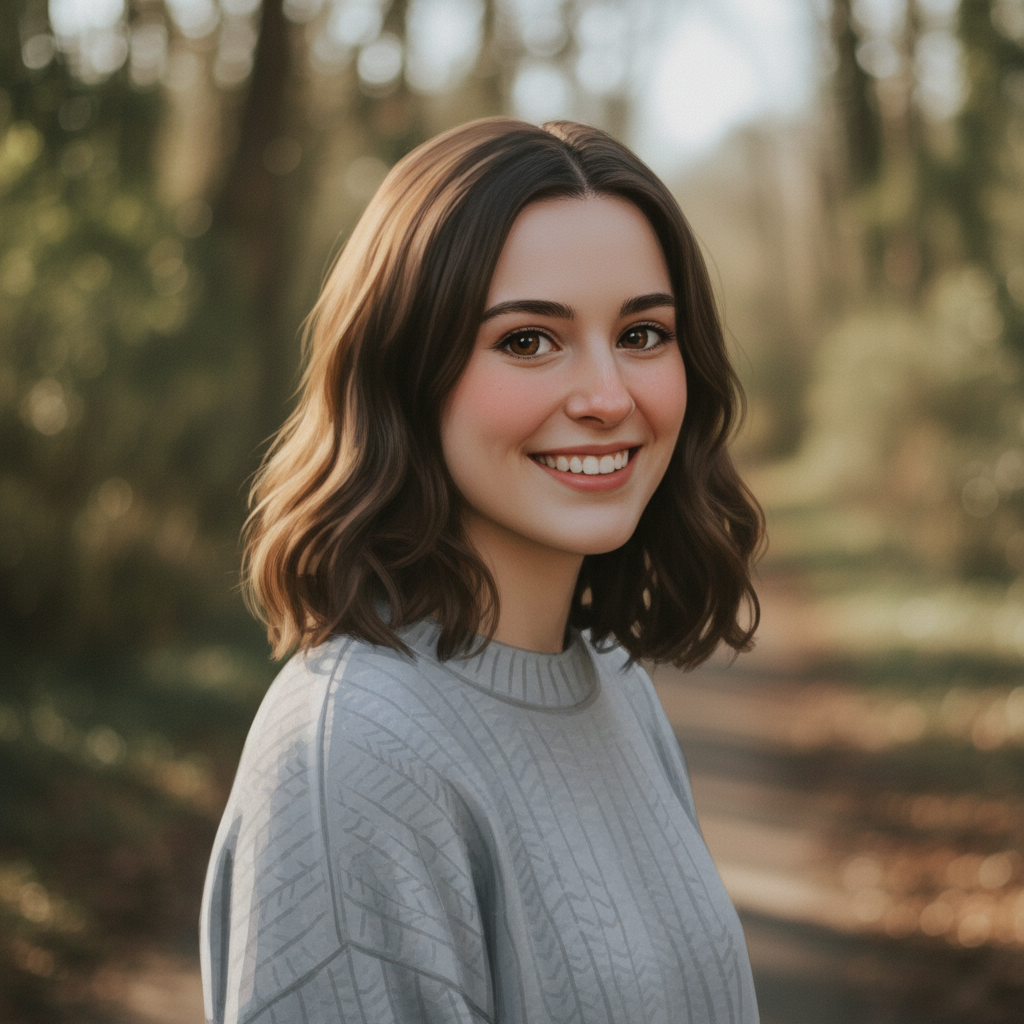
Same portrait transformed into Ghibli anime style character
After

Apply Ghibli Filter to Photo

Drop your photo here

or click to browse

Release to upload

Free • No signup

Advertisement
Popular use cases:
  • Studio Ghibli fans
  • Anime art lovers
  • Social media profiles
  • Digital art enthusiasts
  • Miyazaki aesthetic
  • Profile picture transformation
  • Landscape art conversion

Cost
Free No signup required
Time
Instant results in 15-30 seconds
Works on
Any device - browser, phone, tablet, desktop
Powered by
AI-powered photo editing
Scenario Prompt Time
Classic Ghibli transform into Studio Ghibli art style with soft colors and dreamy atmosphere 20s
Spirited Away make this look like a scene from Spirited Away with magical atmosphere 20s
Totoro countryside convert to Totoro-style Ghibli aesthetic with warm summer colors 20s
Portrait transform portrait into Ghibli character style with expressive eyes 25s

How it works

  1. Upload your photo

    Drop your image into EditThisPic. JPG, PNG, and WebP up to 7MB work best. Landscapes, portraits, and pet photos all work beautifully for Ghibli transformations.

    Expect: Simple photos: 15-30 seconds. Complex scenes with lots of detail: may need 1-2 refinements.
  2. Describe the Ghibli style you want

    Type your instruction: 'transform this photo into Studio Ghibli art style' or 'convert to Miyazaki anime style with soft colors and painterly look.' The AI understands what Ghibli aesthetic means - those dreamy skies, lush greens, and hand-painted textures.

    Tip: Mention specific Ghibli films for different moods: 'Spirited Away' for magical vibes, 'My Neighbor Totoro' for warm countryside, 'Howl's Moving Castle' for fantastical scenes.

    Copy one of these to get started:

    Classic Ghibli transformation transform this photo into Studio Ghibli art style with soft colors, dreamy atmosphere, and hand-painted look
    Spirited Away magical vibe make this look like a scene from Spirited Away with ethereal lighting, rich colors, and mystical Ghibli atmosphere
    Totoro countryside feel convert to Miyazaki anime style like My Neighbor Totoro - warm summer colors, lush green grass, fluffy clouds, nostalgic countryside aesthetic
    Portrait to Ghibli character transform this portrait into Ghibli anime art style - expressive eyes, soft shading, warm skin tones, whimsical character feel
    2 more prompts
    Landscape to Ghibli background turn this landscape into a Ghibli movie background - painterly clouds, soft lighting, detailed foliage, that distinctive hand-painted texture
    Pet in Ghibli style apply Ghibli aesthetic to this pet photo - soft fur texture, warm expressive eyes, Miyazaki anime style, like a creature from a Ghibli film
  3. Generate and review

    Tap generate and examine the result. Check that the painterly texture looks right and colors have that warm, nostalgic Ghibli quality. The best results feel like they could be a frame from an actual Miyazaki film.

  4. Refine with markers if needed

    If certain areas need more Ghibli treatment or you want to preserve specific details, tap markers on those spots and regenerate. Most Ghibli transformations work perfectly on the first try.

    Tip: Markers are optional. Try without them first - Ghibli style is a whole-image transformation that usually just works.
Try it free

Apply Ghibli Filter to Photo

Drop your photo here

or click to browse

Release to upload

Free • No signup

"I've been trying to get that Ghibli look for months. Just typed what I wanted and it actually worked. My cat looks like he belongs in Totoro now." @ArtistMelody

See it in action

Casual portrait photo of a young woman smiling
Before
->
Same portrait transformed into Ghibli anime style character
After

Portrait to Ghibli character

A casual selfie converted into Ghibli anime style - the person now looks like they could star in a Miyazaki film.

Prompt: transform this portrait into Ghibli anime art style - expressive eyes, soft shading, warm skin tones, whimsical character feel
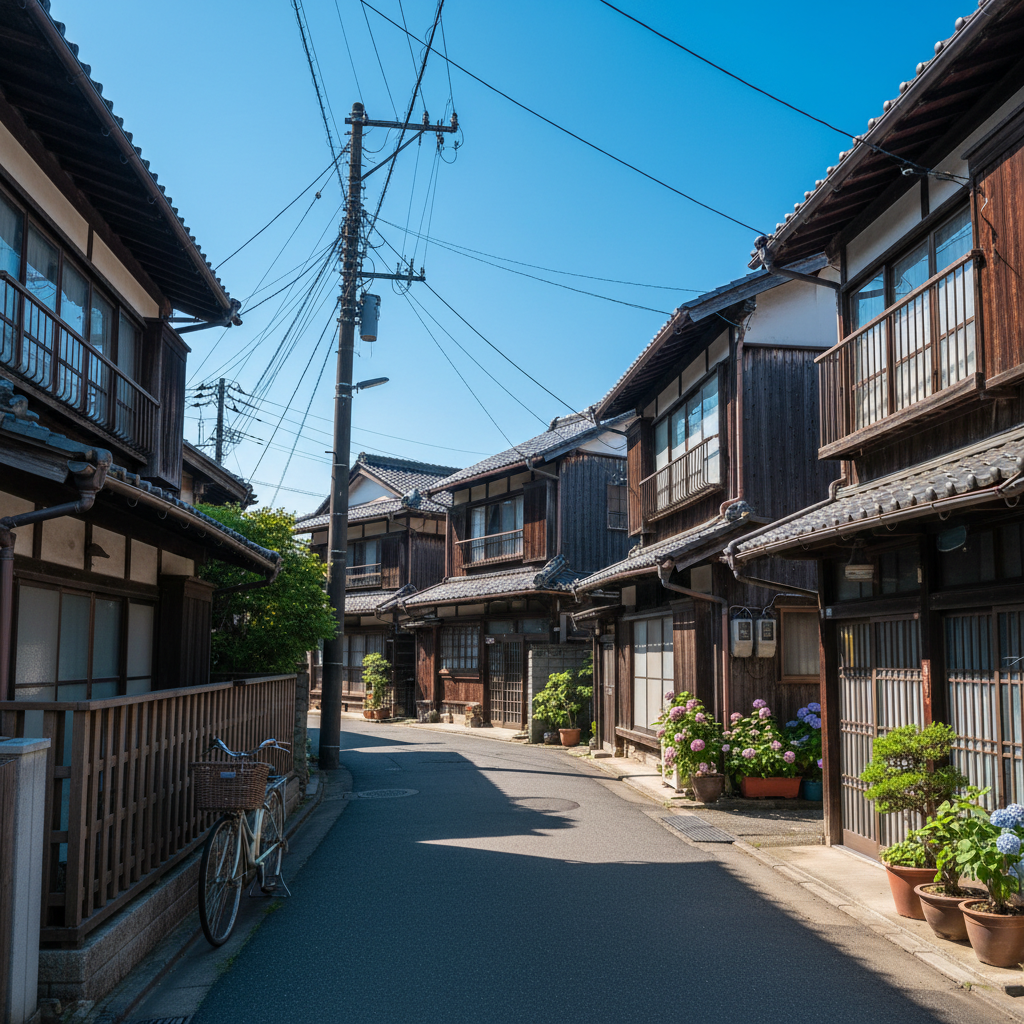
Regular photo of a quiet Japanese neighborhood street
Before
->
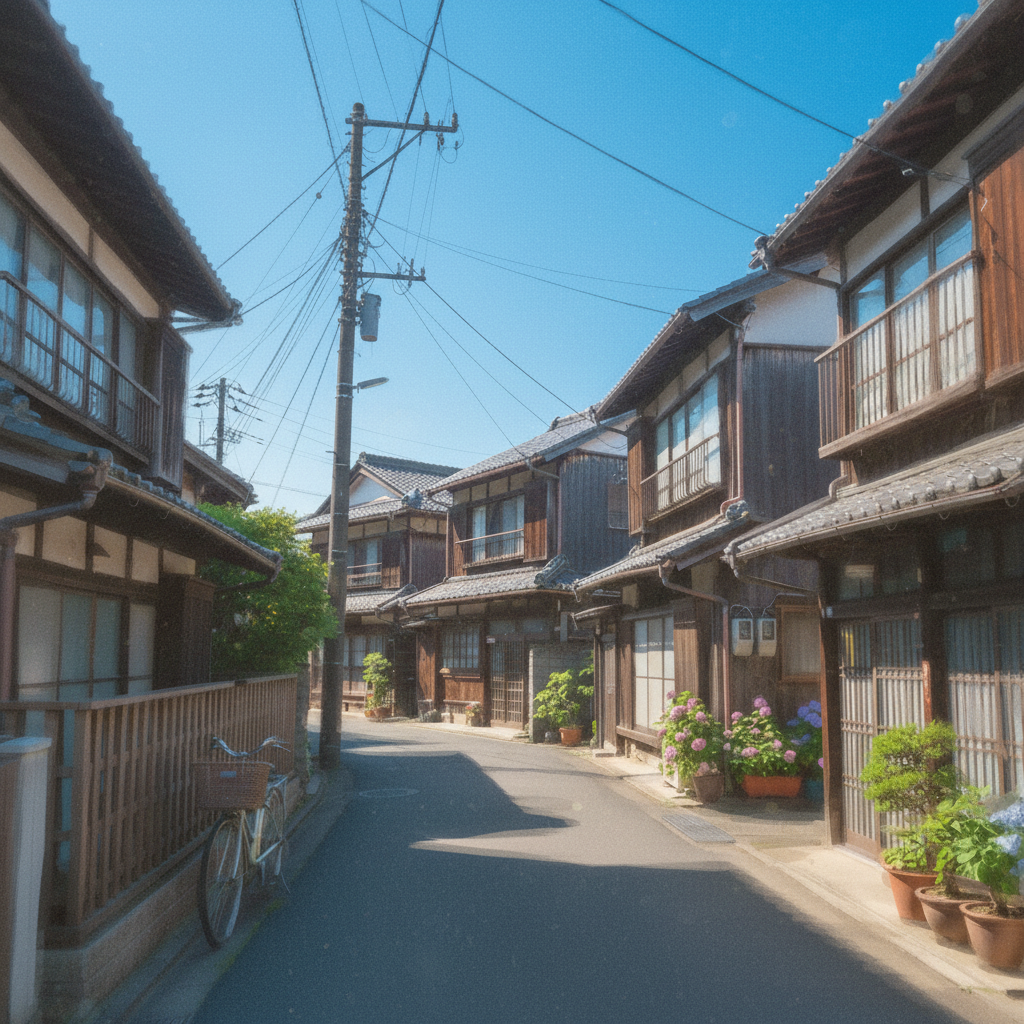
Same street scene transformed into Studio Ghibli art style
After

Japanese street scene to Ghibli world

A regular photo of a quiet Japanese neighborhood street transformed into a scene that could be from a Miyazaki film.

Prompt: transform this photo into Studio Ghibli art style with soft colors, dreamy atmosphere, and hand-painted look
Advertisement

If something looks off

Result looks too cartoon-like, not enough Ghibli magic

Why: Generic anime style differs from Ghibli's distinctive painterly aesthetic. The AI needs more specific guidance about the Ghibli look.

Try: transform into authentic Studio Ghibli art style with hand-painted textures, watercolor-like backgrounds, soft dreamy lighting, Miyazaki's distinctive aesthetic

Tip: Mention 'hand-painted' and 'watercolor' to get that authentic Ghibli texture rather than generic digital anime.

Colors are too saturated or look artificial

Why: The AI may have over-processed the colors. Ghibli uses warm, natural palettes with soft pastels.

Try: apply Ghibli style with warm muted colors, soft pastels, natural earthy tones like in Miyazaki films, not oversaturated

Tip: Ghibli palettes lean toward warm oranges, soft greens, and gentle blues - never neon or harsh colors.

AI changed the wrong area or something I didn't want changed

Why: The AI couldn't determine exactly which area you meant from description alone.

Try: Tap a marker on the specific area you want to keep unchanged, then regenerate with the same prompt

Tip: Markers tell the AI 'I mean THIS one specifically.' Use them when description alone is ambiguous.

Face looks distorted or unrecognizable

Why: Style transfer can be aggressive on faces. The AI needs guidance to preserve facial features.

Try: transform into Ghibli anime style while preserving facial structure and recognizable features, gentle stylization

Tip: Adding 'preserving facial features' helps maintain likeness while still achieving the Ghibli look.

Quick answers

Do I need to mark anything before applying the Ghibli filter?

No. Just describe what you want: 'transform this photo into Studio Ghibli art style.' The AI applies the style to your entire image automatically. Markers are only needed if you want to preserve certain areas unchanged.

How do I get the Ghibli AI filter for free?

Upload your photo to EditThisPic and type 'transform this photo into Studio Ghibli art style.' The AI transforms your image in 15-30 seconds. No account, no login, no watermarks. Works on any device with a web browser.

Is there a free Studio Ghibli filter without signup?

Yes. EditThisPic offers free Ghibli-style transformations with no account required. Just upload, describe the style you want, and download your result. No watermarks added to your images.

What is the best AI tool for Ghibli-style photos?

EditThisPic is a free option that produces authentic Ghibli results. Unlike preset filters, you can describe exactly the style you want - whether Spirited Away's magical atmosphere or Totoro's warm countryside feel. The AI understands these references.

Ready to enter the Ghibli universe?

Free to try. No signup required.

Try it free