Free • No signup Transform Photo style · Free

Transform Photo to Steampunk Style

← Browse all creative effects

Last updated

Give any photo the look of a steampunk world — brass machinery, Victorian atmosphere, and industrial fantasy.
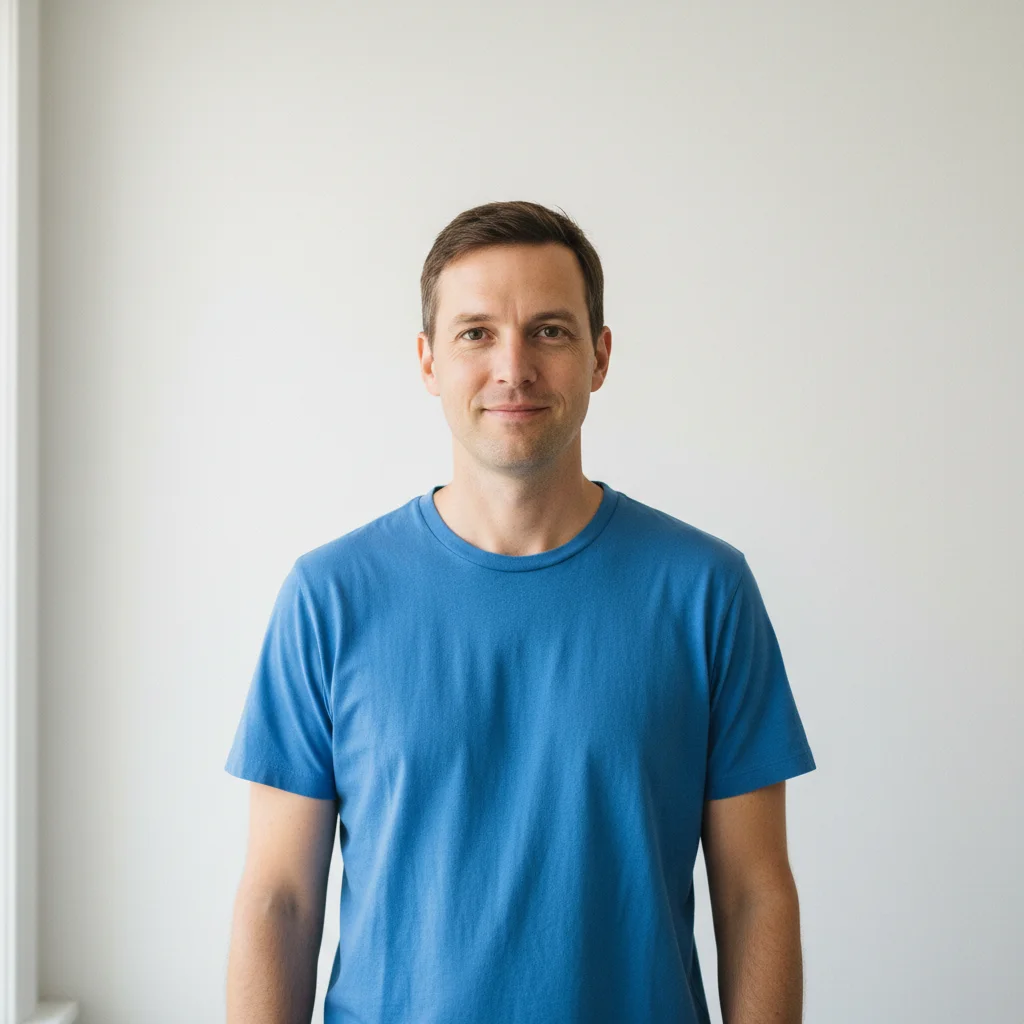
Casual portrait of a man in blue t-shirt against white wall
Before
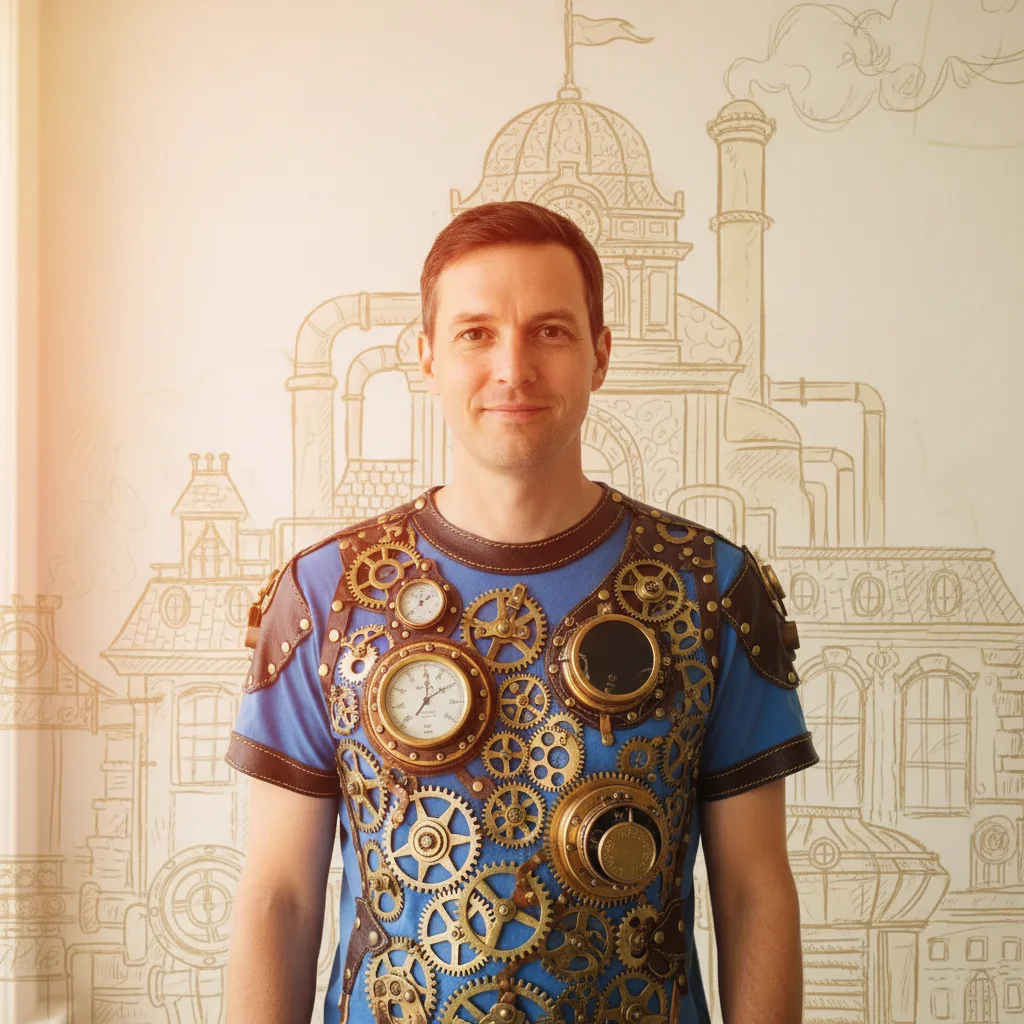
Same portrait transformed into steampunk inventor style with brass gear elements and warm amber tone
After

Upload photo to transform photo style

"give this person a steampunk inventor look with goggles, leather jacket, brass pocket watch, and a mechanical workshop background with steam pipes"

Release to upload

FreeNo signupNo watermark

1 free edit·then from $1.99

Popular use cases:
  • steampunk photo effect
  • Victorian photo filter
  • brass gear photo style
  • industrial fantasy photo transformation
  • steampunk portrait effect

Cost
Free No signup required
Time
Instant results in 15-30 seconds
Works on
Any device - browser, phone, tablet, desktop
Powered by
AI-powered photo editing
Scenario Prompt Time
Portrait transform this into steampunk aesthetic with brass gears, Victorian industrial atmosphere, warm amber lighting 25s
Landscape transform this into a steampunk industrial scene with Victorian factories and warm sepia color grade 35s
Minimal accent add subtle steampunk elements — brass gear overlays, light sepia tone, visible rivet details 20s

How it works

  1. Upload your photo

    Drop any portrait, landscape, or object photo into EditThisPic. JPG, PNG, or WebP up to 7MB. Portraits with neutral or simple backgrounds respond well to steampunk transformation. Industrial or urban settings can be reimagined with Victorian steam-era character.

    Expect: Simple portraits: 20-30 seconds. Complex scenes with many elements: 35-50 seconds.
  2. Describe the steampunk style you want

    Type your instruction: 'transform this into steampunk aesthetic with brass gears, Victorian industrial atmosphere, and warm amber lighting' or 'give this person steampunk attire with goggles and a mechanical workshop background.' No need to mark areas — the AI applies the visual style from your text description.

    Tip: Add 'warm sepia and amber color palette' or 'visible rivets and steam pipes in the background' for more authentic steampunk character. Describing specific material textures — brass, leather, copper — gives richer results.

    Copy one of these to get started:

    Victorian steampunk portrait transform this into steampunk aesthetic with brass gears, Victorian industrial atmosphere, warm amber lighting, and copper accents
    Workshop inventor character give this person a steampunk inventor look with goggles, leather jacket, brass pocket watch, and a mechanical workshop background with steam pipes
    Sepia industrial landscape transform this photo into a steampunk industrial scene with Victorian steam-era factories, smoking chimneys, and a warm sepia color grade
    Minimal steampunk accent add subtle steampunk elements to this photo — brass gear overlays, light sepia tone, and visible rivet details without a complete transformation
    3 more prompts
    Airship captain aesthetic transform this portrait into a steampunk airship captain — long coat with brass buttons, goggles, leather gloves, cloudy dramatic sky with an airship silhouette in the background
    Clockwork mechanical transform this into a steampunk clockwork aesthetic with exposed gear mechanisms visible, copper pipe framing, and a warm candlelit atmosphere
    Dark Victorian steampunk give this a dark Victorian steampunk look — charcoal and brass tones, gas lamp lighting, cobblestone streets, and heavy industrial machinery in the background
  3. Review the transformation

    Look for the hallmarks of steampunk aesthetic — warm amber and sepia tones, mechanical gear and pipe elements, Victorian-era costume details on figures, and an aged industrial atmosphere. Check that faces retain recognizable features while gaining the period character.

  4. Refine specific areas if needed

    If the background machinery effect is too heavy or costume details need adjustment, tap markers on those zones and regenerate with more specific style guidance. This step is optional — most transformations work well in one attempt.

    Tip: For portraits: markers on the background help concentrate the gear-and-steam elements there while keeping the face natural.
Try it free

Upload photo to transform photo style

"transform this photo into a steampunk industrial scene with Victorian steam-era factories, smoking chimneys, and a warm sepia color grade"

Release to upload

Free • No signup

See it in action

Casual portrait of a man in blue t-shirt against white wall
Before
->
Same portrait transformed into steampunk inventor style with brass gear elements and warm amber tone
After

Portrait to steampunk inventor

A casual portrait transformed with Victorian steampunk costume and workshop atmosphere.

Prompt: transform this into steampunk aesthetic with brass gears, Victorian industrial atmosphere, warm amber lighting, and copper accents
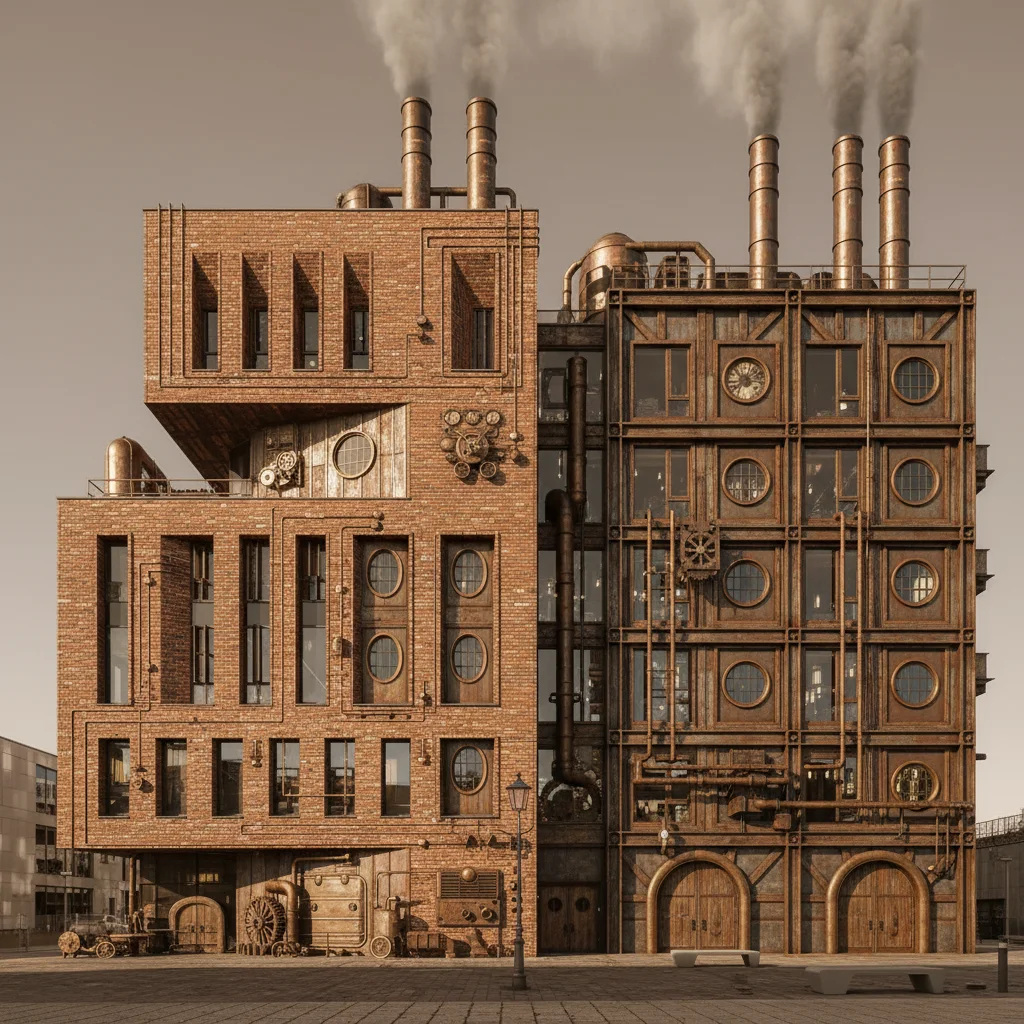
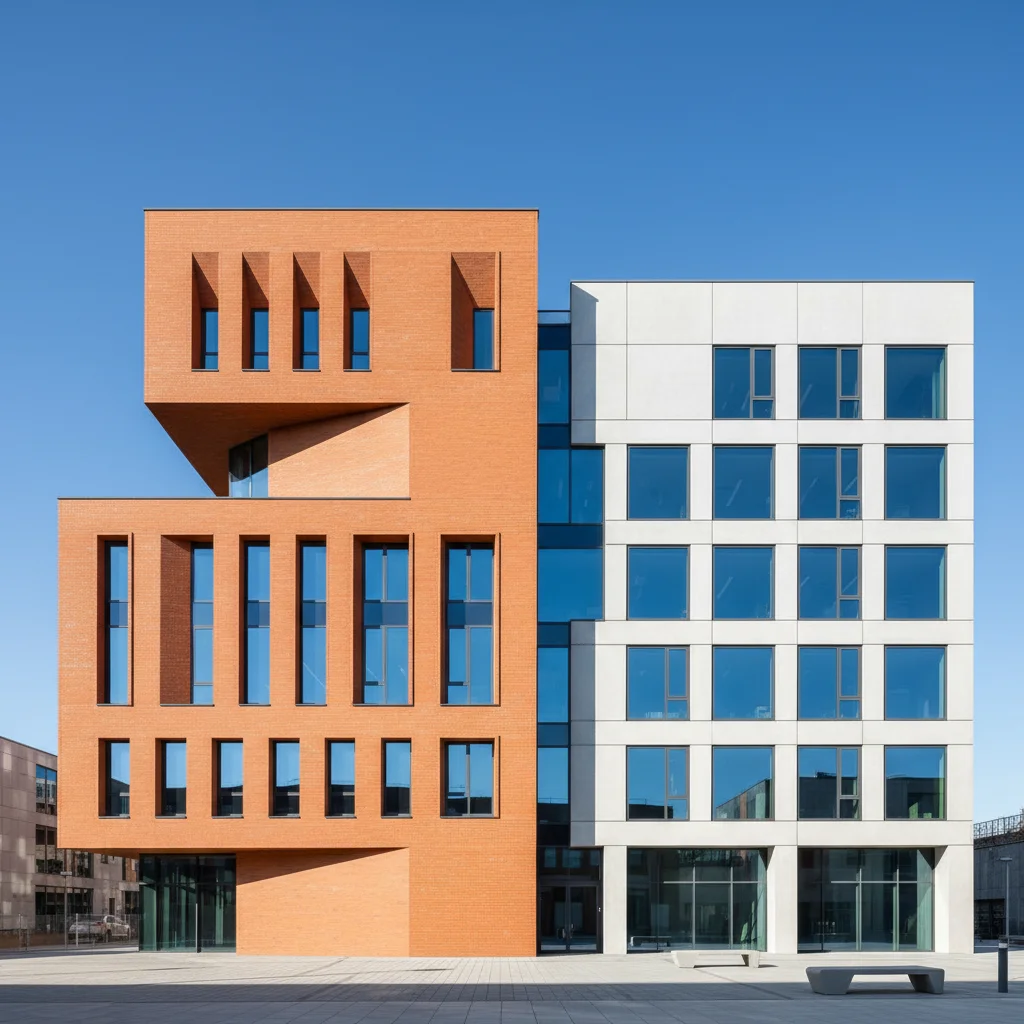
Modern orange brick building exterior under blue sky
Before
->
Same building transformed into a Victorian steampunk industrial factory with sepia tones and smokestacks
After

Urban building to steam-era factory

A modern building exterior reimagined as a Victorian steam-era industrial structure.

Prompt: transform this photo into a steampunk industrial scene with Victorian steam-era factories, smoking chimneys, and a warm sepia color grade
Portrait of a woman in red blazer against grey background
Before
->
Same woman transformed into steampunk airship captain with goggles, long coat, and airship in dramatic sky background
After

Portrait with airship captain character

A plain photo transformed into an elaborate steampunk character with costume and setting.

Prompt: transform this portrait into a steampunk airship captain — long coat with brass buttons, goggles, leather gloves, cloudy dramatic sky with an airship silhouette in the background

If something looks off

The steampunk elements are too subtle

Why: The AI applied a conservative transformation without enough visual weight.

Try: apply dramatic steampunk transformation — large visible brass gears, exposed copper pipes, prominent Victorian mechanical elements, deep amber tones

Tip: Use 'dramatic' or 'heavy steampunk' in your prompt to push the effect further.

AI changed the wrong area or something I didn't want changed

Why: The AI couldn't determine exactly which area you meant from description alone.

Try: Tap a marker on the specific area you want to change, then regenerate with the same prompt

Tip: Markers tell the AI 'I mean THIS one specifically.' Use them when description alone is ambiguous.

The result looks like generic vintage, not steampunk

Why: Sepia tone alone doesn't establish steampunk — mechanical elements are the key differentiator.

Try: transform this into steampunk aesthetic specifically — brass gears, steam pipes, Victorian machinery, and industrial mechanical elements, not just a sepia filter

Tip: Explicitly mention mechanical elements like gears, pipes, and rivets to anchor the style.

The face looks distorted or costume is anatomically wrong

Why: Complex costume additions on portraits can sometimes affect face proportions.

Try: add steampunk costume elements and background only — preserve the natural face and head proportions, keep the person recognizable

Tip: Adding 'preserve face' explicitly helps protect likeness during heavy style transformations.

Colors are too dark or muddy

Why: Steampunk prompts can sometimes tip into dark brown without enough warmth.

Try: use warm rich amber, honey, and copper tones in the steampunk transformation — avoid muddy dark browns, add warm candlelight or gas lamp glow

Tip: Specifying warm light sources (candlelight, gas lamps) gives the AI a clear tonal direction.

Quick answers

Do I need to mark or select areas before applying the steampunk style?

No — just describe the style and the AI transforms the whole photo. Markers are optional and only useful if you want to protect a specific area or concentrate the mechanical elements in a particular zone.

How do I get steampunk-style photos for free?

EditThisPic transforms photos into steampunk aesthetic for free with no account needed. Upload your photo, describe the brass gears and Victorian atmosphere, and download the result — no signup or watermark.

Does this use any specific steampunk franchise IP?

No — steampunk is a generic visual aesthetic (Victorian-era industrial fantasy) not owned by any single franchise. EditThisPic applies the general steampunk style without referencing specific characters or IP from any game, film, or book series.

Can I apply steampunk style to just the background and not change the outfit?

Yes — prompt specifically: 'apply steampunk industrial background only, keep the person's clothing unchanged.' Markers on the outfit area give you additional control over what stays the same.

What's the difference between steampunk and cyberpunk style?

Steampunk draws from Victorian-era steam-powered machinery — warm ambers, brass and copper, gears and pipes, industrial fantasy. Cyberpunk draws from near-future urban dystopia — neon lights, dark rain-soaked streets, electric colors. Both are aesthetic genres, not single works.

How much does EditThisPic cost?

You get 1 free edit per week — no account needed. After that, credit packs start at $1.99 for 3 edits. Monthly plans start at $4.99/mo for 15 edits with unused credits rolling over. All edits are full resolution with no watermark.

Ready to transform your photo to steampunk style?

Free to try. No signup required.

1 free edit included·Credit packs from $1.99