Free β€’ No signup Add Pregnant belly to photo Β· Free

AI Pregnant Belly Prank Photo

Upload any photo, describe the belly size you want, and the AI adds a convincing baby bump. Works on men, women, whoever you pick β€” maximum family group chat chaos.

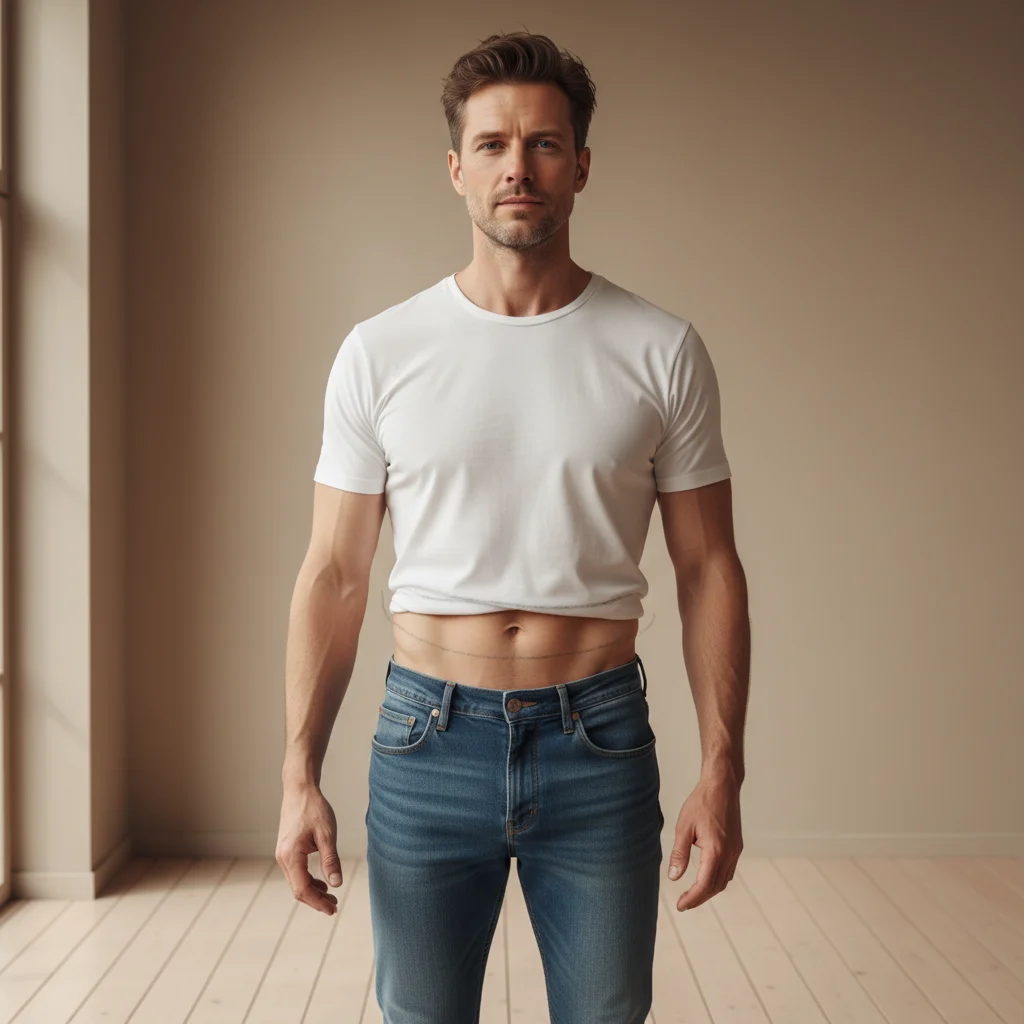
Man in a white t-shirt with a flat stomach standing casually
Before
β†’
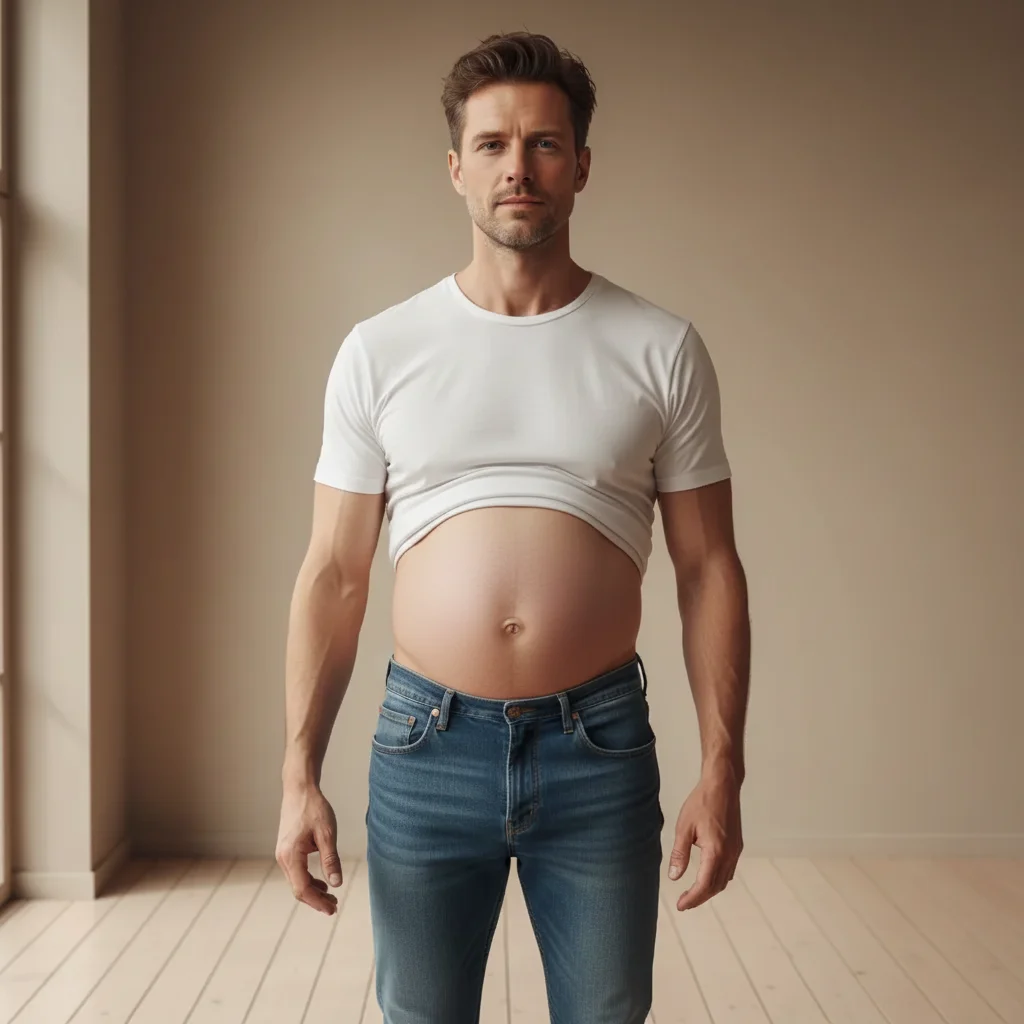
Same man now looking 8 months pregnant with a large round belly stretching his t-shirt
After

AI Pregnant Belly Prank Photo

Upload photo to add pregnant belly

Free β€’ Results in 30 seconds β€’ No signup

Release to upload

FreeNo signupNo watermark

1 free edit·then from $1.99

Popular use cases:
  • prank photos
  • funny photo edits
  • pregnant belly filter
  • baby bump prank
  • fake pregnancy photo
  • group chat prank
  • family prank photo
  • viral pregnant man filter

Cost
Free No signup required
Time
Instant results in 15-30 seconds
Works on
Any device - browser, phone, tablet, desktop
Powered by
AI-powered photo editing
Scenario Prompt Time
Early bump (3-4 months) Add a subtle 3-month baby bump, just starting to show under the shirt 15s
Classic reveal (6-7 months) Make person look 7 months pregnant, clearly visible round belly under fitted top 15s
Full term (9 months) Enormous 9-month pregnant belly, fabric straining, belly button visible through shirt 30s
Pregnant man prank Make this man look 8 months pregnant with a large round belly stretching his t-shirt 30s

How it works

  1. Upload your photo

    Pick a photo where the person's torso is visible β€” a standing or sitting shot works best. A tight t-shirt, fitted top, or fitted dress will make the belly look most convincing. The clearer the shirt fabric, the more realistic the result.

    Expect: Upload takes just a few seconds. Any common image format works.
  2. Describe the pregnant belly

    Type what you want the AI to add. Be specific about size and how far along it should look. For maximum effect, try something like: 'Make this man look 8 months pregnant with a huge, round baby bump stretching his shirt.' The AI reads your description and applies it naturally to the photo.

    Tip: Mentioning the clothing type helps β€” 'stretching his polo shirt' or 'under her sweater' guides the AI to blend the bump with the fabric realistically.

    Copy one of these to get started:

    The classic husband prank Make this man look 8 months pregnant with a large round baby bump visibly stretching his t-shirt, belly button poking out
    Very far along Make this person look 9 months pregnant β€” enormous round belly under their shirt, standing sideways so the full bump is visible
    Subtle early bump Add a small but noticeable 4-month baby bump under this person's fitted top, like they're just starting to show
    Office photo prank Make this person in a button-down shirt look 7 months pregnant, belly straining the bottom buttons slightly
    4 more prompts
    Twins announcement Make this woman look heavily pregnant with twins β€” an extra-wide, very round baby bump at about 8 months, stretching a maternity dress
    Matching couple prank Make this man look the same stage of pregnant as his partner β€” round symmetrical belly, about 6 months along, under a casual hoodie
    The reveal shot Add a pregnant belly to this person lifting their shirt slightly to reveal a round 7-month bump, like a classic pregnancy reveal photo
    Festive holiday version Make this person in a Christmas jumper look 8 months pregnant, large round belly pushing out the front of the sweater
  3. Send it

    Download the result and drop it in the group chat with a caption like 'we have something to tell you' or 'big news.' Works best sent from the subject's own phone β€” borrow it at Christmas dinner and the chaos multiplies.

Try it free ↓

AI Pregnant Belly Prank Photo

Upload photo to add pregnant belly

Free β€’ Results in 30 seconds β€’ No signup

Release to upload

Free β€’ No signup

See it in action

Man in a white t-shirt with a flat stomach standing casually
Before
->
Same man now looking 8 months pregnant with a large round belly stretching his t-shirt
After

The unsuspecting husband

A regular standing photo of a man in a t-shirt turned into a convincing 8-month pregnancy photo β€” complete with belly button showing through the fabric.

Prompt: Make this man look 8 months pregnant with a large round baby bump visibly stretching his t-shirt, belly button poking out
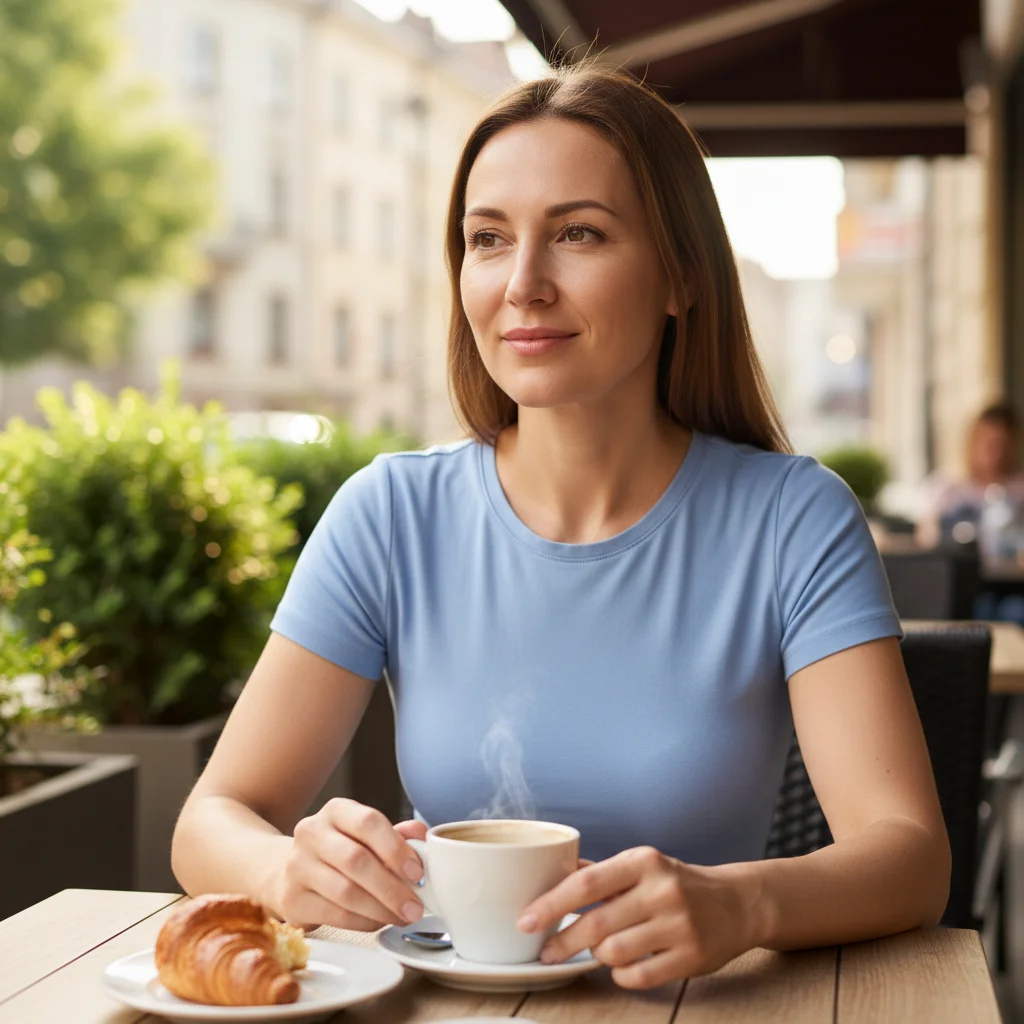
Woman sitting at a cafe in a fitted blue top with a flat stomach
Before
->
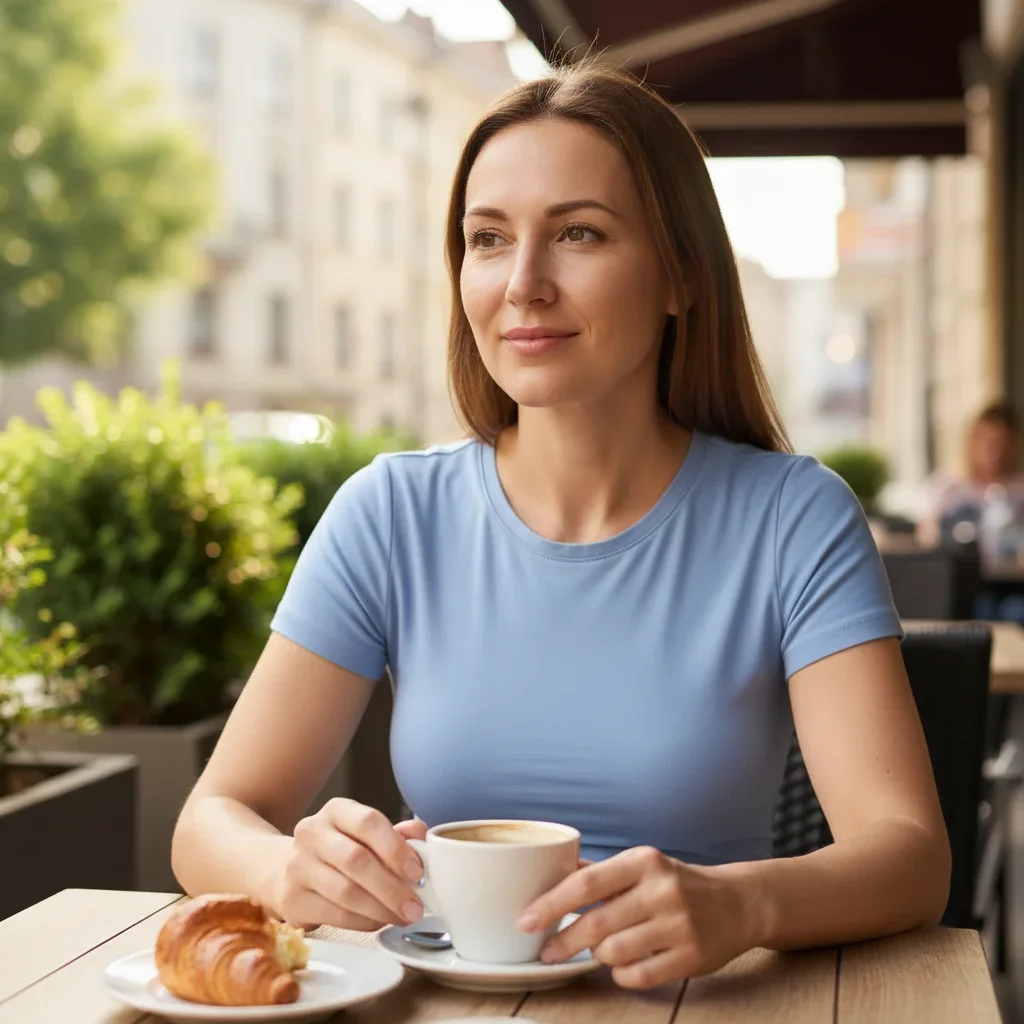
Same woman now appearing 9 months pregnant with an enormous round belly under her top
After

9 months and counting

A seated photo of a woman at a coffee shop transformed into a dramatic 9-month pregnancy photo, belly fully visible under her fitted top.

Prompt: Make this woman look 9 months pregnant β€” enormous round belly under her fitted top, unmistakably about to give birth
Man in a grey hoodie at a family barbecue with a normal body shape
Before
->
Same man now appearing 6 months pregnant with a round belly pushing out the front of his hoodie
After

The dad-to-be sympathetic belly

A photo of a man at a family gathering edited so he appears to be matching his partner's pregnancy stage β€” equally round belly, same month, completely unplanned-looking.

Prompt: Make this man look the same stage of pregnant as his partner β€” round symmetrical belly, about 6 months along, under a casual hoodie

If something looks off

The belly looks flat or barely visible

Why: The AI may have interpreted the prompt too conservatively, especially with loose-fitting clothing or photos taken at a straight-on angle.

Try: Make the pregnancy much more obvious β€” 9 months pregnant, enormous round belly clearly visible and straining the fabric of the shirt

Tip: Add the word 'enormous' or '9 months' to push the AI toward a more dramatic result.

The belly doesn't blend with the clothing

Why: When the AI doesn't have clear fabric context, the bump can look pasted on rather than natural.

Try: Make the pregnant belly look natural under the [specific clothing type] β€” fabric should stretch realistically over the bump

Tip: Describe the specific clothing in your prompt: 'under the blue polo shirt' or 'stretching the grey hoodie.'

The rest of the body changed along with the belly

Why: The AI sometimes adjusts surrounding areas (face, arms) when making large body changes.

Try: Add only a pregnant belly β€” keep the face, arms, and legs exactly the same, only add a large round baby bump

Tip: Explicitly telling the AI what NOT to change helps it stay focused on just the belly.

It looks unrealistic from the angle of the photo

Why: Front-on photos work well, but very high or low camera angles can make belly placement look awkward.

Try: Add a visibly round pregnant belly that looks natural from this angle, matching the lighting and perspective of the original photo

Tip: Photos taken at eye level or slightly below, showing the full torso, consistently give the best results.

The pregnant belly prank didn't fool anyone

Why: The result may look slightly edited if the clothing pattern doesn't stretch correctly or the lighting doesn't match.

Try: Make the pregnant belly look photorealistic β€” same lighting, same fabric texture, no visible editing artifacts

Tip: Crop the final photo to focus on the torso rather than showing the full image β€” tighter crops are more convincing on mobile screens.

Quick answers

Do I need to mark anything in the photo before describing what I want?

No. Just upload the photo and describe the pregnant belly you want β€” the AI figures out where to place it based on the body position in the photo. You only need to use markers if the photo has multiple people and you want to specify exactly which person should look pregnant.

Is this free?

Yes. EditThisPic gives you 1 free edit per week with no account needed. If you want to do multiple prank photos in one session β€” for the whole family group chat β€” credits start from $1.99.

Will this look realistic enough to fool someone?

For a WhatsApp or iMessage screenshot, yes β€” easily. The AI matches the lighting and fabric texture of the original photo. The key is choosing a photo where the torso is clearly visible and the clothing is fitted rather than baggy. Works best on mobile screens where people don't zoom in.

Does this work on men?

Yes, and that's where it really shines. The AI treats the male torso the same way β€” it adds a round belly that stretches the shirt fabric naturally. The results on men tend to be funnier precisely because it looks so unexpectedly convincing.

What type of photo works best?

A photo where the person is standing or sitting with their torso visible, taken at roughly eye level. Fitted clothing (t-shirts, polos, fitted tops) produces more realistic results than baggy clothes. Front-facing or three-quarter angle shots work better than pure profiles.

Can I control how far along the pregnancy looks?

Yes. Just specify it in your description: '3 months' gives a subtle early bump, '6 months' is clearly visible, '9 months' is dramatic and unmistakable. You can also describe specifics like 'twins bump' or 'belly button poking through shirt' for extra detail.

Is my photo kept private?

EditThisPic processes your image to apply the edit and doesn't use your photos to train AI models. Photos are not shared publicly. See the privacy policy at editthispic.com/privacy for full details.

How is this different from a pregnant filter app?

Most pregnant filter apps apply a fixed, rigid overlay that looks obviously fake and doesn't match the clothing or lighting in the photo. EditThisPic's AI reads the actual image β€” fabric texture, lighting direction, body position β€” and generates a belly that integrates with the specific photo. The result is much harder to spot as edited, which is the whole point of a prank.

How much does EditThisPic cost?

You get 1 free edit per week β€” no account needed. After that, credit packs start at $1.99 for 3 edits. Monthly plans start at $4.99/mo for 15 edits with unused credits rolling over. All edits are full resolution with no watermark.

Ready to add a pregnant belly to your photos?

Free to try. No signup required.

1 free edit included·Credit packs from $1.99