Free β€’ No signup Add Makeup Β· Free

AI Makeup Try-On Tool

Try any makeup look instantly - just describe the colors and style you want to see.
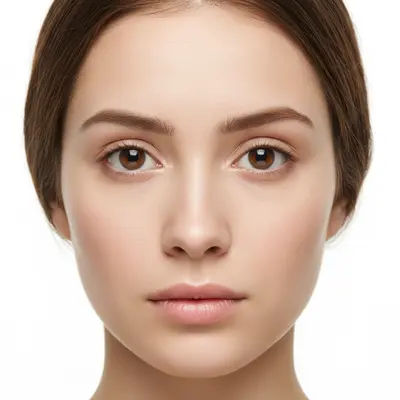
Woman without any makeup in natural lighting
Before
β†’
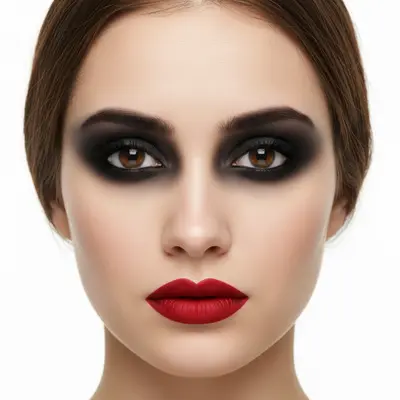
Same woman wearing dramatic smoky eye makeup and red lipstick
After

Try On Makeup in Photo Online Free

Drop your photo here

or click to browse

Release to upload

Free β€’ No signup

Popular use cases:
  • virtual makeup try-on
  • test makeup before buying
  • makeup simulation
  • lipstick try-on
  • eyeshadow preview
  • makeup experiment

Cost
Free No signup required
Time
Instant results in 15-30 seconds
Works on
Any device - browser, phone, tablet, desktop
Powered by
AI-powered photo editing
Scenario Prompt Time
Natural Look Add natural [feature] makeup 45s
Bold Lips Add [color] [finish] lipstick 30s
Eye Makeup Add [color] eyeshadow and [style] eyeliner 60s
Full Glam Add [style] makeup with [elements] 90s

How it works

  1. Upload your photo

    Choose a clear, front-facing photo with good lighting on your face. Natural lighting works best for accurate color matching and realistic makeup application.

    Expect: Simple makeup: 45 seconds. Full glam look: 1-2 minutes and may need color adjustments.
  2. Describe the makeup look you want

    THIS IS THE KEY STEP. Type exactly what makeup you want to try: 'add red lipstick and black eyeliner', 'apply smoky eye makeup with gold eyeshadow', or 'add natural everyday makeup'. Be specific about colors, intensity, and style. No need to mark facial features - the AI finds eyes, lips, and cheeks automatically.

    Tip: Mention specific shades like 'matte red', 'shimmery gold', or 'nude pink' for more accurate color results

    Copy one of these to get started:

    Everyday natural look Add natural everyday makeup with nude lipstick and light brown eyeshadow
    Bold red lips Add matte red lipstick and black eyeliner
    Smoky eye Apply dramatic smoky eye makeup with dark gray eyeshadow and black eyeliner
    Glam night out Add full glam makeup with gold eyeshadow, winged eyeliner, and glossy pink lips
    4 more prompts
    Colorful creative look Add bright purple eyeshadow with pink eyeliner and coral lipstick
    Bridal makeup Apply elegant bridal makeup with soft pink eyeshadow, brown eyeliner, and rose lipstick
    Vintage pin-up Add vintage pin-up makeup with red lips, cat-eye eyeliner, and defined eyebrows
    No-makeup makeup Add subtle natural makeup to enhance skin and features without looking obvious
  3. Review your new look

    Check how the makeup complements your skin tone and features. Zoom in to see blending quality and color accuracy. The AI automatically adjusts intensity based on your natural coloring.

  4. Fine-tune specific areas if needed

    OPTIONAL. If you want to adjust specific features like making lips more defined or adding more eyeshadow, tap markers on those areas and regenerate with refined instructions. Most makeup looks apply perfectly without markers.

    Tip: Markers are great for adjusting lip line precision or eyeshadow placement
Try it free ↓

Try On Makeup in Photo Online Free

Drop your photo here

or click to browse

Release to upload

Free β€’ No signup

"Tested a bold red lip before my wedding day. The AI made it look so natural I knew it was the perfect color!" @BrideToBe

See it in action

Woman without any makeup in natural lighting
Before
->
Same woman wearing dramatic smoky eye makeup and red lipstick
After

Bold Evening Look

Testing a dramatic smoky eye and red lip combination for a formal event.

Prompt: Add dramatic smoky eye makeup with black eyeshadow and bold red matte lipstick
Woman without makeup in professional headshot
Before
->
Same woman wearing subtle natural makeup
After

Natural Daily Makeup

Trying a subtle everyday look that enhances natural features for work.

Prompt: Add natural everyday makeup with nude pink lipstick and light brown eyeshadow
Woman without makeup against colorful background
Before
->
Same woman wearing vibrant purple and gold makeup
After

Colorful Creative Look

Experimenting with bright colors for a creative photoshoot or artistic expression.

Prompt: Add bright purple eyeshadow with golden eyeliner and coral lipstick

If something looks off

AI changed the wrong area or applied makeup where I didn't want it

Why: The AI couldn't determine exactly which facial features you meant to enhance from description alone.

Try: Tap markers on the specific areas you want makeup applied (eyes, lips, cheeks), then regenerate with the same prompt

Tip: Markers tell the AI 'apply makeup HERE specifically.' Use them when working with partial face photos or specific feature enhancement.

Makeup colors don't match what I described

Why: Lighting in your photo or general color terms made it difficult for AI to choose the exact shade.

Try: Use more specific color descriptions: 'cherry red' instead of 'red', 'champagne gold' instead of 'gold'

Tip: Reference popular makeup brands: 'MAC Ruby Woo red' or 'Urban Decay naked palette browns' for accurate colors.

Makeup looks too heavy or unnatural

Why: AI defaulted to full-intensity application rather than the subtle look you wanted.

Try: Add intensity descriptors: 'subtle', 'light', 'natural' for softer looks, or 'dramatic', 'bold' for intense looks

Tip: Photos with even lighting produce the most natural-looking makeup application.

Only some makeup elements were applied

Why: Complex requests with multiple elements may need to be broken down into steps.

Try: Apply one element at a time: first eyeshadow, then eyeliner, then lipstick in separate edits

Tip: For complete makeovers, start with base features and build up the look gradually.

Makeup doesn't blend well with my skin tone

Why: Photo lighting or angle made it difficult to match your natural coloring.

Try: Use a front-facing photo with natural lighting, or specify your skin tone: 'warm undertones' or 'cool undertones'

Tip: Natural daylight photos work best for accurate skin tone matching.

Quick answers

Do I need to mark my facial features before describing the makeup I want?

No! Just describe the makeup look you want - the AI automatically finds your eyes, lips, cheeks, and other facial features. Only use markers when you need precise application on specific areas or when working with partial face photos.

How do I try on makeup for free?

Simply upload your photo and describe the makeup look you want to see. EditThisPic's AI makeup try-on is completely free to try with no account needed. Perfect for testing new looks before buying products.

Is there a free makeup try-on tool that doesn't require login?

Yes, EditThisPic is free to try with no account needed. Upload any photo and instantly see how different makeup looks would appear on you - from natural everyday looks to bold glamour.

Can I try on multiple makeup elements at once?

Yes! Describe multiple elements in one prompt: 'add smoky eye makeup and red lipstick' or apply them separately if you want to see each element individually first.

What makeup looks can I try on?

Any makeup style: natural everyday looks, dramatic evening makeup, colorful creative looks, vintage styles, bridal makeup, and more. The AI works with all cosmetic applications from subtle enhancement to bold transformation.

Will the makeup look natural on my skin tone?

Yes, the AI automatically adjusts colors and intensity to complement your natural skin tone and lighting. For best results, use photos with good natural lighting.

Ready to try on makeup virtually?

Free to try. No signup required.

Try it free β†’