Free • No signup Remove Strangers from vacation photos · Free

Strangers ruined your vacation photos?

Random tourists photobombed your landmark shots? They vanish in seconds. Get the perfect travel photo you waited for.

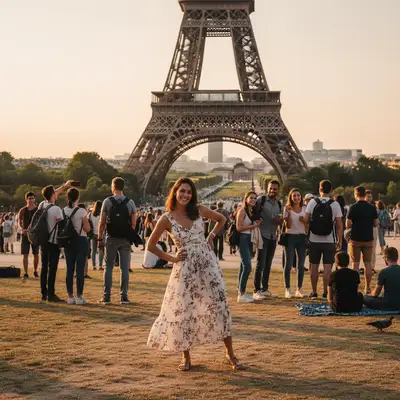
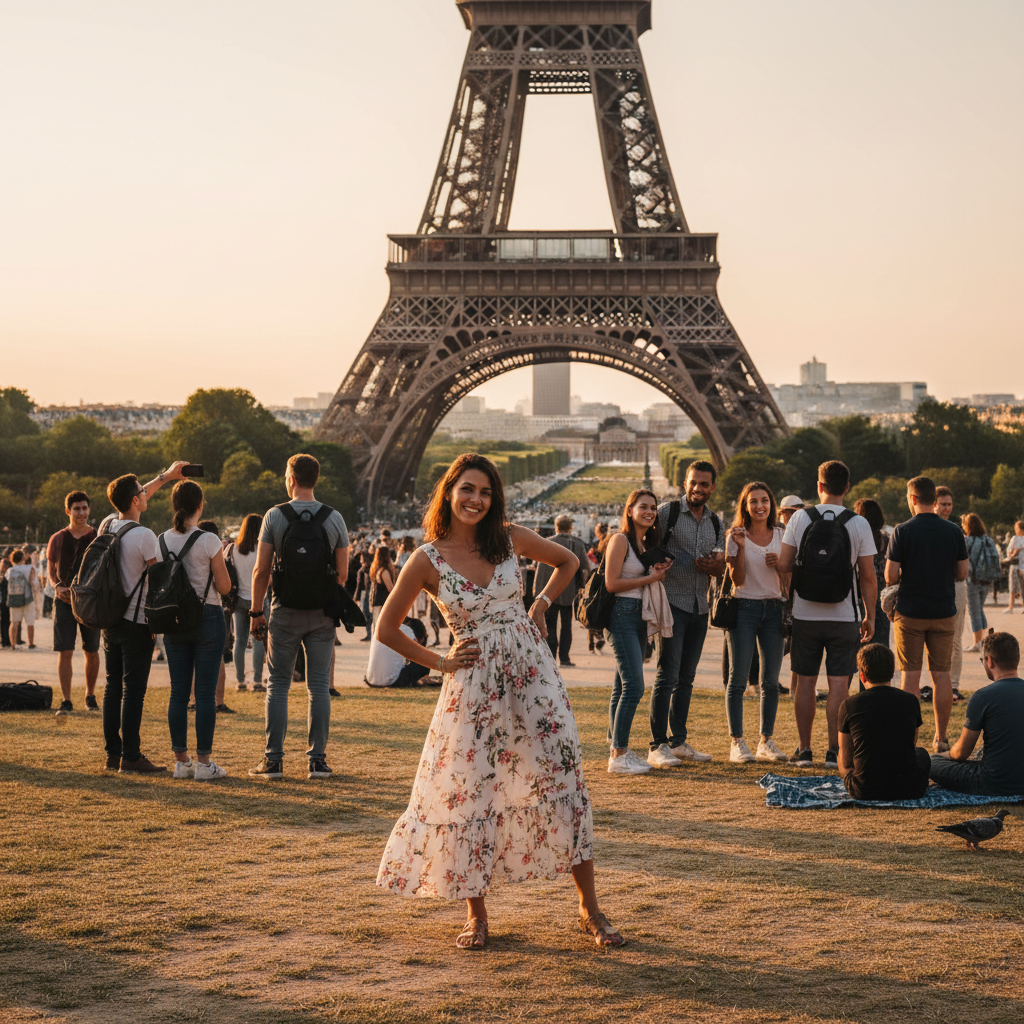
Woman at Eiffel Tower surrounded by crowd of random tourists in background
Before
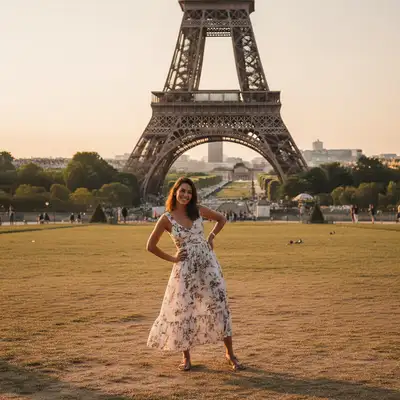
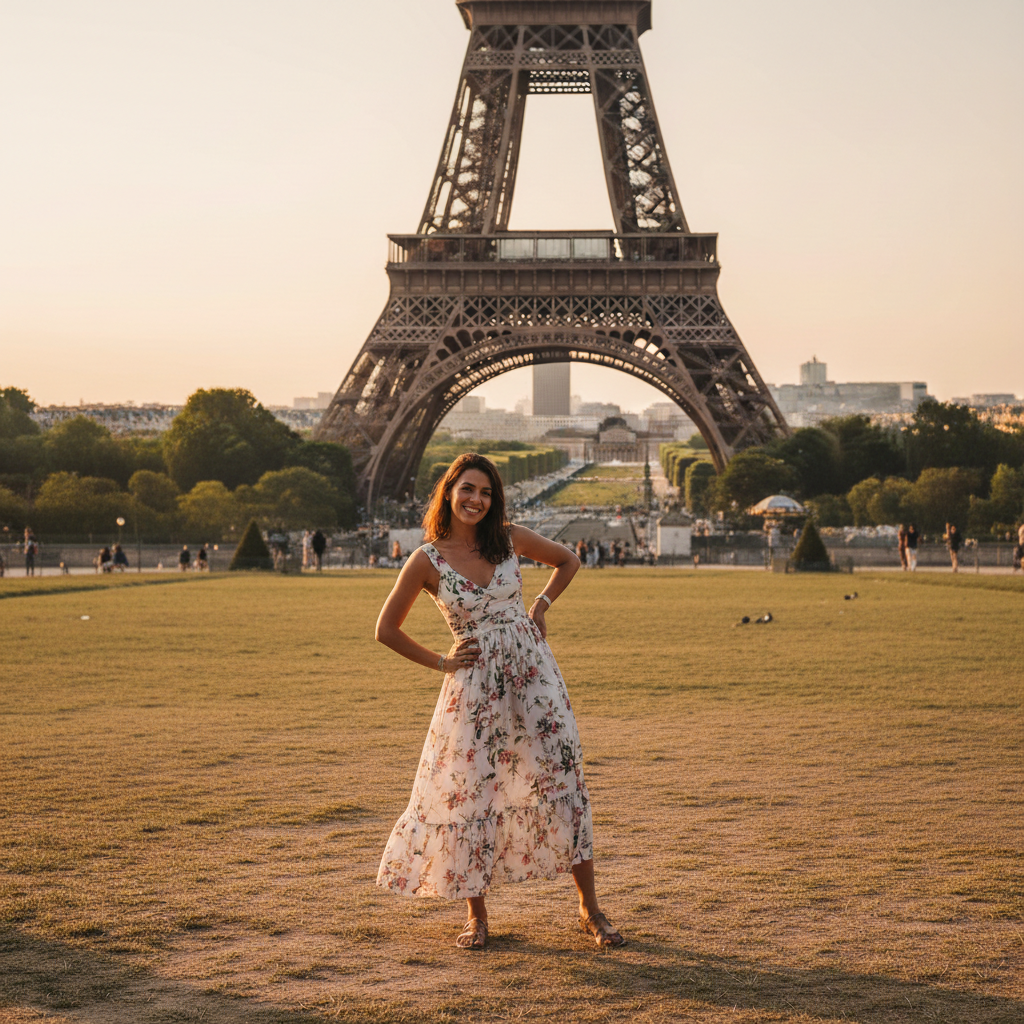
Same photo with all tourists removed, clean Eiffel Tower backdrop
After

Strangers Ruined Your Vacation Photos? | EditThisPic

Drop your photo here

or click to browse

Release to upload

Free • No signup

Advertisement
Popular use cases:
  • Vacation photo fix
  • Landmark photography
  • Tourist removal
  • Travel photography
  • Eiffel Tower photo
  • Times Square photo
  • Instagram travel photos
  • Crowded landmark fix

Cost
Free No signup required
Time
Instant results in 15-30 seconds
Works on
Any device - browser, phone, tablet, desktop
Powered by
AI-powered photo editing
Scenario Prompt Time
Eiffel Tower crowd remove all strangers and tourists from background, keep just me 20s
Times Square packed remove the crowd of people in background, clear the area 30s
Couple + strangers remove all people except me and my partner, clear background 20s
Beach sunset crowd remove all the people from the beach, just want the sunset 25s

How it works

  1. Upload your vacation photo

    Drop your landmark photo into EditThisPic. JPG, PNG, and WebP up to 7MB work best. Any crowded tourist photo works—Eiffel Tower, Times Square, Machu Picchu, Taj Mahal, or any famous landmark with unwanted people in the background.

    Expect: Simple landmark photos: 15-25 seconds. Very crowded scenes with many overlapping people: 30-45 seconds.
  2. Describe who to remove

    Type 'remove all the strangers from the background' or 'remove the tourists behind me.' That's it. The AI identifies random people in the background automatically and removes them while keeping you and your travel companions. No marking or selecting needed.

    Tip: Be specific about who to keep: 'remove all people except me and my partner' or 'remove the crowd but keep my family in front.'

    Copy one of these to get started:

    Random tourists photobombed my Eiffel Tower photo remove all the strangers and tourists from the background, keep just me
    Crowded Times Square ruined my vacation shot remove the crowd of people in the background, clear the area behind me
    I want just me and my partner at the landmark remove all people except me and my partner in the front, clear the background
    Someone walked into my shot at the Colosseum remove the stranger who walked into the photo on the right side
    2 more prompts
    Tour group blocking my Taj Mahal photo remove the tour group blocking the view, clear the entire background area
    People ruin my beach sunset photo remove all the people from the beach in the background, just want the sunset
  3. Review the result

    Check that all unwanted strangers are gone and the landmark background looks natural. Zoom in to verify there are no leftover people or obvious gaps where tourists were removed. The AI fills in the background intelligently.

  4. Refine if needed

    If some strangers are still visible or the AI removed someone you wanted to keep, tap markers on specific people and regenerate. This is rarely needed for straightforward landmark photos.

    Tip: If the AI removed your travel companion, try 'remove tourists but keep the person in the red jacket next to me.'
Try it free

Strangers Ruined Your Vacation Photos? | EditThisPic

Drop your photo here

or click to browse

Release to upload

Free • No signup

"I waited 20 minutes for a clear shot of the Eiffel Tower. This removed all the tourists in 15 seconds. My Instagram looks amazing now." @WanderlustEmily

See it in action

Woman at Eiffel Tower surrounded by crowd of random tourists in background
Before
->
Same photo with all tourists removed, clean Eiffel Tower backdrop
After

Eiffel Tower with crowd of tourists

Classic Paris landmark photo ruined by dozens of tourists in the background. One prompt removed everyone, leaving a clean iconic shot perfect for Instagram.

Prompt: remove all the strangers and tourists from the background, keep just me
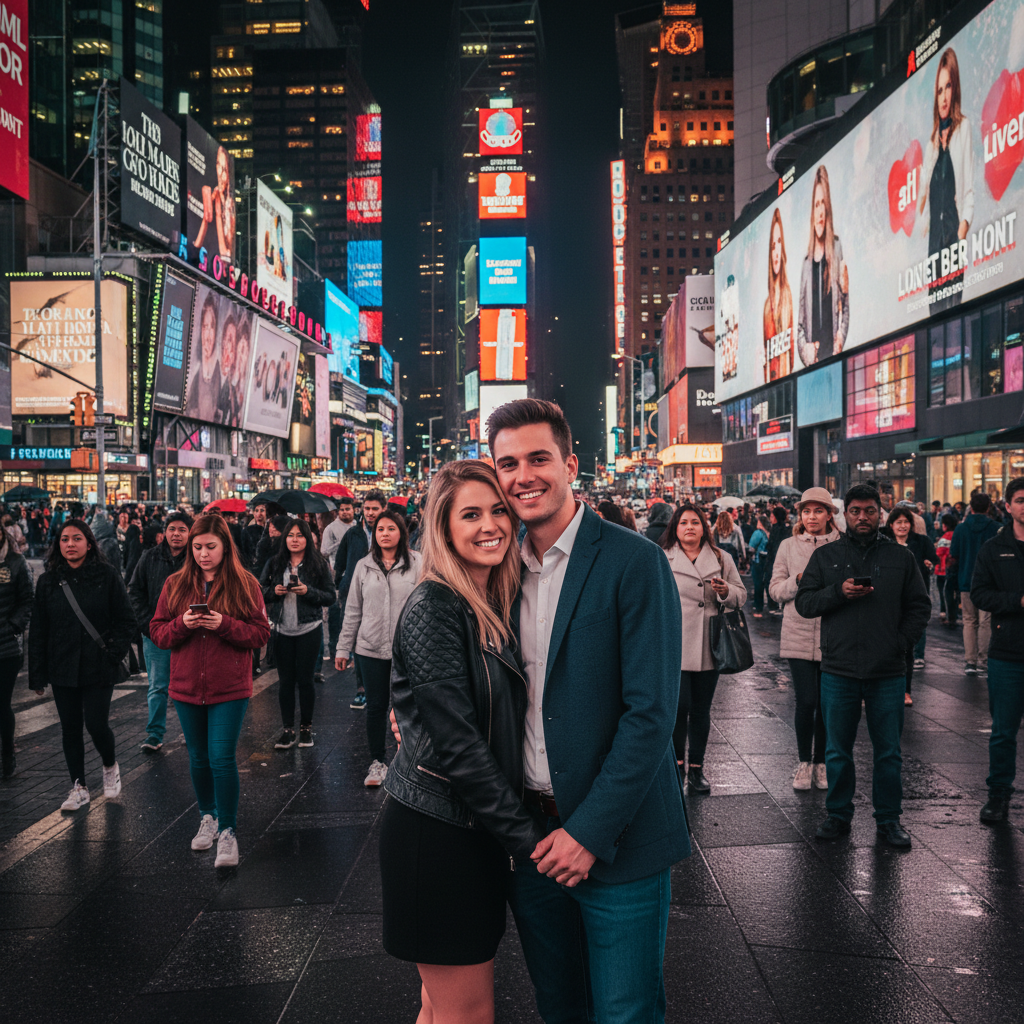
Couple at Times Square with massive crowd of strangers in background
Before
->
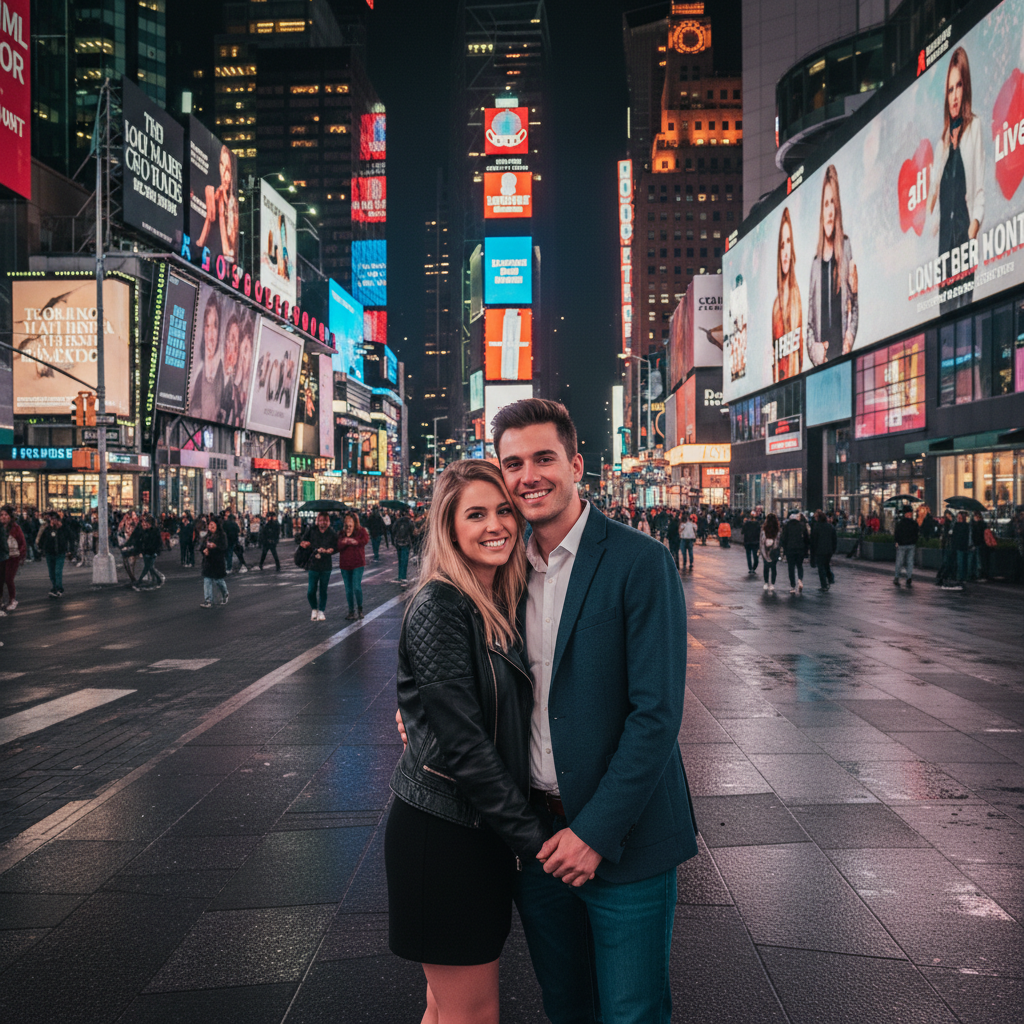
Same photo with entire crowd removed, just couple and billboards
After

Times Square photobombed by strangers

Iconic New York City landmark but completely packed with random people walking through the shot. Removed the entire crowd while keeping the couple in front.

Prompt: remove all people except me and my partner in the front, clear the background
Advertisement

If something looks off

AI removed my travel companion along with the strangers

Why: The AI couldn't distinguish between your companion and random tourists. This happens when everyone is dressed similarly or positioned at similar distances.

Try: remove all people in the background except the person in the red jacket next to me

Tip: Describe your companion by clothing color, position ('next to me'), or action ('holding my hand') to help the AI identify them.

Some tourists are still visible in the background

Why: Very crowded scenes can overwhelm the AI, or people partially hidden behind landmarks may be missed.

Try: remove all remaining people from the background, clear everyone completely

Tip: Tap markers directly on the leftover people to target them specifically, then regenerate.

Background looks blurry or unnatural where people were removed

Why: When many overlapping people are removed, the AI has to reconstruct large areas of the landmark or scenery.

Try: remove tourists and fill the background naturally to match the landmark architecture

Tip: For very dense crowds, the AI does its best but may need multiple passes. Try removing people in sections.

The AI changed the landmark itself while removing people

Why: Sometimes people are positioned directly in front of important architectural details, causing unintended edits.

Try: remove only the people, don't change the Eiffel Tower structure or any buildings

Tip: Being explicit about preserving the landmark helps the AI focus only on people removal.

Quick answers

Why are there always strangers in my vacation photos?

Famous landmarks are tourist magnets—everyone wants the same shot at the same time. Popular spots like the Eiffel Tower, Times Square, Taj Mahal, and Machu Picchu are almost never empty. Even arriving early or late often means competing with dozens of other travelers. Getting a clean shot used to mean hours of waiting or visiting during off-season. Now the AI can remove the crowd in seconds.

Do I need to mark each stranger before removing them?

No! Just type 'remove all the strangers from the background' and the AI finds random people automatically. Markers are only needed if the AI accidentally removes your travel companions or misses specific people. For most landmark photos, the AI handles everything without any marking.

Will this work if the landmark is very crowded?

Yes, but extremely dense crowds (30+ people) may take longer and require refinement. The AI handles most tourist crowds well—Eiffel Tower, Colosseum, Golden Gate Bridge. For places like Times Square or Shibuya Crossing where people are packed shoulder-to-shoulder, you may need to regenerate once or twice to clear everyone.

How does the AI know who to remove and who to keep?

By default, the AI assumes you're one of the main subjects in the foreground and strangers are in the background. If you specify 'remove everyone except me and my partner,' it uses position, clothing, and context to identify who to keep. Being specific helps: 'remove tourists but keep the person in blue jacket next to me.'

Can I remove people from beach vacation photos too?

Absolutely. This works for any vacation photo with unwanted people—beaches, sunsets, hiking trails, monuments, museums, anywhere. Just describe the scene: 'remove all the people from the beach in the background' or 'remove the hikers on the trail behind me.'

What if I want to keep my whole travel group but remove strangers?

Type 'remove all people except my group in front' or 'remove background tourists but keep my family.' The AI distinguishes between your group (usually positioned together, facing camera) and random strangers (scattered, walking, doing their own thing). For large groups, be specific: 'keep all 6 people in front, remove everyone else.'

Ready to remove those strangers?

Free to try. No signup required.

Try it free