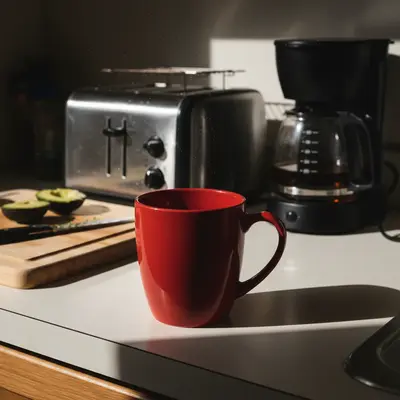
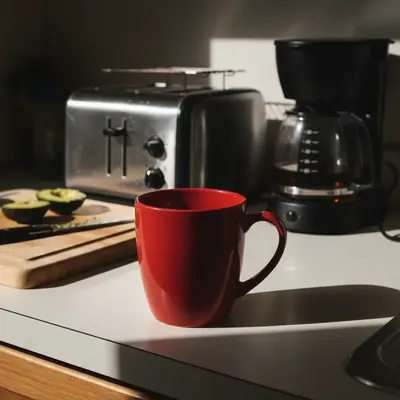
Professional listing photos for Amazon, Shopify, Etsy, and Vinted. White backgrounds that pass Amazon's main image requirements, drop shadows, lifestyle context, and background removal — describe what you need and get marketplace-ready results in under 60 seconds.
FreeNo signupNo watermark
Drop your photo here
"remove the background and make it pure white for Amazon listing compliance — product should fill 85% of the frame"
Drag & drop, or paste · JPG · PNG · WEBP
Free to try · no sign-up · photos are never shared
✦Free · No signup · Nothing to install
Release to upload
Free • No signup
Before→After
Quick Answer
EditThisPic edits product photos for Amazon, Shopify, Etsy, and Vinted sellers. Upload your product photo, describe the result — white background, background removal, drop shadow, lifestyle context — and get marketplace-ready images in under 60 seconds. Free to try, no account required. Supports all major marketplace image requirements.
Unlike ProductPhoto.AI and Pebblely — which apply preset studio templates to every product — EditThisPic lets you describe exactly what you need in plain English. White background with a drop shadow, lifestyle on a specific surface, brand-consistent color treatment, or anything the photo needs. No templates, no presets. Describe and get it — in one step, free to try.
Why Product Photos Are Your Highest-ROI Investment
Product photos are the single biggest factor in online purchase decisions. Buyers can't touch, hold, or try your product — the photo does all the selling. Listings with professional-quality images see 2–3× higher click-through rates and significantly lower return rates across every major marketplace.
The good news: you don't need an expensive studio. A smartphone, window light, and AI editing tools produce product photos that compete with professional shoots. The editing is what separates amateur listings from six-figure sellers' listings — not the camera.
For Amazon specifically, your main image is the deciding factor for whether a shopper clicks on your listing at all. A pure white background with the product filling 85% of the frame isn't optional — it's the minimum bar. AI background removal achieves this in one step from any source photo.
Amazon Listing Photo Requirements — What the AI Handles
Amazon's main image policy is strict: pure white (#FFFFFF) background, product fills at least 85% of the frame, minimum 1000px on the longest side (2000px recommended), no text, watermarks, or props. Violations result in listing suppression.
AI background removal is the fastest path to compliance. Upload your product photo and say 'remove the background and make it pure white for Amazon listing compliance.' The AI cleanly separates product from background, handles fine edges (jewelry, hair accessories), and preserves transparent product areas when you specify it.
For transparent or reflective products: 'remove the background to pure white while preserving the transparent glass.'
To add a drop shadow for depth without a visible background: 'add a subtle drop shadow for a professional floating product look.' This is standard on premium Amazon listings and makes products feel grounded rather than pasted on.
For secondary Amazon images (lifestyle, infographics, A+ content): there's no background restriction. Use 'place this product on a clean kitchen counter with warm natural light from the left' for contextual shots that show the product in use.
Shopify Product Photo Best Practices
Shopify recommends 2048×2048px square images with consistent aspect ratios across all products. Inconsistency breaks the grid layout on collection pages and signals a low-investment store to potential buyers.
The most impactful edit for Shopify stores is visual consistency across the catalog. Use identical prompts for every product: 'clean white background, product centered, slight drop shadow for depth' or 'lifestyle on a light marble surface with soft natural light from the left.' Repeating the same prompt builds a cohesive brand aesthetic without a photographer or studio.
For apparel on Shopify: 'remove the background and place the clothing on a clean mannequin silhouette against white.' Flat lays work too: 'remove the wrinkles and improve the color accuracy of this flat-lay clothing photo.'
For jewelry: 'remove the background to pure white, remove any reflections on the metal, and add a subtle drop shadow.' Jewelry benefits most from clean isolation because the product detail is the selling point.
Etsy and Vinted Listing Photo Strategy
Etsy's aesthetic skews warmer and more artisanal than Amazon. Buyers expect lifestyle context — products feel more compelling when shown in a setting, not just on white. Etsy recommends 2000px wide with a 5:4 aspect ratio, and your first photo becomes the search thumbnail.
AI lifestyle generation works well for Etsy: 'place this handmade candle on a rustic wooden surface with dried flowers and warm candlelight ambiance.' Use consistent styling language across your shop to build a recognizable look.
For vintage and handmade goods: 'enhance the photo's warm tones, improve sharpness, and make the product colors accurate while keeping a natural vintage feel.'Vinted rewards clear, well-lit photos of the actual item. The primary need is improving phone photos taken in poor light: 'improve the lighting and color accuracy of this clothing item, remove any background distractions, and sharpen the fabric detail.' For secondhand clothing listings, showing texture and condition clearly drives conversions. 'Enhance the fabric texture detail and fix the white balance so the color is accurate to the real item.'
Meet Amazon's strict main image requirements and produce secondary lifestyle images that convert browsers into buyers — without an expensive photographer or studio setup.
Common scenarios
An Amazon FBA seller with product photos taken on a home background who needs pure white for main image compliance
A seller with a full product catalog who needs consistent white backgrounds across hundreds of SKUs
A brand owner creating lifestyle secondary images to show the product in use for A+ Content
Best practices
Always specify 'pure white for Amazon listing compliance' in your prompt — this signals the exact #FFFFFF requirement rather than a near-white gray
Check the result's edges carefully: AI background removal can leave colored fringing on fine product details. If needed, add 'clean up any colored edge pixels' to your prompt
For lifestyle and secondary images, describe the product in use: 'show this supplement bottle on a clean white marble bathroom counter with morning light' tells the AI both the setting and the mood
Upload source photos at the highest resolution available — the AI can upscale, but starting at 1000px+ produces sharper output at Amazon's 2000px recommendation
Sample prompts
Remove the background and make it pure white for Amazon listing compliance — product should fill 85% of the frame with no colored fringing on the edgesPlace this product in a warm lifestyle setting — clean kitchen counter, morning light from the left, no props that compete with the product
🛍️
Shopify Storefront Photography
Build a visually cohesive Shopify store without a studio — consistent backgrounds, lifestyle scenes, and brand-matched aesthetics across your entire product catalog.
Common scenarios
A Shopify store owner whose catalog has inconsistent photo backgrounds, making the collection grid look chaotic
A brand launching a Shopify store who wants a cohesive lifestyle aesthetic without hiring a photographer
An apparel brand adding new SKUs and needing to match the existing photo style of older catalog items
Best practices
Create a single 'house style prompt' and use it for every product: 'clean white background, product centered, soft drop shadow for depth' is a complete house style that scales to any SKU
For lifestyle consistency, write the scene description once and save it: 'light oak surface, soft window light from the right, minimal neutral props' — reuse the exact wording
Shopify's grid layout rewards square photos — add 'crop to a square with the product centered and even white margins' if your product photos are landscape or portrait
For clothing: 'remove background, place on a minimal flat-lay with white background and clean shadow' reads as professional without a model shoot
Sample prompts
Clean white background, product perfectly centered with even margins, subtle drop shadow for depth — consistent with a professional product catalogPlace this product on a light marble surface with a soft natural light aesthetic — match the warm, minimal Scandinavian style
🏷️
Etsy and Vinted Resellers
Turn phone photos of handmade goods, vintage finds, and secondhand clothing into listing images that get clicked — without a photography setup or editing skills.
Common scenarios
An Etsy seller of handmade candles, jewelry, or ceramics who shoots on a home surface and wants a professional lifestyle look
A Vinted reseller of secondhand clothing who shoots items on a bed or floor and needs cleaner, accurate-color listing photos
An Etsy vintage seller who photographs items in mixed lighting and wants consistent warm-toned results across their shop
Best practices
For Etsy handmade goods, lifestyle context outperforms white backgrounds — 'rustic wooden surface with dried flowers and soft candlelight' converts better than plain white for artisanal products
For Vinted and resale clothing, accurate color is the most important factor — always include 'fix the white balance so the color is accurate to the real item' to prevent buyer disappointment
Etsy's first photo is the search thumbnail — it needs to stand out at 75×75px. Bold, well-lit, high-contrast images get more clicks than busy lifestyle scenes
For secondhand clothing texture and condition: 'enhance fabric texture detail and show the stitching clearly' gives buyers the material information they need to trust the listing
Sample prompts
Place this handmade ceramic mug on a rustic wooden surface with soft morning light and minimal natural props — warm Etsy aesthetic, no busy stylingImprove the lighting and fix the white balance so this clothing item's color is accurate, sharpen the fabric texture, and remove the background distractions
📸
Instagram Product Photos
Create scroll-stopping product content for Instagram — consistent feed aesthetics, lifestyle scenes, and hero shots that drive traffic to your Shopify or Etsy store.
Common scenarios
A product brand using Instagram to drive traffic to their Shopify store and needing feed-consistent product photography
An Etsy seller growing an Instagram audience and needing lifestyle photos that feel native to the platform
A reseller using Instagram Shops who needs professional-looking product images without a photo studio
Best practices
Instagram rewards visual consistency — your feed is a portfolio. Pick one aesthetic (warm and earthy, clean and minimal, moody and dark) and write every prompt around it
Square and portrait (4:5) crops dominate Instagram. Specify the crop in your prompt: 'portrait crop with the product in the lower two-thirds and clean negative space above'
For product stories and reels thumbnails, a clean white or single-color background with strong product lighting gets attention at small sizes — simple outperforms complex on mobile
Lifestyle images for Instagram can be more aspirational than Shopify — 'show this skincare product on a luxe marble bathroom vanity with gold accents and morning light' works well for premium brand positioning
Sample prompts
Portrait crop, product centered with soft shadow, clean light warm background — minimal aesthetic consistent with a premium lifestyle brand Instagram feedPlace this product in a luxe lifestyle setting — marble surface, gold accent props, soft diffused light from above — aspirational but not cluttered
Example prompts to get started
remove the background and make it pure white for Amazon listing compliance — product should fill 85% of the frame
improve the lighting and fix the white balance so the clothing color is accurate, remove background distractions, and sharpen the fabric texture detail
What AI product photo editor works best for Amazon listings?
EditThisPic handles Amazon listing photo requirements in one step: pure white (#FFFFFF) background removal, product centered, no watermarks. Upload your product photo and say 'remove the background and make it pure white for Amazon listing compliance.' The result meets Amazon's main image policy. For best results, ensure your source photo is at least 1000px — upload at 2000px for Amazon's recommended resolution.
Can AI remove the background from product photos for free?
Yes. EditThisPic removes product backgrounds free — one edit per week with no account required. Upload your product photo and describe the background you want: 'remove the background and make it pure white' for Amazon/Shopify compliance, or 'remove the background and make it transparent' for overlay use. For high-volume catalogs, credit packs or subscriptions provide more edits.
How do I edit Shopify product photos to look professional?
The most impactful change for Shopify stores is visual consistency: use the same prompt across every product in your catalog. 'Clean white background, product centered, subtle drop shadow' applied consistently looks more professional than varied backgrounds. For a lifestyle feel, repeat 'place this product on a light marble surface with soft natural light from the left' across your catalog. Shopify recommends 2048×2048px — upscale source photos if needed.
What background does Etsy prefer for product photos?
Etsy doesn't mandate a specific background — both white and lifestyle contexts perform well. White backgrounds display cleanly as search thumbnails. Lifestyle backgrounds (wood, marble, fabric textures with natural light) often convert better for handmade and artisanal goods because they show the product in context. Your first photo becomes the search thumbnail, so make it stand out. Test both — 'place on a clean white background' vs 'rustic wooden surface with warm natural light' — and watch which listing gets more clicks.
How do I make product photos meet Amazon requirements?
Amazon main image requirements: pure white (#FFFFFF) background, product fills 85% of frame, minimum 1000px longest side (2000px recommended), no text, watermarks, or props. In one prompt: 'remove the background and make it pure white for Amazon listing compliance — product should fill 85% of the frame.' Check the result for any colored pixels along the product edges before uploading.
Can I add a drop shadow to product photos?
Yes. Drop shadows add depth and make products look grounded rather than floating on white. Prompt: 'add a subtle natural drop shadow beneath the product for a professional floating look — keep the background pure white.' For a harder, more stylized shadow: 'add a defined drop shadow at a 45-degree angle.' Drop shadows don't violate Amazon's main image policy — just ensure the background remains pure white.
How do I edit Vinted listing photos to sell faster?
Vinted buyers decide based on accurate color, visible fabric texture, and clear condition. The most effective edits: 'improve the lighting and fix the white balance so the clothing color is accurate, remove background distractions, and sharpen the fabric texture detail.' Accurate color representation reduces 'not as described' disputes and builds positive seller ratings. If the item has specific features (buttons, stitching, wear patterns), show those clearly: 'enhance the detail visibility on the fabric texture and stitching.'
Does AI background removal work for jewelry and glass products?
Yes, with specific prompting. For jewelry: 'remove the background to pure white, clean any reflections from the metal surface, add a subtle drop shadow.' For transparent glass products: 'remove the background to pure white while preserving the transparent areas of the glass.' The 'preserving transparent areas' instruction tells the AI not to fill in the glass — essential for bottles, glasses, and crystal products.
Can I edit product photos taken on my phone?
Yes. Phone photos make excellent source material for AI editing. Shoot in natural light near a window, keep the product on a flat surface centered in frame, no flash (flash creates harsh shadows and glare on glossy products). Then describe everything you need: 'remove the background and make it pure white, enhance the product sharpness, fix the white balance so colors are accurate.' One prompt handles most phone photo issues.
Is AI-edited product photo use commercial and royalty-free?
Yes. Product photos edited with EditThisPic are yours to use commercially on any marketplace — Amazon, Shopify, Etsy, Vinted, eBay, or your own website. No watermarks, no usage restrictions. The AI edits your photos; the photos remain yours.
How do I create lifestyle backgrounds for Shopify product photos?
Describe the scene in detail: 'place this product on a light marble surface with a small succulent plant to the left and soft window light from the right.' More detail produces more consistent results. For catalog consistency, use the exact same scene description for every product. Good lifestyle prompts for Shopify: warm kitchen counter with morning light, clean linen background with neutral props, minimal Nordic desk setting with natural wood tones.
What size should product photos be for Shopify and Amazon?
Amazon: minimum 1000px longest side, 2000px recommended, JPEG or PNG, pure white background for main image. Shopify: 2048×2048px square recommended, consistent aspect ratio across all products. If your source photo is lower resolution, upscale it first: 'upscale this product photo to 2000px while keeping it sharp.' Upload AI-edited images at maximum resolution — marketplaces compress on their end.